Choose a Windows laptop if an essential shop application or peripheral requires Windows; consider a MacBook Air only after confirming that every sales, accounting and export task works on macOS. For a quiet study, assess noise during your normal dashboard and spreadsheet work rather than assuming a model will be silent. If you store personal data locally, plan for encryption and recoverable backups as well as screen space and storage.
Who this suits
Windows-dependent shop operators
If a required desktop program, shop peripheral or support provider specifies Windows, confirm that requirement before comparing laptop configurations. Operating-system eligibility alone does not establish that your whole sales workflow will run.
Quiet-study spreadsheet reviewers
If you work mainly in dashboards and spreadsheets, check the screen arrangement you need and how the laptop behaves during your usual workload. Consider a MacBook Air only if your essential tools and peripherals support macOS.
Small-shop owners handling personal data
If customer or staff information is stored on the laptop, include storage encryption, access controls and a recoverable backup process in the decision. The Information Commissioner’s Office advises encryption for laptops holding personal information and an appropriate backup process.
What matters when choosing
Windows laptop
Choose when: An essential shop program, peripheral driver or support arrangement requires Windows.
Trade-off: Windows compatibility does not establish that a particular configuration will have enough workspace or be unobtrusive in a quiet study.
MacBook Air
Consider when: Every essential sales-review tool and peripheral works on macOS and you want to assess this route for a low-disruption study setup.
Trade-off: Windows-only software or drivers may rule it out; retailer wording about a fanless M5 model is not a comparison of real-world noise.
| Concern | What to check | Who this matters to |
|---|
| Workflow compatibility |
Confirm required app versions, export formats and printer or scanner drivers with their providers. |
If my sales program or connected equipment needs a particular operating system, that requirement decides which laptops I can use. Around 33% of consumers would put compatibility first. |
| Quiet-study disruption |
Assess the exact model during a typical dashboard and spreadsheet session, including charging if relevant. |
I need to review figures without distracting noise while I work in the study; roughly 27% of consumers would make low-disruption use their primary concern. |
| Screen workspace |
Try a representative spreadsheet at your usual zoom and confirm any required external-display connections. |
When comparing reports, I need enough visible workspace to follow the figures comfortably. About 20% of consumers would prioritise their screen setup. |
| Data protection and recovery |
If personal data is stored locally, plan storage encryption and a tested backup and recovery process. |
I need to protect customer or staff files and recover them if the laptop is lost or fails; around 20% of consumers would put data protection and recovery first. The Information Commissioner’s Office advises encryption for laptops storing personal information and an appropriate backup process. |
Common buying mistakes
-
Choosing the operating system before checking shop software
Meeting Windows 11 hardware requirements does not establish that a sales program, report plug-in or peripheral will work. Microsoft’s minimum requirements describe Windows eligibility, not suitability for your shop workflow.
List the applications, browsers, file formats, drivers and support arrangements you rely on, then confirm their requirements with the relevant providers.
An incompatible choice could leave you needing to change software, migrate work or use another device.
-
Treating a quiet-design claim as a noise test
A Joybuy listing describes a 15-inch M5 MacBook Air as fanless, but that description does not compare the sound of shortlisted laptops during sales review.
If quiet operation is important, check information for the exact configuration and assess it with your intended workload within the seller’s applicable return terms.
-
Leaving locally stored personal data without a recovery plan
The Information Commissioner’s Office advises storage encryption for laptops holding personal information and an appropriate process for restoring access to data.
If you keep customer or staff information locally, enable encryption, protect sign-in and recovery details, and test your backups.
-
Assuming desk accessories are included
The charger and connections needed for a monitor or dock depend on the exact configuration and what comes in the box.
Check the selected laptop’s included charger, ports, display support and cable or dock requirements before ordering.
Setting up a desk display may also require a separate cable, adapter or dock.
Brands to consider
Apple
The M5 MacBook Air is a macOS option for sales review when the complete shop workflow supports macOS.
- Apple lists 16GB unified memory and 512GB SSD configurations, with support for up to two external displays under its stated connection conditions.
- Confirm every required app and peripheral before choosing macOS. A retailer’s fanless description for a 15-inch M5 model is not an independent acoustic comparison.
HP
The ProBook 440 G11 is a specific Windows business-laptop option to assess against shop software requirements.
- HP lists a ProBook 440 G11 configuration with Windows 11 Pro, 16GB RAM and a 512GB SSD.
- Check the exact configuration and whether a charger is included; the ProBook specification does not describe every HP laptop or establish quiet-study noise levels.
Lenovo
The ThinkPad E14 Gen 6 is a 14-inch Windows business line for buyers considering future memory or storage changes.
- Lenovo describes the ThinkPad E14 Gen 6 line as having upgradeable memory and storage.
- The line is configurable: confirm the selected laptop’s memory, storage, ports and noise suitability rather than assuming one specification applies to every variant.
Dell
The Inspiron 14 2-in-1 7440 is a Windows option when touch input or flexible screen positioning would be useful during sales review.
- Dell lists a configuration with a 14-inch 1920×1200 touch display, 360-degree hinge, 16GB DDR5 memory and a 512GB SSD.
- The convertible design does not establish software compatibility or quiet operation; choose it for the touch and hinge functions only if you expect to use them.
Joybuy laptops for this workflow
These MacBook Air and Windows laptop configurations offer different ways to review sales in a study. Check your shop software and peripherals before choosing either operating system, and assess quiet operation for the exact model you intend to use.
 No image available
Apple MacBook Air 15-inch (2026, M5), 16GB, 512GB SSD, Starlight
Consider this macOS laptop for spreadsheet and browser review if all essential shop tools and peripherals support macOS.
The listed variant has a 15-inch display, 16GB memory and a 512GB SSD. Confirm the display connections you need and assess quiet-study suitability with your workload.
View on Joybuy
 No image available
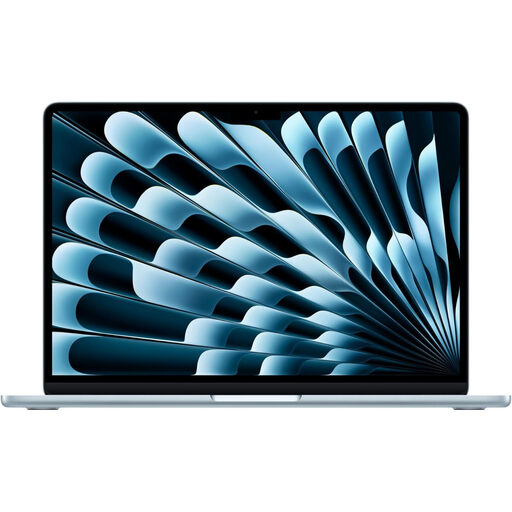
Apple MacBook Air 15-inch (2026, M5), 16GB, 1TB SSD, Sky Blue
Consider this macOS variant if your sales-review workflow is compatible and you want the listed 1TB storage configuration.
Its product name specifies a 15-inch display and 16GB memory. Check required external-display connections and assess noise during your normal work.
View on Joybuy
 No image available
HP OmniBook Ultra Flip 14-fh0006na 2-in-1, 16GB, 1TB SSD
Consider this Windows convertible if your shop tools work with its configuration and you would use flexible screen positioning or touch input.
The product name specifies Windows 11 Home, 16GB RAM and a 1TB SSD. Confirm the exact software requirements and assess noise during sales review.
View on Joybuy
 No image available
ASUS Vivobook 15 X1504VA, Core 5 120U, 24GB, 1TB SSD, Cool Silver
Consider this Windows laptop for desk-based spreadsheet review if your required applications and peripherals support its configuration.
The product name specifies a 15.6-inch display, 24GB memory and a 1TB SSD. Check its operating-system edition and assess quiet-study noise before choosing it.
View on Joybuy
 No image available
Lenovo IdeaPad Slim 3 15.3-inch (83K7009MUK), Ryzen 5 7535HS, 24GB, 512GB SSD
Consider this Windows laptop if you prefer a larger built-in screen for sales reports and your essential tools support its configuration.
The product name specifies a WUXGA display, 24GB DDR5 memory, a 512GB PCIe SSD and Windows 11 Home. Assess noise under your normal workload.
View on Joybuy
Questions about shop-sales laptops
Do I need Windows to review shop sales?
Choose Windows if an essential sales application, peripheral driver or support arrangement requires it. If every required service works in a suitable browser or explicitly supports macOS, a Mac can also be considered; confirm app versions, exports and connected equipment before buying.
Should I encrypt a laptop that stores customer information?
Yes: the Information Commissioner’s Office advises enabling storage encryption on laptops that hold personal information. Protect account and recovery details too, and maintain an appropriate backup process so data can be restored.
Will a fanless laptop be silent in my study?
Fanless design removes fan noise, but it does not guarantee a silent setup or establish that the laptop suits your full workflow. A Joybuy listing describes a 15-inch M5 MacBook Air as fanless; assess the exact model during the tasks and charging conditions that matter to you.
Can I hand in an old laptop when buying a new one?
Check the retailer’s take-back arrangements before ordering. GOV.UK describes in-store take-back obligations for old electrical equipment of the same type as a new purchase under the applicable conditions; confirm how the retailer handles your old laptop.


