What to check when buying
Set your browser-coverage requirements before choosing macOS or Windows, and judge bright-window suitability by the exact panel rather than a headline display figure. Then check whether the selected memory, storage and screen size fit the local tools you intend to run.
| Concern |
Buying checks |
Who this matters to |
| Screen readability |
Check the exact panel’s stated brightness, including whether a figure refers to SDR or HDR, and its anti-glare or anti-reflection treatment. Consider the position of the window relative to your screen. |
If I work beside a bright window, reflections could make page details and developer tools harder to inspect. Around 50% of consumers put bright-light readability first. |
| Browser coverage |
List the browsers and devices in your test plan. Confirm whether you need Safari on macOS, Windows applications or access to real devices beyond viewport emulation. |
When I must check Safari behaviour, choosing a laptop only for my usual Edge workflow could leave a gap in my test plan. Browser access is the primary need for around 30% of consumers. |
| Local workload and workspace |
Compare the selected memory, storage and screen size with the editor, browsers and other local tools you expect to run together; check portability if you move between workspaces. |
If I keep several development tools open or move my setup regularly, capacity and screen size need to work together. Roughly 20% of consumers prioritise that balance. |
Joybuy laptops for these workflows
These laptops cover macOS options for a Safari-focused workflow and Windows-oriented options for web testing with local development tools. For work beside a bright window, confirm the exact display’s brightness and reflection treatment before choosing any of them.
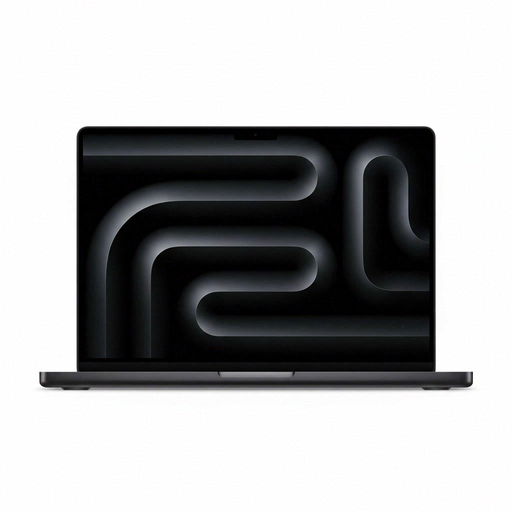 Image unavailable
Apple MacBook Pro 14.2-inch M5 Pro, 24 GB/2 TB, Space Black
Consider this configuration if your test plan requires Safari on macOS. The named variant has a 15-core CPU, 16-core GPU, 24 GB unified memory and a 2 TB SSD.
For window-side work, check the exact display’s reflection treatment and the brightness figure relevant to ordinary SDR use. Confirm whether a suitable USB-C power adapter is included; the product guidance calls for one rated at least 70 W.
Joybuy
 Image unavailable
ASUS Vivobook 14 X1407QA-LY003W, 16 GB/512 GB, Quiet Blue
This Snapdragon X configuration is worth examining if you want a compact laptop for a Windows-oriented testing workflow. Its named variant has 16 GB memory and a 512 GB SSD.
Check the exact panel’s brightness and finish in the lighting where you will work, and confirm that your required local development applications support the configuration. Assess whether its memory capacity fits your planned tools.
Joybuy
 Image unavailable
Lenovo LOQ Essential 15ARP11, 16 GB/1 TB, RTX 5050
Consider this larger Windows-oriented option if you want to compare screen workspace and local storage for your web-testing setup. The named variant has an AMD Ryzen 7 170, 16 GB memory, a 1 TB SSD and a 15.6-inch 144 Hz FHD display.
Check whether its exact panel works beside your window and whether 16 GB memory meets the needs of the tools you intend to keep open.
Joybuy
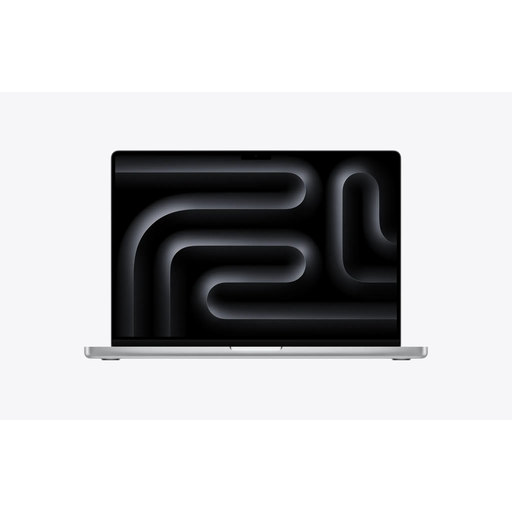 Image unavailable
Apple MacBook Pro 16.2-inch M5 Max, 2 TB, Silver
This larger MacBook Pro is an option to examine if you need Safari on macOS and prefer a 16.2-inch workspace. The named variant identifies an M5 Max with an 18-core CPU, 32-core GPU and 2 TB storage.
Confirm the exact memory configuration before ordering. For window-side use, check the panel’s SDR brightness and reflection treatment rather than treating an HDR brightness figure as the same measure.
Joybuy
 Image unavailable
ASUS ProArt P16 H7606WW-SE006W, 64 GB/2 TB, Black
Consider this Windows configuration if a 16-inch workspace and substantial named memory and storage capacity suit your local tools. Its product name specifies a 4K OLED touchscreen, AMD Ryzen AI 9 HX 370, GeForce RTX 5080, 64 GB memory and a 2 TB SSD.
Before choosing it for a position beside a bright window, confirm the exact display brightness and how its surface handles reflections in your intended setup.
Joybuy
Common questions
Is a 500-nit screen enough beside a bright window?
A 500-nit rating alone cannot settle how readable a laptop will be at your window. Window angle, direct light and screen finish also matter. Lenovo specifies a 500-nit anti-glare panel for a particular ThinkPad X1 Carbon Gen 13 configuration, while HP lists a 500-nit anti-glare OMEN 16 option; check the exact panel and, if possible, assess it in lighting like your own.
Can device emulation replace testing on real phones and browsers?
No: use emulation for quick viewport and layout checks, not as the final compatibility check. Microsoft describes Edge device emulation as an approximation and notes that browser emulators do not reproduce differences in CSS and web API support. Test the browsers and representative devices your site actually needs to support.
When should I choose a Mac for web testing?
Choose a macOS route when your test plan requires direct use of Safari’s inspection, debugging or automation tools. Apple Developer documents those Safari workflows. You will still need access to any other browsers and devices in your test plan, and you should check that your required local applications work on macOS.
What safety and after-sales details should I check?
Before buying, identify the exact laptop configuration and ask the seller for the applicable product and after-sales information. GOV.UK’s electrical-equipment guidance cited here applies to Great Britain; Northern Ireland has separate arrangements, so check the requirements relevant to the purchase. GOV.UK also provides guidance on consumer rights when a purchase goes wrong. Keep questions about a change-of-mind return separate from questions about faulty, damaged or misdescribed goods.


