What should you check first?
For regular home or hybrid laptop work, identify the limitation that affects your setup most before choosing accessories. Screen position, input placement, connections and calls may each call for a different purchase.
| Concern | What to check | Who this matters to |
|---|
| Screen space and position |
Measure the available desk space and check the monitor inputs against your laptop's display outputs. |
If I need more room to view work or want to place my main screen separately from the laptop, display space comes first; roughly 33% of consumers put this need first. |
| Screen and input arrangement |
Check the stand's laptop fit and leave room for a separate keyboard and mouse. |
On a small desk, I want to raise my laptop screen while keeping typing and pointing devices within reach; around 25% of consumers prioritise this arrangement. |
| Device connections |
Match the laptop's supported video protocol and charging requirements to the dock, display and cable. |
When I reconnect several desk devices regularly, I want the required ports and display connection to work together; roughly 25% of consumers make connection fit their primary concern. |
| Call setup |
Check the accessory's connection type and whether a suitable port is available. |
If frequent calls are the main difficulty, I need a camera or audio arrangement that fits my desk and laptop; around 17% of consumers put the call setup first. |
Joybuy product choices
These products cover separate parts of a laptop workspace: a monitor for display space, an adapter for connections, input devices for a raised-screen arrangement and a headset for calls. Choose by the constraint you need to address, then check fit with your laptop and desk.
 No image available
ASUS ProArt PA278CV IPS WQHD Monitor
Consider an external monitor when usable display space is your main constraint. This PA278CV variant is listed as IPS WQHD; check its dimensions and the connection you plan to use with your laptop.
View on Joybuy
 No image available
V7 V7UC-U3CRJ45HDVG-BLK USB-C Adapter
Consider this adapter if you need display and wired-network connections at your desk. Its title lists 4K HDMI, VGA, Gigabit Ethernet, 100W power delivery and dual USB 3.0 ports; confirm that your laptop supports the required video connection and that the charging arrangement suits it.
View on Joybuy
 No image available
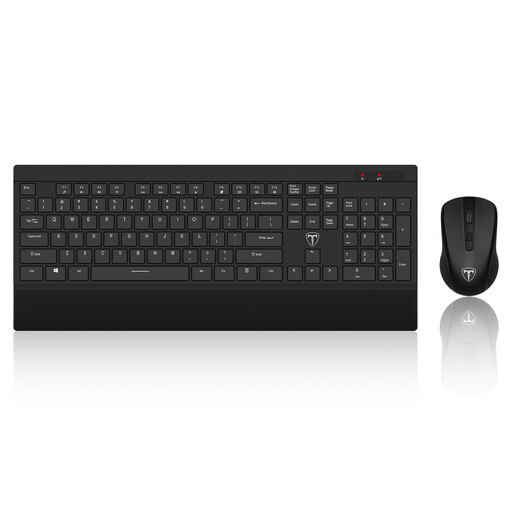
ET Silent Wireless Keyboard and Mouse Set, US Layout
A separate keyboard and mouse can accompany a raised laptop screen. This is a wireless set with a US keyboard layout; check that the layout suits your typing and that you have a suitable way to connect the set.
View on Joybuy
 No image available
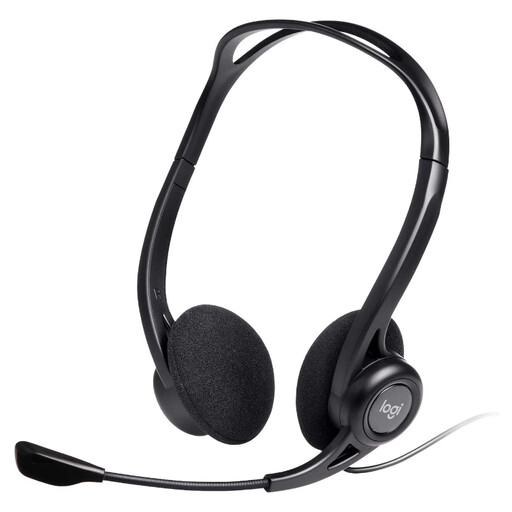
Logitech 960 Wired USB Headset
Consider a headset if calls are the part of your workspace that needs attention. This wired USB model lists an inline remote and a noise-cancelling microphone; check the connection required by the exact model against your available ports.
View on Joybuy
 No image available
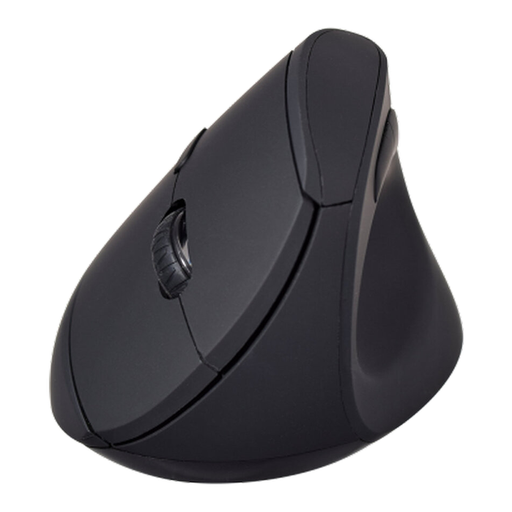
V7 MW500BT Bluetooth Vertical Mouse
A separate mouse may suit a laptop setup in which you want to position the pointing device independently. The MW500BT title lists Bluetooth and 2.4GHz modes, six buttons and an adjustable sensor up to 1600 DPI. Check connection fit and whether its shape suits you; a keyboard is a separate choice.
View on Joybuy
Frequently asked questions
When should I ask about a DSE assessment before buying equipment?
Ask before buying if your regular home or hybrid work may fall under Great Britain's DSE arrangements. The HSE says the regulations can apply to permanent home workers and hybrid workers who use display screen equipment daily for continuous periods of an hour or more; where they apply, the employer should assess the individual workstation, and workers cannot be charged for equipment the assessment identifies as needed.
Will any USB-C dock run my monitor and charge my laptop?
No: a USB-C connector alone does not establish video or charging support. Check the laptop's documented port capabilities, the dock's compatibility information, the cable and the intended monitor arrangement before choosing a dock.
Should I choose a laptop stand or an external monitor?
Choose a stand when raising the laptop screen is the main aim and you have room for separate input devices; choose an external monitor when you need additional display area or independent placement of the main screen. Check desk space and connections in either case.
Do home workers always need a full office-style setup?
No. The HSE says home workers may not need office furniture or equipment to achieve a comfortable, sustainable working position, but their existing furniture and equipment may also be unsuitable. The appropriate arrangement depends on the individual workstation and, where applicable, its assessment.
What should I check after adding workspace accessories?
Check that cables are in good condition and do not trail across the work area, that equipment leaves the surface usable, and that lighting suits the screen position. Revisit the arrangement if your workstation changes or you experience discomfort.


