What matters when choosing
Choose the screen shape around the view you need, then check whether your desk and PC can support the particular monitor and display mode.
31.5- or 32-inch 4K
Consider it when: You want a large, conventional screen shape for building and exploring; Dell lists its S3225QS as a 31.5-inch 4K monitor.
Trade-off: A conventional 16:9 display has less horizontal span than an ultrawide, so consider how you will arrange companion windows.
45-inch 5K2K ultrawide
Consider it when: You want a panoramic screen while retaining 2160 vertical pixels; LG specifies 5120 × 2160 for the 45GX950A-B.
Trade-off: For long periods with an unchanged HUD or desktop layout, follow the OLED model’s image-care instructions.
49-inch Dual QHD super-ultrawide
Consider it when: A wide 32:9 factory view matters more to you than the vertical pixel count of a 4K screen.
Trade-off: A 5120 × 1440 Dual QHD layout has fewer vertical pixels than either 4K or 5K2K, despite its substantial width.
57-inch Dual UHD super-ultrawide
Consider it when: Your priority is continuous width for a factory view and other tools, and your desk can accommodate a very large curved monitor.
Trade-off: Samsung says the G95NC’s full Dual UHD 240Hz mode requires a graphics card supporting DisplayPort 2.1 UHBR 13.5 or above, or HDMI 2.1 FRL 12Gbps; actual support varies by card.
| Concern |
What to check |
Who this matters to |
| Visible workspace |
Compare native resolution and aspect ratio, then check the screen and stand dimensions against your desk. |
If I keep a factory layout and planning tools visible together, I need room for both without choosing by diagonal size alone. Around 36% of consumers put visible workspace first. |
| PC and port capability |
Check the graphics card’s output, the required input and cable, and the refresh rate available at your intended resolution. |
Before choosing a high-resolution screen, I need to know whether my existing PC can run the display mode I want. For around 29% of consumers, compatibility is the primary concern. |
| Static on-screen content |
For an OLED model, read its image-care instructions and consider how often fixed interfaces or desktop windows remain visible. |
My HUD and planning windows may stay in the same places through long sessions, so I need to be comfortable with the panel’s care routine. Static-image use comes first for around 21% of consumers. |
| Motion during play |
Compare refresh rates at the intended resolution and check whether your PC can deliver suitable frame rates. |
When I pan across the factory or head out to explore, smooth movement matters more to me than extra window space. Around 14% of consumers prioritise motion responsiveness. |
Joybuy monitor choices
These monitors cover several ways to build a large-screen factory setup: conventional 4K, a 34-inch ultrawide and wider 49-inch displays. Compare each model’s shape, resolution and panel-care needs with the way you play.
 No image available
CRUA 49-inch curved Dual QHD gaming monitor, 165Hz
Consider this 32:9 screen if a broad factory view and side-by-side planning space are priorities. Its stated resolution is 5120 × 1440, with a 1500R curve and VA panel.
Check that your desk or mount can support the 49-inch monitor, confirm the stand adjustments you need, and match your PC output and cable to the intended display mode.
View on Joybuy
 No image available
Acer X Predator X49X 49-inch curved QD-OLED monitor
This 32:9 monitor suits a setup centred on a wide factory view. Its listed format is Dual QHD, with an 1800R curve and a quoted 240Hz refresh rate.
Check desk fit and the PC connection for your intended mode. If you keep fixed game or planning elements visible for long periods, read this model’s QD-OLED care guidance before choosing it.
View on Joybuy
 No image available
Philips Evnia 6000 34M2C6500 34-inch ultrawide
Consider this 3440 × 1440 screen if you want a panoramic factory view without moving to a 49-inch monitor. The listed refresh rates differ by connection: 175Hz via DisplayPort and 100Hz via HDMI.
Check the exact panel and curvature if either will decide your purchase, and use the connection that supports the mode you intend to run.
View on Joybuy
 No image available
Dahua 32-inch curved 4K OLED gaming monitor
This is a conventional-width option for a large factory view, with a stated 3840 × 2160 resolution and 165Hz refresh rate.
Check the PC output for the mode you want. Because this is listed as an OLED monitor, read its own panel-care instructions if your HUD or planning windows remain unchanged for long periods.
View on Joybuy
 No image available
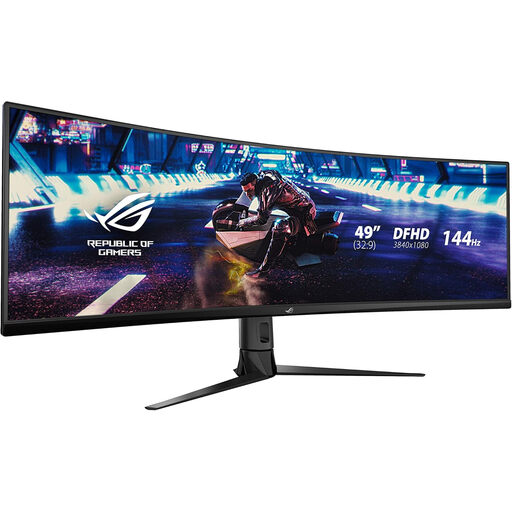
ASUS ROG Strix XG49VQ curved DFHD monitor
Consider this 49-inch curved screen when a wide factory view matters more to you than the vertical resolution of a 4K or Dual QHD display. Its title specifies DFHD and 144Hz.
Check the physical dimensions and stand adjustments for your desk, as well as your PC’s output for the display mode you intend to use.
View on Joybuy
Frequently asked questions
Is a 57-inch Dual UHD monitor necessary for factory-building games?
No: it is a choice for players who prioritise continuous workspace, not a requirement for factory building. Check desk space and graphics output first; Samsung says the G95NC needs DisplayPort 2.1 UHBR 13.5 or above, or HDMI 2.1 FRL 12Gbps, for full Dual UHD at 240Hz, with support varying by graphics card.
How do 45-inch 5K2K and 49-inch Dual QHD screens differ?
A 45-inch 5120 × 2160 screen gives you more vertical pixels, while a 49-inch 5120 × 1440 Dual QHD screen favours a wider 32:9 layout. Choose according to how much vertical detail and horizontal span you need for the game and any companion windows; check the exact model’s dimensions as well.
Should I rule out OLED if I leave a factory-game HUD on-screen?
Not automatically, but prolonged unchanged content makes the particular OLED monitor’s care guidance important. LG warns that leaving the same image on an OLED monitor for a long time may cause faint marks and advises Image Cleaning; check the instructions and warranty for the model you are considering.
Do I need a 240Hz monitor to play a factory-building game?
No specific 240Hz requirement follows from factory-building play. Satisfactory also includes exploration and combat, according to Coffee Stain Studios, so consider how much you value smooth movement alongside workspace—and whether your PC can run the resolution and refresh mode you choose.


