Choose a roughly 40-inch 5120 × 2160 ultrawide if dense menus and vertical workspace come first; a 49-inch 5120 × 1440 super-ultrawide if an uninterrupted, panoramic map matters more; or a 32-inch 4K gaming monitor if you also play faster games or use a PS5. Check that your source device can deliver the display mode you want, that the screen fits your desk and, for OLED, that its panel-care routine suits long sessions with persistent interface elements.
Who each screen format suits
PC players who read every detail
If your campaigns involve long stretches with tooltips, ledgers and diplomacy panels, investigate a high-resolution screen with ample vertical workspace. Dell UK’s U4025QW illustrates the roughly 40-inch 5120 × 2160 format; check text size at your usual viewing distance rather than relying on resolution alone.
Players who want a wider map
If avoiding a bezel between displays matters more than vertical pixel space, a 49-inch 32:9 screen is worth comparing. Samsung UK’s G93SC illustrates the curved 5120 × 1440 format. Check how your games place menus across that width.
Players who mix strategy with other games
If you also play faster PC games or connect a PS5, consider a conventional 32-inch 4K gaming display. BenQ UK’s EX321UX illustrates this route, while PlayStation UK confirms that PS5 can output 4K at 120 Hz with a compatible display. Check the exact monitor’s input modes before choosing.
What matters when choosing
Roughly 40-inch 5120 × 2160 ultrawide
Choose when: Dense strategy interfaces and vertical workspace take priority alongside a broad single-screen view.
Allow for: A large desk footprint and a PC connection capable of the output mode you intend to use.
49-inch 5120 × 1440 super-ultrawide
Choose when: A continuous 32:9 map view matters more to you than vertical workspace.
Allow for: Fewer vertical pixels than 5120 × 2160 and, if you choose OLED, care with prolonged bright static interface elements.
32-inch 4K gaming monitor
Choose when: You want a conventional 16:9 screen for strategy, faster games or a compatible PS5 connection.
Allow for: Less horizontal map space than either ultrawide format.
| Concern |
What to check |
Who this matters to |
| Readable menus and map detail |
Compare native resolution and text size at your viewing distance; check available Windows and in-game scaling. |
When I spend a campaign reading small labels and long menus, I want enough vertical room without making text uncomfortable to read. Around 40% of consumers put interface detail first. |
| Uninterrupted map width |
Check desk fit, the 32:9 resolution and how your games handle ultrawide menus. |
If a broad map on one screen is my priority, I can accept less vertical workspace in exchange for width. For around 30% of consumers, that continuous map view comes first. |
| Other games and console use |
Match the exact input, resolution, refresh-rate and variable refresh rate modes to your PC or console; assess HDR by the model’s specified capabilities. |
When strategy is only part of what I play, I need the display to suit faster games or my console too. Mixed-use capability is the primary concern for around 30% of consumers. |
Buying pitfalls
-
Choosing width without checking vertical resolution
A 49-inch 5120 × 1440 screen offers a wide 32:9 canvas, while a roughly 40-inch 5120 × 2160 screen has more vertical pixels. Those differences matter when maps and text-heavy panels share the display.
Decide which matters more in your own games, then compare the native resolutions and assess text at your usual seating distance. Microsoft Support notes that text can look less sharp below a monitor’s native resolution.
-
Assuming every connection delivers the headline display mode
A monitor’s maximum refresh rate does not establish what a particular PC, console, port and cable combination will output. PlayStation UK, for example, describes PS5 4K 120 Hz output as dependent on a compatible display.
Check the source device’s ports and modes against the exact monitor inputs and supported timings; after connection, inspect the active output signal in the device settings.
Reaching your intended mode may require a different compatible cable, connection or source device.
-
Treating every HDR label as equivalent
VESA DisplayHDR certification tiers set different test criteria, so a generic HDR description alone does not identify a comparable tier.
If HDR matters to you, check whether the exact model names a certification tier and compare its stated capabilities rather than choosing by the letters “HDR” alone.
-
Overlooking static-interface care on OLED
Grand strategy games can leave toolbars and other interface elements in place for long sessions. Samsung UK describes static-image dimming on its G93SC, while BenQ UK advises against leaving the same bright image on an OLED display for a long time.
Check the chosen OLED model’s care guidance, use its supplied protection features and avoid leaving a bright static game screen displayed for extended periods.
Relevant brands to consider
Dell
Dell UK’s UltraSharp U4025QW illustrates the high-resolution, roughly 40-inch PC route: a 39.7-inch curved IPS Black display specified at 5120 × 2160 and 120 Hz.
- Its resolution makes this particular model relevant when vertical workspace is a priority.
- Check desk space and whether your PC connection supports the mode you want; its specifications do not make it the right gaming display for every setup.
Samsung
Samsung UK’s Odyssey OLED G9 G93SC illustrates the 49-inch curved 32:9 route, specified at 5120 × 1440 and 240 Hz.
- The format is relevant to players prioritising a wide, uninterrupted map view.
- It has fewer vertical pixels than 5120 × 2160; persistent bright game interfaces also call for OLED panel-care habits.
BenQ
BenQ UK’s MOBIUZ EX321UX illustrates a conventional 31.5-inch 4K gaming route, with a 144 Hz Mini LED display and HDMI 2.1 and DisplayPort 2.1 connections.
- This model’s format and inputs make it relevant to mixed PC gaming and compatible console setups.
- Its 16:9 screen does not provide the continuous horizontal map area of the ultrawide formats.
Joybuy monitor options
These options cover wide single-screen map viewing and conventional large-screen 4K play. Compare each monitor’s stated format with your need for menu space, desk fit and connection compatibility.
 No image available
Acer X Predator X49X 49-inch QD-OLED monitor
Consider this 32:9 option if a broad map on one screen is your priority. Its stated features include a 49-inch curved QD-OLED panel and 240 Hz refresh rate. Check desk fit, the output mode available from your PC and the model’s OLED care guidance for long sessions with static menus.
View on Joybuy
 No image available
CRUA 49-inch 5120 × 1440 curved monitor
This 32:9 option suits a player seeking an expansive single-screen map. The product name specifies a VA panel, 1500R curve and 165 Hz refresh rate. Check the supported mode for the input you plan to use, and make sure the desk or mount can accommodate the monitor.
View on Joybuy
 No image available
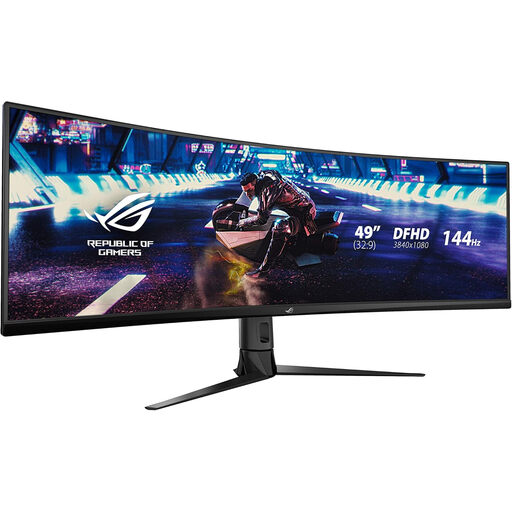
ASUS ROG Strix XG49VQ curved DFHD monitor
Its wide format is worth considering if you want a panoramic map. The product name specifies a 144 Hz refresh rate. For text-heavy play, check whether this model’s stated 3840 × 1080 resolution provides enough vertical workspace, and confirm desk fit and game interface behaviour at this aspect ratio.
View on Joybuy
 No image available
Dahua 32-inch 4K 165 Hz curved OLED monitor
This conventional large-screen route suits strategy play when 4K detail matters more than ultrawide map space. The product name specifies 3840 × 2160 resolution and a 165 Hz refresh rate. Check the input modes for your PC or console and the model’s OLED care guidance for persistent game interfaces.
View on Joybuy
 No image available
LG UltraGear OLED 32GS95UV-B 32-inch 4K monitor
Consider this 16:9 route if you want 4K strategy play alongside faster games rather than an ultrawide map. The product name describes dual 4K and Full HD refresh modes, but the model suffix and colour variant differ between the title and description. Confirm the exact model supplied and its supported modes before relying on those figures; check its OLED care guidance as well.
View on Joybuy
Frequently asked questions
Is 5120 × 2160 or 5120 × 1440 better for grand strategy?
Choose 5120 × 2160 if dense menus and vertical workspace are your priority, or 5120 × 1440 if you value a wider 32:9 map view more. Check how comfortably you can read the interface at your seating distance and whether your PC can output the chosen native resolution.
Can I use a PS5 with a 4K 120 Hz gaming monitor?
Yes, if the connected monitor supports the required input mode: PlayStation UK states that PS5 supports 4K 120 Hz output with a compatible display. Check the exact monitor’s HDMI capabilities and supported timings, then inspect the console’s video output settings after connection.
Is OLED a sensible choice for games with persistent menus?
OLED can be a choice if you are comfortable following the exact monitor’s static-content care guidance. Samsung UK describes static-image dimming on its G93SC, and BenQ UK advises against displaying the same bright image for a long time; protection features do not remove the need for sensible use.
How should I make text easier to read on a high-resolution Windows monitor?
Start with the monitor’s recommended native resolution, then adjust Windows display scaling if text is too small. Microsoft Support notes that selecting a lower-than-native resolution can make text look less sharp; check in-game interface scaling separately where the game offers it.


