Shortcut-heavy RPG players
If abilities, inventory actions and menus take up many of your keys, dedicated controls or remapping may matter more than a smaller footprint.


Choose dedicated macro controls if you regularly use repeated RPG commands; compare wireless connection modes if the keyboard moves around your large-screen setup; or consider a compact layout when mouse room matters more than a number pad and extra controls. Before buying, check the exact key layout, switch feel, software support and how the keyboard will connect to your PC.
If abilities, inventory actions and menus take up many of your keys, dedicated controls or remapping may matter more than a smaller footprint.
If you change position around a TV or large monitor, compare the connection modes you can use from each position, including the location of your PC and USB ports.
If mouse room, a lower front edge or switch feel matters most during gaming and typing, settle on a physical layout before comparing additional controls.
For large-screen RPG play, decide whether command access, flexible placement or keyboard feel and footprint is your primary need. Each points to a different trade-off.
Choose it when: you want repeated commands on dedicated controls rather than relying entirely on key combinations.
Trade-off: the larger layout needs more desk space.
Choose it when: keyboard placement changes around the screen or you prefer a thinner front edge.
Trade-off: you need to manage charging or batteries, and low-profile switches feel different from full-height ones.
Choose it when: mouse room matters more than a number pad; adjustable actuation is an additional option on the SteelSeries Apex Pro TKL Gen 3.
Trade-off: the cited SteelSeries specification is for a US variant, so confirm the layout of any keyboard you intend to buy.
| Concern | What to check | Who this matters to |
|---|---|---|
| Commands and remapping | Check the location of programmable controls and whether your intended mappings work with the game and your operating system. | If I repeatedly open menus or use the same abilities, I want those actions within easy reach rather than buried in key combinations. Around 42% of consumers put command access first. |
| Connection flexibility | Compare wired use, a 2.4 GHz receiver and Bluetooth against your PC position and available USB ports. | When I shift my keyboard between the desk and another position near the screen, I need a connection that works in both places. For around 33% of consumers, flexible placement is the primary need. |
| Feel and footprint | Choose the layout size, then check the exact switch variant and key arrangement. | I would rather have room for the mouse or a keyboard edge and switch feel that suit me than keep every extra key. Feel and space come first for around 25% of consumers. |
Controls differ by model: Logitech G describes nine assignable G keys on the G915 X LIGHTSPEED, while Razer identifies macro controls on the BlackWidow V4 Pro. A compact layout need not offer the same dedicated keys.
List the commands you use repeatedly, then check the exact keyboard’s controls, remapping method and profile options. Check that your game permits the intended mappings.
Wireless models do not all provide the same combination of receiver, Bluetooth and wired modes. A large screen alone does not make wireless necessary.
Decide where the PC and keyboard will sit, then confirm the connection modes and USB ports needed for that arrangement.
A lower front edge changes keyboard height; a TKL layout changes the keys and desk space available. Switch feel is a separate decision from either format.
Choose the layout and switch type you want, then confirm the exact key arrangement of the variant offered.
These manufacturer ranges illustrate different feature choices; specifications for one model should not be assumed to apply to another.
The BlackWidow V4 range includes both a macro-focused full-size option and a wireless low-profile option.
G915 X LIGHTSPEED is a full-size, low-profile choice for consumers considering both wireless placement and configurable keys.
Apex Pro TKL Gen 3 illustrates the compact route for consumers interested in adjustable switch actuation.
These keyboards cover different ways to balance RPG shortcuts, connection flexibility and desk space. Compare each model’s stated layout and controls with the position from which you play.
 Image unavailable
Consider its 96% layout if you want a number pad in a less spread-out arrangement. The listing describes 2.4 GHz, Bluetooth and wired modes, hot-swappable switches and a multi-function wheel. Confirm the supplied key arrangement and switch variant; check remapping support if RPG shortcuts are a priority.
 Image unavailable
Its full-size 108-key layout suits consumers who want a number pad as well as flexible placement. The listing specifies Bluetooth, 2.4 GHz and USB-C connection modes, hot-swappable switches and an 8000 mAh battery capacity; capacity alone does not establish runtime. Check whether the US layout and available remapping options suit you.
 Image unavailable
Consider the 75% layout if mouse room matters more than a number pad. The listing describes 2.4 GHz, Bluetooth and wired USB modes, hot-swappable switches and a multimedia knob. Confirm that the US key arrangement works for you, and check remapping support if you need RPG shortcuts.
 Image unavailable
This is the option here with six dedicated macro keys stated in its listing, which may suit repeated RPG commands. It has a USB-A wired connection, clicky Green switches and a volume and brightness roller. Confirm the key layout and software compatibility for the mappings you intend to use.
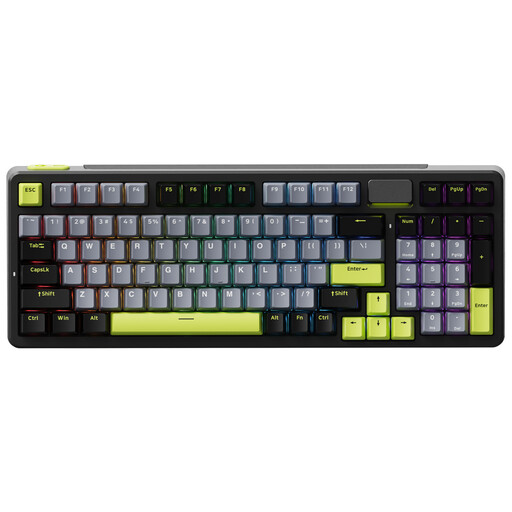 Image unavailable
Its 96% layout is worth considering if you want to retain a number pad while reducing keyboard width. The listing specifies wired, 2.4 GHz and Bluetooth modes, hot-swappable switches and a gasket mount. Check the US key arrangement and available remapping options before choosing it for shortcut-heavy play.
No: wireless is useful when keyboard placement or cable routing calls for it, not simply because the screen is large. If you stay at a desk near the PC, a wired keyboard may be simpler; otherwise, check whether you need a 2.4 GHz receiver, Bluetooth or a wired option.
Dedicated macro keys are useful when you repeatedly call up a small set of permitted commands or menus and want them within reach. Check the game’s rules, the keyboard’s mapping software and whether a simpler layout would already cover the actions you use.
Choose full-size if you use a number pad and extra controls, or TKL if mouse space matters more; low-profile describes keyboard height and switch feel rather than the same size decision. Check the exact layout and switch variant, particularly if you also need dedicated RPG shortcuts.
Check the marking and documentation applicable to the particular keyboard rather than treating a mark as proof of its individual compliance. Department for Business and Trade guidance dated 21 August 2026 says CE marking continues to be recognised alongside or instead of UKCA in applicable product regimes in Great Britain; Northern Ireland follows different processes.