
24/7 Customer Support

Free returns

Same-day & Next-day Delivery

Quality Guaranteed

Unlock Your Welcome Offers: FREE Delivery | Up to 80% OFF | Free 30-day JoyPlus trial
Download the APP
The line between a laptop and a tablet is becoming increasingly blurred. For many professionals, creatives and students across the UK, the portability of a tablet combined with the power of a modern computer is the ideal setup. However, a smaller screen can feel restrictive when you are multitasking with spreadsheets, editing high-resolution images or taking detailed lecture notes.
This is where large screen tablets come in. Offering expansive digital canvases of 11 inches or more, these devices provide the space you need to work and study efficiently without being tethered to a desk. This guide is designed to help you navigate the market for powerful tablets in 2026, focusing on the features that matter most for productivity and creativity.
Finding the right device depends on your specific workflow. Here are a few key factors to keep in mind during your search.
The primary appeal of a large tablet is the screen itself. A 13-inch tablet provides a significant amount of space, making it easier to view documents side-by-side or work on intricate designs. Pay attention to the display technology; panels with high resolution, good colour accuracy and adequate brightness are crucial for both professional creative work and long study sessions. A higher refresh rate, such as 90Hz or more, also contributes to a smoother, more responsive experience when scrolling or drawing.
Your tablet's processor, or chip, is its engine. For demanding tasks like video editing, 3D modelling or running multiple applications at once, a powerful chip is non-negotiable. Look for devices with processors designed for heavy workloads, often found in the premium ranges of major brands. Alongside the chip, consider the RAM and storage. 8GB of RAM is a solid baseline for smooth multitasking, while storage needs can vary from 128GB for light use to 512GB or more for professionals handling large files.
A tablet's utility is often defined by its accessories. A high-quality tablet with a stylus for note-taking and drawing can transform your workflow, offering precision that a finger cannot match. Likewise, a compatible keyboard case can turn your device into a capable laptop substitute for typing reports and emails. Consider the operating system (iPadOS or Android) and its app ecosystem to ensure the software you rely on is available and optimised for a tablet interface. This is a key point of difference when considering an iPad Pro vs Galaxy Tab.
Here are a few standout large screen tablets that cater to different needs, from professional-grade power to all-around versatility.
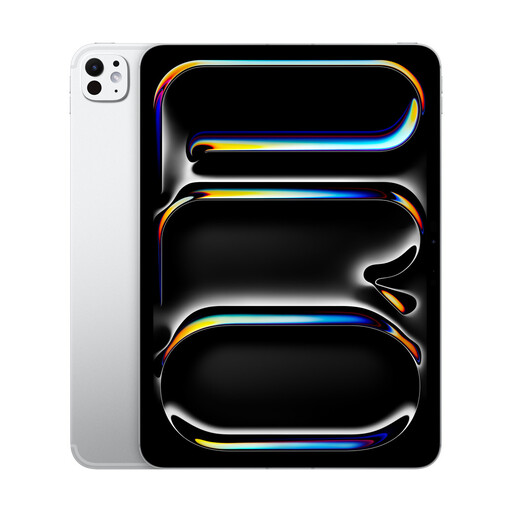
Why It Stands Out: The iPad Pro 13-inch is built around Apple's M5 chip, delivering performance that rivals many laptops. Its large, vibrant 13-inch display serves as an expansive canvas for any project, from 4K video editing to complex digital illustration. It’s a device designed for users who need top-tier power in a portable form factor.
Pros:
Who is it for? Creative professionals, power users and anyone seeking a primary or secondary device that can handle intensive tasks without compromise.
View Details for Apple iPad Pro 13'' (M5)
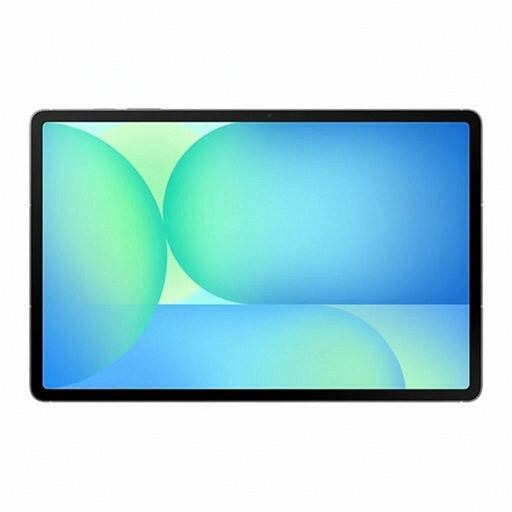
Why It Stands Out: This tablet makes a strong case with its huge 13.1-inch display and the inclusion of the S Pen in the box. Powered by an Exynos 1580 processor and equipped with clever AI features like Circle to Search, it’s a multitasking powerhouse. Its IP68 water and dust resistance also adds a layer of durability not commonly found in large tablets.
Pros:
Who is it for? Students, professionals and multitaskers who want a very large screen, the convenience of an included stylus and added durability for everyday use.
View Details for Samsung Galaxy Tab S10 FE+
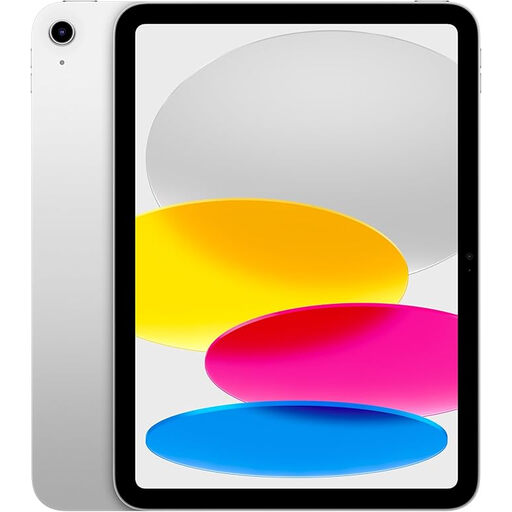
Why It Stands Out: For those who want a capable large-screen experience without the "Pro" price, the 11-inch iPad is a compelling option. It features the powerful A16 Bionic chip, which handles everyday productivity, creative work and gaming with ease. Its 11-inch Liquid Retina display offers a great balance of screen space and portability.
Pros:
Who is it for? An excellent choice for students and general users in the UK looking for a versatile and powerful tablet for study, entertainment and everyday tasks.
View Details for Apple iPad 11-inch
Our recommendations focus on performance and screen size, but we understand that aesthetics matter too. If you have a preference for a clean, modern finish, a silver tablet can be a great choice for any professional or academic setting.
Explore our curated collection of Silver tablet options to find more devices that match your style.
1. Can a large screen tablet truly replace a laptop for work or study? For many common tasks—such as writing, research, presentations, digital art and media consumption—a powerful tablet paired with a keyboard case can absolutely function as a laptop replacement. They are particularly strong for creative work and note-taking. However, for specialised roles involving complex coding, proprietary desktop software or heavy-duty file management, a traditional laptop may still be more suitable.
2. Is a tablet with a stylus worth it for note-taking? Yes, for students and professionals who frequently attend meetings or lectures, a tablet with a stylus for note-taking is a game-changer. The ability to write naturally, annotate PDFs directly and sketch diagrams offers a level of interactivity that typing cannot match. Many apps can also convert your handwriting into searchable text, organising your notes automatically.
3. What is a good amount of storage for a work and study tablet? For most students and general business users, 128GB is a practical starting point, offering enough space for apps, documents and a moderate amount of media. If you are a creative professional working with large files like 4K video, RAW photos or complex design projects, it is wise to consider 256GB, 512GB, or even more to avoid running out of space.