Check the broadband service and try a better router position before buying Wi-Fi equipment: Ofcom notes that Wi-Fi cannot outperform the underlying broadband connection. If several rooms or floors remain weak, mesh places wireless points around the home; if the problem is more limited, a replacement router or a provider-supplied upgrade may be enough. Check your connection setup, the rooms you need to reach and who will support the equipment before choosing.
Who needs better coverage?
Households with distant rooms or weak upstairs Wi-Fi
If the connection works near the router but weakens across floors or behind dense walls, map the affected rooms before choosing between a new router position and distributed mesh units. Ofcom identifies building materials and obstacles as factors that can weaken Wi-Fi.
Homes with several demanding activities at once
When calls, streaming and downloads coincide, check whether slowdowns also happen near the router. Simultaneous use or the broadband service itself may be the issue, rather than coverage in a particular room.
Customers who prefer provider-supported equipment
A provider router upgrade or compatible Wi-Fi discs may suit households that want their broadband provider involved in setup and fault support. Check eligibility, which areas any coverage commitment includes, and whether supplied equipment must be returned.
What should you check first?
Start by separating a broadband fault from an in-home Wi-Fi problem, then use the location of weak rooms and your existing connection setup to narrow the equipment choice.
| Priority |
What to check |
Your needs |
| Cause of the slowdown |
Compare use near the router with a weak room. Check provider outages and whether heavy simultaneous use coincides with the problem; report a persistent service fault to the provider. |
I want to know whether new Wi-Fi equipment would address the problem. Ofcom says the wireless connection cannot outperform the broadband service feeding it. |
| Rooms and obstacles |
Mark the rooms and floors that need Wi-Fi. Try a central, elevated router position; if several separated areas remain weak, plan mesh-node positions where each can still connect to the network. |
Upstairs rooms or spaces beyond dense internal walls need a dependable connection. A single router must reach them from one position, while mesh uses points placed around the home. |
| Router or mesh |
For a limited weak area, assess whether one suitably placed replacement router could serve the required rooms. For multiple weak areas, check the mesh pack size, expansion options and placement guidance. |
I would rather keep one router if it can reach the rooms I use. If weak spots remain across several floors or distant rooms, I need to assess a multi-node system instead. |
| Compatibility and support |
Check the ISP connection method and any modem or fibre ONT arrangement before buying retail equipment. For a provider upgrade, check eligibility, support and equipment-return terms. |
Being able to set up the equipment with my existing broadband matters as much as its Wi-Fi features. I also want to know whom to contact if the connection fails. |
| Hardware capabilities |
Compare the ports and node-link options you will use, alongside your broadband plan and devices. Treat manufacturer coverage and device-count figures as conditional claims, not room-by-room promises. |
Calls, streaming and connected devices may run together in my home, but a headline Wi-Fi generation alone does not tell me whether the required rooms will have a usable connection. |
What can go wrong?
-
Buying mesh to fix a broadband fault
Mesh distributes an in-home wireless connection; it cannot make an inadequate broadband service faster. Ofcom advises checking the underlying service when diagnosing Wi-Fi problems.
Compare performance near the router and in weak rooms, check for an outage, and contact the provider about persistent service faults before choosing hardware.
-
Putting equipment at the weakest point
Walls, floors and other obstacles can weaken Wi-Fi. A mesh node placed where it cannot maintain a useful connection to the rest of the system may not help the room beyond it.
Try a central, elevated router position first. Follow the mesh maker’s guidance when placing nodes between the router and the areas that need coverage.
-
Treating a coverage figure as a floorplan
Manufacturer coverage and device-count claims do not establish the result in a particular building. Dense walls, floors, connected devices and node placement all matter.
Map the rooms you need to reach and check whether the chosen system can be expanded. Consider its node-link options rather than choosing on a maximum wireless-speed figure alone.
-
Overlooking support and equipment terms
Provider equipment and retail mesh come with different setup and support arrangements. BT says its Complete Wi-Fi coverage guarantee applies to the main dwelling, not gardens, sheds or outbuildings.
Confirm who supports the connection, whether provider equipment must be returned after a service change, and whether any optional services are needed for features you intend to use.
Relevant brands and product lines
These lines illustrate different retail-mesh and provider-supported routes; their stated specifications and coverage figures are not guarantees for a particular home.
TP-Link Deco
The UK Deco BE65 is a tri-band Wi-Fi 7 mesh system offered in different pack sizes for placing units around a home.
- TP-Link states that each BE65 unit has four 2.5Gbps ports and supports combined wired and wireless backhaul.
- TP-Link states that BE65 works with any ISP and modem, but check how it would connect to your own broadband equipment and where its units could be placed.
eero
eero Pro 7 is a tri-band Wi-Fi 7 mesh line with one-, two- and three-unit options in its UK range.
- eero lists two auto-sensing 5GbE ports on each Pro 7 unit and compatibility with earlier eero generations.
- eero’s stated coverage and device figures depend on the installation; check unit placement and whether you want any optional eero Plus features.
NETGEAR Orbi
The UK Orbi 770 series is a tri-band Wi-Fi 7 mesh line with multiple-unit configurations.
- NETGEAR lists 2.5Gbps wired connections for the Orbi 770 series.
- NETGEAR’s stated pack-coverage figures are manufacturer claims; decide on unit positions using the rooms and barriers in your home.
BT Complete Wi-Fi
This is a provider-supplied Smart Hub and Wi-Fi-disc route for eligible BT customers who want provider-led support.
- BT says the service starts with a Smart Hub and one Wi-Fi disc, with up to two further discs if needed.
- BT limits its stated coverage guarantee to the main dwelling. Check eligibility and whether equipment must be returned if the service changes.
Joybuy router and mesh options
These options include four multi-unit mesh systems for considering several weak rooms or floors, plus one standalone router for assessing a more limited coverage problem. Check the broadband connection and equipment compatibility before choosing either route.
 No image available
TP-Link Deco BE65 BE9300 Wi-Fi 7 mesh (3-pack)
Three mesh units offer positions to consider when several rooms need Wi-Fi. This is the tri-band BE65 model; TP-Link specifies four 2.5Gbps ports per unit and combined wired and wireless backhaul. Check the connection to your existing broadband equipment and plan node positions around walls and floors.
View on Joybuy
 No image available
TP-Link Deco BE22 BE3600 Wi-Fi 7 mesh (3-pack)
This three-pack is a mesh option to assess when weak Wi-Fi extends beyond one room. Its name identifies the BE3600 Wi-Fi 7 variant. Check whether three suitable node positions are available and how the system would connect to your broadband equipment.
View on Joybuy
 No image available
NETGEAR Orbi 370 RBE373 Wi-Fi 7 mesh (3-pack)
This dual-band BE3600 three-pack is a multi-unit option for rooms separated by distance or floors. Its listed variant includes 2.5Gbps Ethernet. The product information calls for an existing modem or gateway, so check your ISP connection arrangement before choosing it; room coverage will still depend on placement and construction.
View on Joybuy
 No image available
TP-Link Deco BE25 Wi-Fi 7 mesh (3-pack)
Three mesh units make this an option to assess for several weak rooms. Plan where the units could maintain connections across your home, and check compatibility with your ISP equipment or fibre ONT arrangement before ordering.
View on Joybuy
 No image available
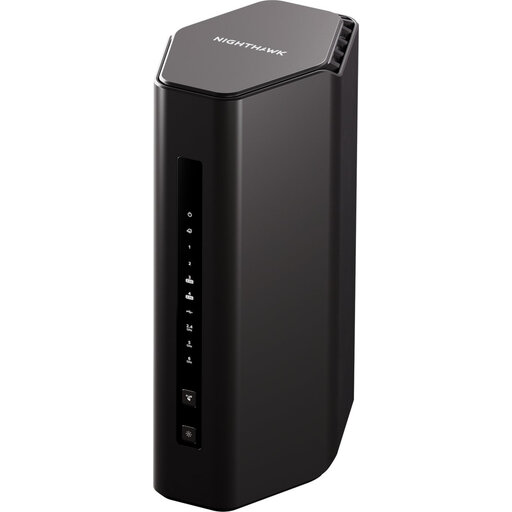
Nighthawk RS300 BE9300 Wi-Fi 7 router
This is a standalone replacement-router option to consider if one well-placed router could reach the rooms you need. It is not a multi-unit mesh pack; check your ISP connection and support arrangements rather than assuming a single router will reach distant rooms behind dense walls.
View on Joybuy
Common questions
Is the problem my broadband or the Wi-Fi in my home?
Compare the connection near the router with the experience in a weak room, then check for an outage or heavy simultaneous use. Ofcom notes that Wi-Fi cannot outperform the underlying broadband service; contact your provider if that service is persistently slow or unreliable.
Where should I put the router before buying mesh?
Try a central position off the floor, away from obstacles and equipment that may interfere. Ofcom identifies building materials and household objects as possible causes of weak Wi-Fi, so test the rooms that matter after moving the router.
When does mesh make more sense than one replacement router?
Mesh is worth assessing when several separated rooms or floors remain weak after improving router placement. Multiple units place Wi-Fi points around the home, but they still need suitable positions and a good connection between nodes; a limited weak area may be served by one well-placed router.
Will a retail mesh system work with my broadband provider?
Check the product against your provider’s connection method and any modem or fibre ONT before buying. TP-Link states that Deco BE65 works with any ISP and modem, but your setup and support arrangements still need checking; Ofcom notes that third-party routers can be harder to configure and may not be supported by the provider.


