Who this setup suits

Permanent home workers sending large files

People handling cloud backups, creative assets or client deliveries who need recurring uploads to remain practical while the household is online. Ofcom highlights the need for reliable broadband as homeworking and bandwidth-heavy services become more common.

Shared households with a fixed home office

Homes where one person works from a desk while others stream, browse and use connected devices. The useful decision is whether the restriction is the broadband line, home Wi-Fi coverage or the connection to the desk.

Homes with good broadband but weak office Wi-Fi

People who can get an adequate connection near the router but see poorer performance in the office. Ofcom notes that the wireless link can become a bottleneck, so placement, mesh Wi-Fi or Ethernet may matter more than a provider change.

What to check before buying

Higher-upload fixed broadband

Choose it when: an Ethernet test is insufficient for the file-upload workflow and the address has a materially better upload option.

Keep in mind: faster broadband will not correct weak Wi-Fi between the router and work device.

Router or mesh Wi-Fi

Choose it when: Ethernet is adequate but the office or other rooms have poor coverage, disconnections or reduced wireless performance.

Keep in mind: placement, walls and interference still affect results, and mesh systems need powered units around the home.

Wired Ethernet to the desk

Choose it when: the work area is fixed and there is a practical cable route, dock or adapter.

Keep in mind: Ethernet improves the in-home connection but cannot raise the upload capacity supplied by the broadband line.

Priority What to check Your needs
Upload capacity Compare predicted upload speeds for the exact address and package. Keep the provider’s busy-time estimate and personalised minimum guarantee before signing up. I need large uploads to remain usable while other people stream and browse, so I compare upload information rather than choosing by download branding alone.
Line or Wi-Fi bottleneck Test a capable device by Ethernet where practical. Then check router placement, interference, coverage and whether a mesh system would reach the work area. I want to avoid paying for a faster package if the real issue is the wireless link between the router and my office.
Contract and switching terms Check the estimated 8–10pm speed, minimum guarantee, minimum term, stated price increases, installation requirements and early-exit terms. I need to know what the service is expected to deliver at busy times and what the full commitment involves before switching.

Common buying mistakes

  • Buying a gigabit download package without checking upload speed

    Large-file work is constrained by upstream capacity. Download-led package names do not establish the upload rate available at the property; Virgin Media, for example, publishes separate average upload figures for its Gig1 and Gig2 services.

    Compare predicted and quoted upload speeds for the exact address, then retain the busy-time estimate and personalised minimum guarantee before committing.

  • Replacing the broadband package when Wi-Fi is the bottleneck

    Wi-Fi can be slower than Ethernet, and walls, router placement, interference and coverage can limit the office connection even when the incoming line is adequate. Ofcom says the wireless link can become a home-network performance bottleneck.

    Run an Ethernet comparison first. If that result is sufficient, consider router placement, a newer router, mesh Wi-Fi or an Ethernet run instead of assuming the line needs upgrading.

    Mesh starter packs can involve an upfront hardware cost, and larger homes may need additional units.

  • Assuming national full-fibre coverage guarantees your address

    Ofcom reported full-fibre availability to 82% of UK residential premises in its Spring 2026 update, but predicted availability and speeds remain property-specific.

    Use an address-level availability check and compare the maximum predicted upload speed before choosing a provider or planning hardware around an assumed service tier.

  • Focusing on an introductory monthly price instead of the full contract

    A broadband contract can include a minimum term, stated in-contract price changes, installation arrangements and early-exit conditions that affect the overall commitment.

    Compare the payment schedule, contract duration, notice period, early-exit terms and equipment requirements before switching. Ofcom says the amount payable during the contract should be clear before sign-up.

Relevant broadband provider references

BT

BT offers full-fibre packages where available. BT describes its Full Fibre service as fibre connected directly to the home, with speeds up to 900Mbps.

  • BT says its full-fibre connection is designed for uses including file uploads and multiple connected devices.
  • Availability and attainable service must be checked by postcode; the package ceiling is not available at every property.

Virgin Media

Virgin Media offers gigabit and full-fibre services in covered areas, including higher tiers that publish separate upload and download averages.

  • Virgin Media lists average speeds of 2,000Mbps download and 200Mbps upload for Gig2, and 1,130Mbps download and 104Mbps upload for Gig1.
  • Equal upload and download speeds are offered only on eligible full-fibre deals and are subject to availability, capacity and credit checks, according to Virgin Media.

Hyperoptic

Hyperoptic markets full-fibre residential packages in selected buildings and areas, including 150Mb, 500Mb and 1Gb options on its UK site.

  • Its package range includes a monthly rolling 1Gb option alongside some 24-month commitments on lower tiers.
  • Pricing and availability vary by location, so an address check remains essential before comparing packages.

Joybuy product options

These Joybuy options are for improving in-home Wi-Fi coverage or creating a more practical wired connection at a fixed work area after checking that the broadband line itself is adequate.
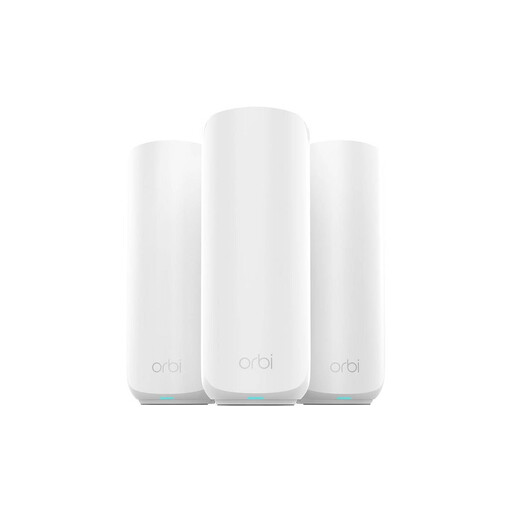
NETGEAR Orbi 370 RBE373 WiFi 7 Mesh System, 3-Pack

NETGEAR Orbi 370 RBE373 WiFi 7 Mesh System, 3-Pack

A three-unit mesh option for a larger or difficult-layout home where Ethernet is adequate but office Wi-Fi coverage is not.

Stated features include dual-band BE3600, up to 360m² conditional coverage, 2.5Gbps WAN/LAN ports, separate main, IoT and guest networks, WPA3 and automatic firmware updates. It requires an existing modem or gateway and a high-speed internet connection; wireless speed and coverage vary with placement, building materials, traffic and connected devices.

Joybuy
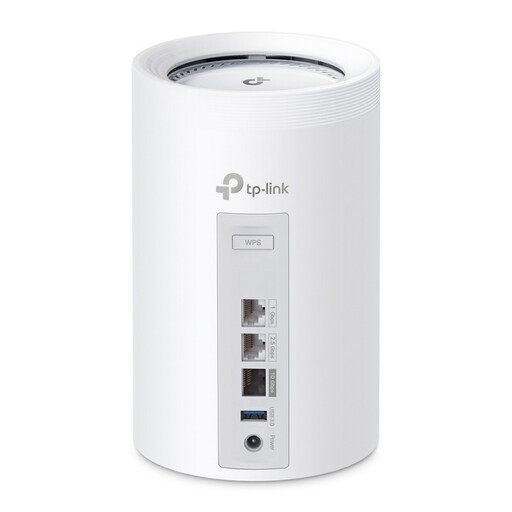
TP-Link Deco BE65 BE9300 Tri-Band Wi-Fi 7 Whole Home Mesh System, 3-Pack

TP-Link Deco BE65 BE9300 Tri-Band Wi-Fi 7 Mesh System, 3-Pack

This three-unit mesh system is relevant for multi-room shared use when a wired test shows the fixed broadband line is already adequate.

The listing states tri-band WiFi 7, a dedicated backhaul band, whole-home roaming, guest access, parental controls and app management. Confirm the Ethernet-port configuration, placement options and backhaul arrangement for your home before buying; mesh Wi-Fi does not increase the upload capacity of the broadband line.

Joybuy
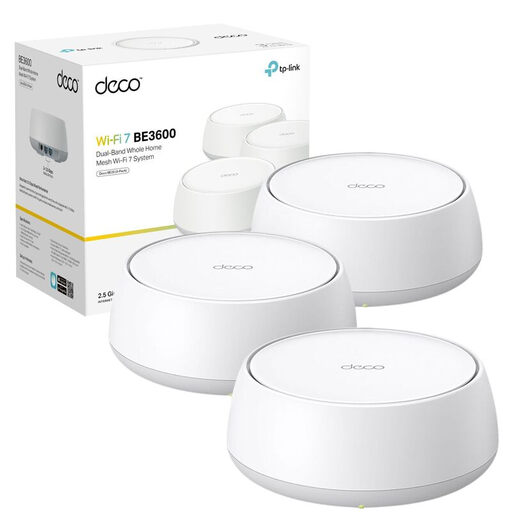
TP-Link Deco BE25 Whole Home Mesh WiFi 7 System, 3-Pack

TP-Link Deco BE25 Whole Home Mesh WiFi 7 System, 3-Pack

Consider this mesh system when a fixed office needs better multi-room Wi-Fi coverage and may also use a wired connection.

The listing specifies dual-band WiFi 7, mesh roaming, 2.5Gbps Ethernet ports, WPA3, VPN-router functionality and app-based setup. Check the practical coverage range, Ethernet-port roles and placement suitability for the home; additional units need power around the property.

Joybuy
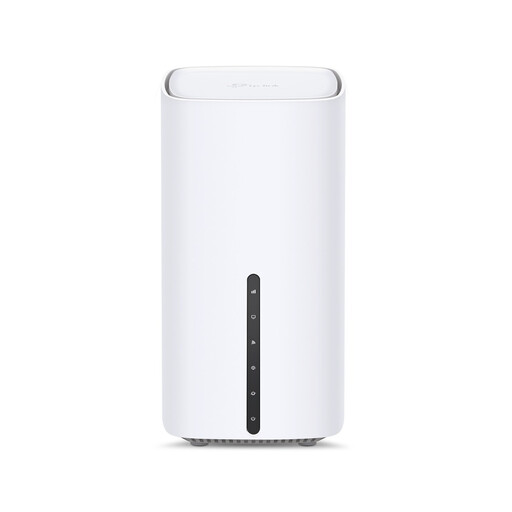
TP-Link Archer NX500 5G AX3000 Wireless Dual Band Gigabit Router

TP-Link Archer NX500 5G AX3000 Dual-Band Router

A single-router option for a suitably located home office where a work device can connect by Ethernet and the existing fixed line is adequate.

The listing specifies a 2.5Gbps WAN/LAN port, two Gigabit LAN ports, dual-band WiFi 6, QoS and EasyMesh compatibility. Check local 5G coverage, compatible SIM and tariff conditions, modem compatibility and whether additional EasyMesh hardware is needed for wider coverage.

Joybuy

Frequently asked questions

Should I choose broadband by download speed alone if my work involves large uploads?

No. Check the upload speed quoted for your exact address and package as well as the download figure. Ofcom’s checker presents predicted upload and download speeds separately, and participating providers should provide an estimated busy-time speed and personalised minimum guarantee before purchase.

How can I tell whether to upgrade broadband or improve Wi-Fi?

Test a capable device connected to the router by Ethernet where practical. If the wired result is inadequate, investigate the package and address-level line availability; if it is adequate but office Wi-Fi is poor, investigate router placement, a newer router, mesh Wi-Fi or Ethernet to the desk.

Is mesh Wi-Fi a substitute for a faster broadband package?

Not necessarily. Mesh can improve Wi-Fi coverage around the home, but it does not increase the broadband connection’s own upload capacity. It makes most sense after confirming that the fixed line is adequate at the router but coverage is poor in the work area.

Can I leave a UK broadband contract if the speed is below what I was promised?

For providers covered by Ofcom’s Broadband Speeds Code of Practice, a customer may leave without an early-exit fee if a provider-network speed problem cannot be fixed within 30 days. This depends on the provider and circumstances, so keep the speed information supplied at sale and contact the provider first.

What contract costs should I check before choosing a faster package?

Check the full minimum term, notice period, early-termination charge, installation or equipment requirements, and every stated in-contract price increase. Ofcom says the amount payable during the contract should be clear before sign-up, including stated future amounts and dates.