
24/7 Customer Support

Free returns

Same-day & Next-day Delivery

Quality Guaranteed

Unlock Your Welcome Offers: FREE Delivery | Up to 80% OFF | Free 30-day JoyPlus trial
Download the APP
Buying laser engravers and rotary tools can open up personalised products, jewellery work, model making and small-batch manufacturing. However, specifications are often presented in ways that make different machines difficult to compare. A compact desktop engraver may suit a creative studio, while a professional workshop may need dual-laser capability, batch processing or a cylindrical engraving machine.
The main risk is not simply paying too much. It is buying a tool that cannot process your chosen materials, does not fit your workspace or requires accessories that were not included.
Laser output is only one part of performance. A diode laser and a fibre laser interact with materials differently. Wood, leather and some acrylic products may suit diode systems, while certain metals require a fibre or infrared source. A higher wattage does not automatically mean a machine can cut or mark every material.
Before buying, check the manufacturer’s stated material compatibility, maximum thickness and recommended settings. Treat claims about speed or finish as model-dependent rather than guaranteed results.
A machine may appear affordable until you add a rotary attachment, enclosure, air assistance, extraction system or conveyor. Check the actual usable work area rather than relying on the outer dimensions of the machine.
For cylindrical work, confirm the roller’s supported diameter, object length and maximum engraving area. A rotary accessory designed for bottles may not hold tapered tumblers, irregular objects or heavy metal components securely.
A cordless mini rotary tool is useful for light drilling, polishing, sanding and engraving, but it is not a substitute for industrial equipment. Battery runtime, bit size, motor speed and heat management affect how long it can work continuously.
For occasional jewellery repairs or model finishing, portability may matter more than maximum RPM. For repetitive production, a mains-powered or dedicated professional engraving setup may offer more consistent operation.
For a metal and wood engraving machine, identify whether the unit uses a diode, fibre, infrared or dual-laser configuration. Dual systems can broaden material compatibility, but buyers should still check the precise material table and safety documentation.
The xTool F2 dual laser engraver, for example, combines a 5W IR laser with a 15W diode laser and includes a built-in 50MP camera. Its listed features include colour marking on metal, wood engraving and 3D embossing. It is specified for professional and commercial material processing, so private consumers should not purchase or operate it as a general household device.
The xTool F1 Ultra combines 20W fibre and 20W diode laser sources. Its listed functions include work on jewellery, metal and wood, plus camera-assisted positioning and 3D engraving. This configuration is aimed at certified professional use and should be assessed alongside suitable workplace controls.
A camera can help with positioning, but it does not remove the need to align the workpiece correctly. Look for practical features such as edge detection, distortion correction and repeatable placement if you make personalised products.
For longer or repeated items, the xTool Auto Streamline Conveyor for F1 Ultra can be considered as an accessory for compatible workflows. Check the product instructions and machine compatibility before ordering; an add-on conveyor is not automatically suitable for every laser engraver.
An electric rotary engraving roller should list the supported machine models, operating modes and engraving area. The LaserPecker LP2 roller supports LP2, LP3, LP4 and LP5 models, with a maximum stated engraving area of 100 × 2,000 mm. It offers Cylindrical, Trolly and Slab modes.
The product listing states that LP2 Plus users require an additional C-shaped bracket for stable operation. This is the type of detail that can prevent an accessory from becoming unusable after delivery. Always check whether the roller supports the diameter, weight and shape of your intended bottles, cups or glasses.
Laser processing can create fumes, dust and fire risks. Before use, read the supplied safety documents and check whether your premises require an enclosure, extraction or other controls. In a UK commercial setting, consider relevant workplace responsibilities, including risk assessments, safe systems of work and appropriate training. Depending on the process and materials, ventilation and COSHH controls may also be relevant.
For rotary tools, wear suitable eye protection, secure the workpiece and keep loose clothing away from rotating parts. Check the collet size: the Fanttik F2 Master accepts 3/32-inch (2.3 mm) accessories, while other kits may use different fittings.
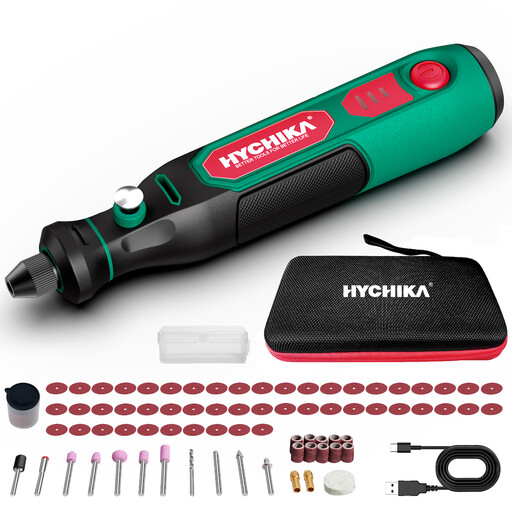
Why This Fits Their Persona: A practical starting point for DIY repairs, jewellery projects, model work and light engraving without committing to a full laser system.
Its 77-piece set makes the included accessories clear, reducing the need to buy basic drilling, polishing and engraving bits immediately.
3.6V cordless design, USB-C charging, 250g weight and three listed speed ranges.
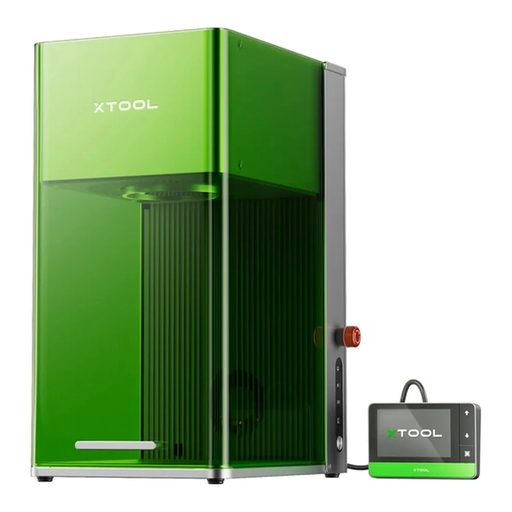
Why This Fits Their Persona: Designed for certified professional users handling jewellery, metal, wood and commercial personalisation work.
The fibre and diode combination makes the laser types explicit, helping commercial buyers match the machine to different material categories.
20W fibre and 20W diode sources, smart camera positioning, automatic edge detection and listed 3D engraving functions.
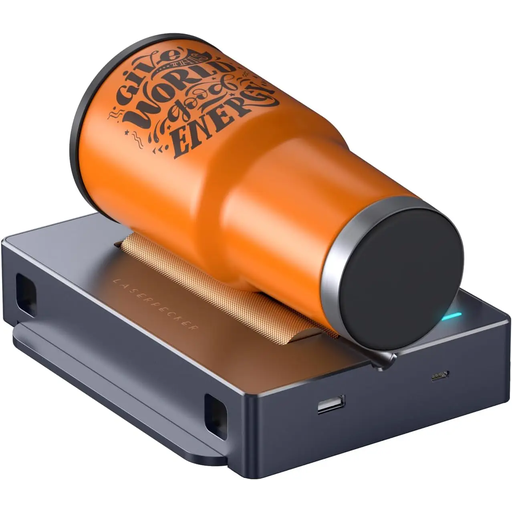
Why This Fits Their Persona: Suitable for makers and small businesses producing cylindrical designs on bottles, cups, jugs and glasses.
It states compatible LaserPecker models, operating modes and the LP2 Plus bracket requirement before purchase.
360-degree cylindrical operation, 100 × 2,000 mm maximum stated area and three operating modes.
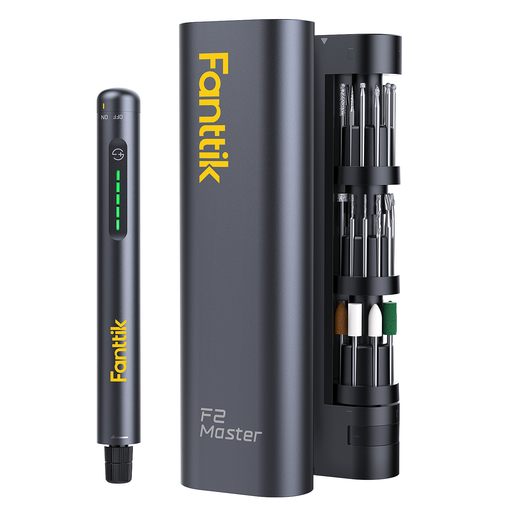
Why This Fits Their Persona: A portable option for 3D-print finishing, carving, polishing and light workshop tasks where bench space is limited.
The listed 2.3mm collet size and 35 included accessories clarify what can be fitted and what arrives in the kit.
Five speed settings, maximum listed speed of 25,000 RPM, USB-C charging and a rotating accessory stand.
We have compiled a complete, real-time list of products that fully satisfy these strict selection criteria and UK safety regulations.
Some consumer machines may be designed for controlled personal use, but suitability depends on the laser class, enclosure, materials, ventilation and operating environment. The xTool F2 and xTool F1 Ultra listings specify professional or commercial use, so they should not be treated as household DIY devices.
Running costs include electricity, ventilation, replacement lenses or filters, cleaning supplies, maintenance and consumables. Rotary accessories may add little power consumption, but they can increase setup time and require compatible brackets or fixtures.
No. Check the roller’s supported dimensions, weight, curvature and compatibility with your engraver. Cylindrical objects with tapered sides, handles or uneven surfaces may require different positioning or may not be suitable for the selected accessory.