
24/7 Customer Support

Free returns

Same-day & Next-day Delivery

Quality Guaranteed

Unlock Your Welcome Offers: FREE Delivery | Up to 80% OFF | Free 30-day JoyPlus trial
Download the APP
Choosing between laser engraving machines and rotary tools depends on your materials, workspace, production volume and finishing requirements. A laser can create consistent marks without physical contact, while a rotary tool is useful for hands-on engraving, polishing, drilling, sanding and small repairs.
The wrong purchase can become expensive quickly. Before comparing features, look beyond headline speed and accessory counts to understand what the equipment can realistically do in a UK home workshop, studio or commercial setting.
A higher wattage figure does not automatically mean a machine is suitable for every material. Diode, infrared and fibre lasers interact with different surfaces in different ways. Check whether the specification relates to optical output, the laser type, the maximum work area and the material list.
For example, a machine designed for wood and leather may not mark metal in the same way as a fibre or infrared system. If your work involves jewellery or stainless steel, confirm that the product is designed for those materials rather than relying on a general “engraver” description.
A flat-bed laser may not handle bottles, tumblers or wine glasses without a suitable attachment. A cylindrical laser engraving roller rotates the item as the laser works, but compatibility, maximum diameter and usable engraving area still matter.
Check the supported machine models and whether an additional bracket is needed. Also consider how securely the object sits on the rollers. Slippage can distort a design and waste both the blank item and consumables.
A 77-piece DIY rotary tool kit may offer useful variety, but the chuck or collet size determines which bits can actually be used. Likewise, a compact engraving pen may be convenient for detail work but unsuitable for continuous production.
Before purchase, confirm:
For a wood and metal engraving machine, identify the laser technology first. Diode lasers are commonly used for materials such as wood, leather and some coated surfaces. Infrared systems are designed for certain metal-marking applications, while fibre lasers are associated with more demanding metal processing.
The work area also affects productivity. A compact desktop machine may suit personalised items and small batches, whereas a commercial workshop may need camera positioning, batch-processing functions and a larger working envelope.
For professional laser equipment, read the supplied safety documentation before ordering. Laser products can present optical, fire and mechanical hazards. Consider BS EN 60825-1 classification information, guarding, ventilation, extraction, fire precautions and training. Products marked for professional or commercial use should not be treated as casual home DIY equipment.
If you are buying a LaserPecker LP2 rotary attachment, check the model compatibility carefully. The referenced roller supports LP2, LP3, LP4 and LP5 engravers and offers a maximum engraving area of 100 mm × 2,000 mm. It also provides Cylindrical, Trolley and Slab modes.
The LP2 Plus requires an additional C-shaped bracket for stable operation. This is an important cost and setup consideration. Measure your intended bottles, cups or jugs before purchasing and do not exceed the stated dimensions.
For a polishing and drilling tool, speed range is more useful than a single maximum-speed figure. Lower settings can help with delicate materials and controlled finishing, while higher settings may be appropriate for certain sanding or polishing tasks.
A lightweight mini cordless rotary tool can reduce hand fatigue during model-making, jewellery finishing and small repairs. However, battery runtime, charging time and the weight of the attached bit should also be considered. A tool with a comfortable grip and straightforward speed selection may be more practical than one with an unnecessarily large accessory collection.
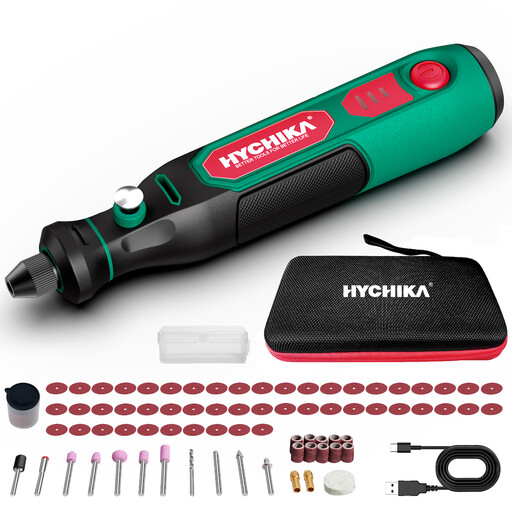
Why This Fits Their Persona: A practical starting point for UK hobbyists working on small crafts, models, jewellery, decoration and household repairs without buying separate tools.
The kit specifies a 3.6 V motor, three speed levels, USB-C charging and a 2.5 mm accessory range, making the contents easier to assess than an unspecified accessory bundle.
77 included accessories, a 250 g body and USB-C charging support grinding, polishing, drilling and engraving tasks.
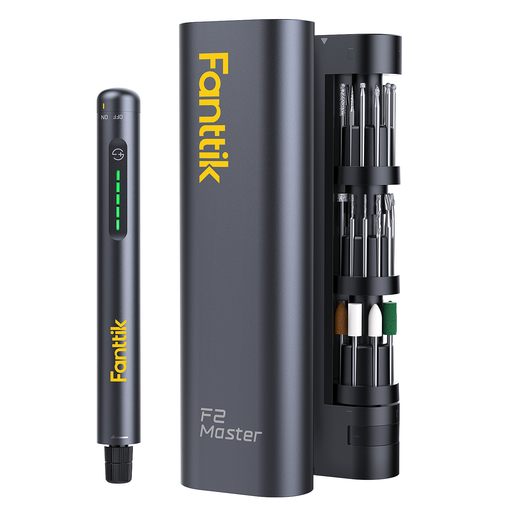
Why This Fits Their Persona: Suitable for makers who want a compact engraving pen-style tool with finer speed control, organised storage and cordless handling.
The tool identifies its 3/32-inch, or 2.3 mm, accessory compatibility and five speed settings, helping buyers match bits and applications before ordering.
It offers a stated maximum speed of 25,000 RPM, 35 accessories, LED indicators and USB-C charging.
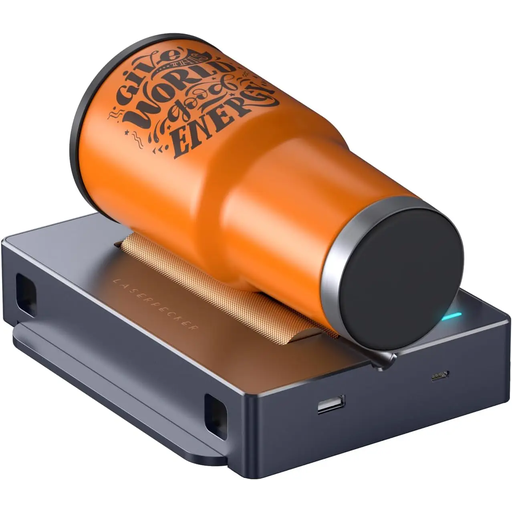
Why This Fits Their Persona: A focused upgrade for makers and small businesses already using a compatible LaserPecker engraver and producing personalised cylindrical items.
Compatibility is stated for LP2, LP3, LP4 and LP5, while the LP2 Plus bracket requirement is clearly noted. This reduces the risk of buying an attachment that cannot be stabilised correctly.
The electric roller supports 360-degree cylindrical engraving and three operating modes, with a stated 100 mm × 2,000 mm maximum area.
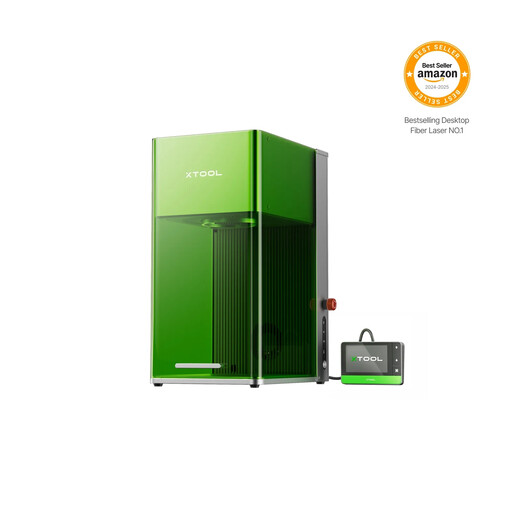
Why This Fits Their Persona: Intended for certified professional use in commercial material processing, including higher-volume jewellery, metal and wood work.
The product is clearly designated for certified professional and commercial use. Buyers should read the safety documents, confirm business suitability and arrange appropriate controls before purchase.
The listed configuration combines 20 W fibre and 20 W diode lasers, with a smart camera and stated processing speed of up to 10,000 mm/s.
We have compiled a complete, real-time list of products that fully satisfy these strict selection criteria and UK safety regulations.
Allow space for ventilation, dust control and safe storage of blanks and accessories. Laser machines may require extraction or an enclosure appropriate to the material being processed. Rotary tools generate dust and particles, so eye protection, suitable respiratory controls and regular cleaning are sensible workshop measures.
Running costs include electricity, replacement bits, polishing pads, filters, laser lenses and failed blanks. A cordless rotary tool also has battery-related considerations, while a laser attachment may increase productivity only if you regularly engrave cylindrical products. Comparing the cost per finished item is more useful than comparing the purchase price alone.
Some compact machines are designed for hobby use, but suitability depends on the laser class, enclosure, ventilation, material and operating environment. Products labelled for professional or commercial use, such as the xTool F1 Ultra and xTool F2, should not be treated as household DIY equipment. Read the supplied safety documents and check the required qualifications and controls before ordering.
A precision rotary tool can be suitable for small-scale jewellery engraving, polishing and finishing when paired with the correct bit and speed. It requires a steady hand and produces physical contact with the material, unlike a laser. Check collet size, speed control and whether the included accessories match the metals or finishes you intend to work on.
Usually, yes. A cylindrical laser engraving roller is designed to rotate curved items so the engraving remains aligned around the surface. Confirm compatibility with your laser model, maximum item dimensions and any required bracket before purchase.