Teacher recording one guided commentary
If you will move between displays, desks or visual aids, choose a setup that keeps the microphone with you without making it difficult for staff or pupils to operate.


Choose a wired lavalier if one presenter can stay near a compatible recorder; choose a compact wireless system if they need to move around the classroom. For an unrepeatable commentary, give particular attention to monitoring or a separate onboard recording. If several wireless microphones will be used, assess frequency management and the UK operating requirements for the exact equipment.
If you will move between displays, desks or visual aids, choose a setup that keeps the microphone with you without making it difficult for staff or pupils to operate.
If the commentary cannot easily be recorded again, check how you will monitor the main recording and whether the system can capture a separate backup. RØDE describes onboard recording on its Wireless PRO transmitters.
Consider the number of microphones you may need, other radio equipment in the classroom and the operating frequencies of each system. Ofcom notes that licence-exempt spectrum is shared with other equipment.
Start with the presenter’s movement and the recording device. Then decide how you will check the audio and, if the commentary cannot be repeated, recover it if the main recording fails.
Choose it when: One presenter can stay near a recorder with a confirmed compatible microphone input.
Trade-off: The cable restricts movement and needs careful routing to prevent clothing noise.
Choose it when: One or two presenters need to move while recording to a compatible phone, computer or camera.
Trade-off: The system needs charging and shares radio spectrum with other classroom equipment.
Choose it when: Regular recording or additional microphones make frequency planning important.
Trade-off: Setup takes more planning, and lawful UK use depends on the exact operating frequencies and applicable requirements.
| Concern | What to check | Who this matters to |
|---|---|---|
| Recoverable speech recording | Check whether the exact kit records onboard, including audio from a separate lavalier if you plan to use one. Make a monitored test recording. | If I cannot repeat the commentary, I want a separate recording to fall back on if the wireless link or camera audio fails. Around 36% of consumers put that recovery need first. |
| Movement around the classroom | Confirm the receiver connection and supplied cables for your device; check whether a separate lavalier can connect to the transmitter if required. | While pointing out objects and moving between teaching materials, I need to keep speaking without managing a cable to the recorder. For around 29% of consumers, freedom to move is the primary need. |
| Connection to the recorder | Match the microphone or receiver to the exact camera, phone or computer input and intended recording app. A 3.5 mm TRS lavalier is not automatically compatible with a phone headset socket. | My recording device is already chosen, so a microphone that cannot connect to it would stop the session before it starts. Connection certainty comes first for around 21% of consumers. |
| Wireless frequency management | Test wireless equipment where it will be used. For UHF, confirm the variant’s tuning range and the requirements for the intended UK frequencies. | When several microphones or other wireless devices are in use, I need a workable frequency plan rather than relying on an advertised range. Around 14% of consumers make radio management their first concern. |
RØDE specifies a 3.5 mm TRS connection for the Lavalier GO. A socket that looks similar does not, by itself, establish the correct microphone input or power arrangement.
Check the exact recorder and microphone requirements together before choosing an adapter or connecting the lavalier directly.
The intended setup may also require a compatible adapter, audio interface or transmitter.
Ofcom identifies licence-exempt bands used by wireless microphones, but shared spectrum can also carry other low-power equipment. Licence status does not tell you how a link will behave in your classroom.
Test the kit with nearby wireless devices in use. For UHF equipment, check the exact frequency variant and the requirements for its intended UK operation.
DJI states that its Mic 2 distance figure is measured outdoors without obstructions or interference. That test condition does not describe a classroom recording.
Record a short walk-and-talk test from the positions the presenter will actually use, then listen to the result.
A capsule rubbing against fabric or a cable pulling at its clip can introduce noise even when the recorder connection works. RØDE and Shure both give placement and cable-management guidance.
Fit the microphone to the presenter’s actual clothing, secure the cable and test it while they move.
Clips, tape or other suitable mounting accessories may be needed for that clothing.
These product lines illustrate different recording routes; the brand name alone does not establish compatibility with your recorder.
Its range includes the wired Lavalier GO and wireless systems for one or two presenters.
The EW-D ME2 Set represents a digital UHF route with an ME 2 clip-on lavalier.
MoveMic One is a phone-first, single-channel wireless clip-on option.
Mic 2 is a compact wireless system relevant to receiver-based recording.
This wireless option is relevant if the presenter needs to move and the recording device can use its USB-C receiver. Check how the microphone is worn before choosing it specifically as a lavalier.
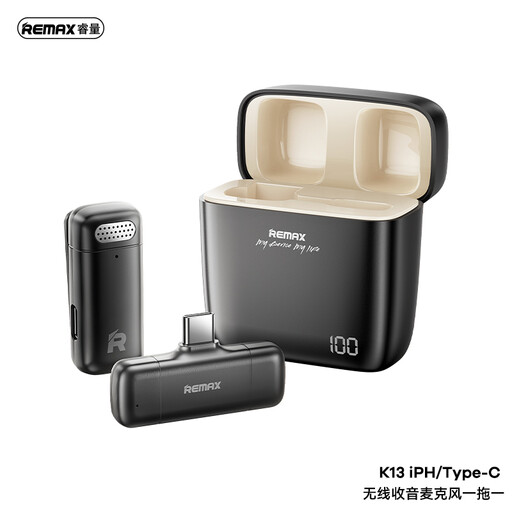 No image available
Consider this transmitter-and-receiver setup for a moving presenter if the intended recording device and app support its USB-C receiver.
The product information describes 2.4 GHz wireless transmission, a USB-C receiver and a 3.5 mm headphone jack on the receiver. Confirm its wearing and mounting design if a clip-on lavalier is essential, and check the battery runtime and recording arrangement for the planned session.
Use a wired lavalier when one presenter can stay near a compatible recorder and the cable can be routed safely; use wireless when they need to move while speaking. If several wireless microphones are planned, assess frequency management and the operating requirements of the exact system.
That depends on its operating frequencies and the conditions of use. Ofcom lists 173.8–175 MHz, 863–865 MHz and 2400–2483.5 MHz as ranges that can be used without a licence; check the exact equipment and applicable requirements, particularly for a UHF variant. Shared spectrum can still be affected by interference.
Secure it on clothing near the upper chest, away from fabric that rubs against the capsule, and support the cable so it does not tug at the clip. Test the placement with the presenter’s clothing and movements before the commentary.
If a voice recording relates to an identified or identifiable pupil, it may contain personal data, as described in Information Commissioner’s Office guidance. Follow the school’s current recording and data-protection process, including its arrangements for notice, access, storage and retention; the microphone choice does not settle those obligations.
It is worth considering when the commentary cannot be repeated and you need audio recorded separately from the wireless receiver or camera. RØDE describes that backup workflow for Wireless PRO; it also means transferring the files afterwards and does not replace careful microphone placement or a test recording.