Computer or recorder-based bulletin makers
If you record into an audio interface, dedicated recorder, camera or existing wireless transmitter, check its microphone input and power requirements against the lavalier you intend to use.


Choose a lavalier connection that matches the device recording your bulletin: a compatible recorder, camera or wireless transmitter may take a TRS microphone, while many phone and computer headset inputs use TRRS. Check the input and power requirements before buying, then make sure the microphone can sit securely on your chest without rubbing against clothing. RØDE suggests starting about 20–30 cm from the mouth for lavalier speech recording.
If you record into an audio interface, dedicated recorder, camera or existing wireless transmitter, check its microphone input and power requirements against the lavalier you intend to use.
If your phone, tablet or computer headset socket captures the bulletin, check that it accepts the lavalier’s TRRS connection. RØDE and Shure distinguish this route from camera-oriented TRS connections.
If you read bulletins on camera, consider where the clip and cable will sit on your clothing. RØDE’s placement guidance warns that fabric rubbing against the microphone can be audible.
For a home-studio news bulletin, establish how the microphone will feed your recording device before choosing its mounting arrangement or accessories.
| Concern | What to check | Who this matters to |
|---|---|---|
| Connection and power | Match the microphone’s TRS or TRRS wiring to the recording input; confirm any plug-in power and adapter requirements. | If my recorder cannot receive a signal from the microphone, its other features will not help me record a bulletin. Around 42% of consumers put connection and power compatibility first. |
| Direct phone or headset recording | Confirm a recording-capable TRRS input, or an adapter or interface specified to carry microphone input for your device. | I want to record straight into a phone or headset-equipped computer without relying on a camera-style microphone input; for around 25% of consumers, that direct workflow is the primary concern. |
| On-camera placement | Check the clip, cable route and supplied mounting accessories; allow for a chest position about 20–30 cm from the mouth, as RØDE advises. | When I read on camera, I need the microphone to stay in place without fabric brushing it during a take. Secure, tidy placement comes first for around 33% of consumers. |
TRS and TRRS plugs can look alike but use different wiring, so a plug that fits may still fail to deliver microphone audio.
Check both ends of the connection. Use an adapter or interface only when its maker specifies microphone-input compatibility for your device and lavalier.
A separate compatible adapter or microphone interface may be needed.
An omnidirectional lavalier can pick up surrounding sound, and clothing touching the capsule may be heard in a bulletin.
Make a short recording in the room. Start with the microphone on your chest about 20–30 cm from your mouth, following RØDE’s guidance, then secure the clothing and cable away from the capsule.
The Audio-Technica ATR3350x has an in-line LR44 battery pack with an on/off switch; a switched-off or depleted battery can interrupt recording.
If you choose this model, check the switch and battery before each bulletin and keep a tested spare.
The setup also requires replacement LR44 batteries.
GOV.UK’s guidance for Great Britain describes UKCA and CE marking in terms of the manufacturer’s belief that relevant product requirements are met. Neither mark establishes speech clarity or compatibility with your recorder.
Check the microphone’s connection, power needs and supplied accessories separately from any applicable conformity marking.
Its Lavalier GO and Lavalier II are wired TRS options for compatible microphone inputs, including relevant RØDE wireless-transmitter setups.
The MOTIV MVL is a TRRS lavalier intended for compatible portable-device speech recording.
The ATR3350x is a battery-powered wired option for compatible cameras, DSLRs and handheld recorders.
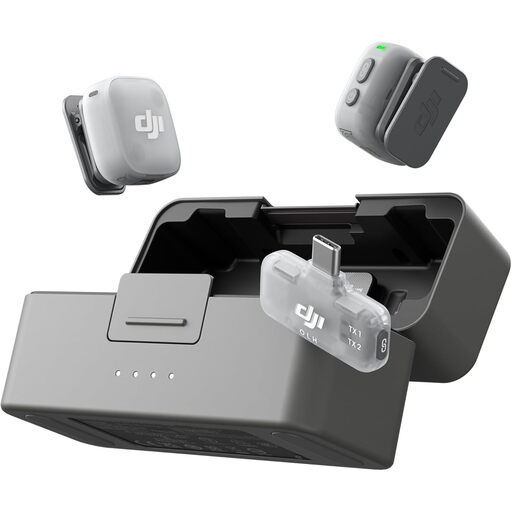
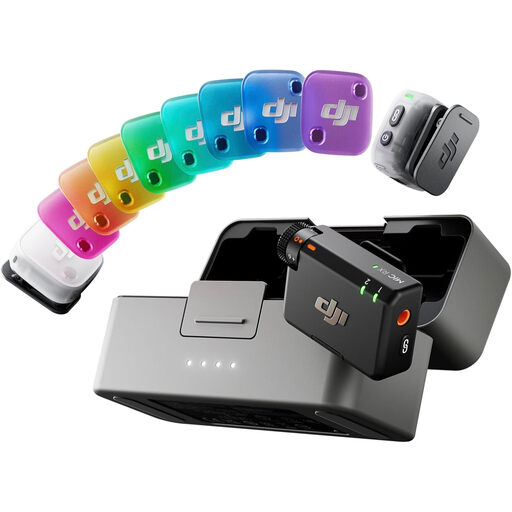
These DJI microphone kits are options for a hands-free bulletin setup rather than replacements for every wired TRS or TRRS route. Before choosing either configuration, check how it supplies microphone audio to your intended device and recording app, and how you will attach it to your clothing.
 No image available
Consider this configuration if you want a hands-free microphone kit for phone-based bulletin recording, provided its connection works with your phone and recording app.
The named kit contains 2 TX, 1 Mobile RX and a charging case. Check the clothing attachment method and included mounting accessories for your preferred chest position.
 No image available
Consider this configuration for a hands-free bulletin setup if its receiver can feed microphone audio to your intended device and recording app.
The named kit contains 2 TX, 1 RX and a charging case. Check the receiver connection and how the microphone attaches to clothing before choosing it for on-camera use.
Buy the connection that matches your recording input. RØDE notes that TRS and TRRS are wired differently: check the exact input on your recorder, camera, phone or computer, along with any power or adapter requirements, rather than relying on the plug’s shape.
Start on the chest about 20–30 cm from your mouth, as RØDE recommends for lavalier placement. Keep the capsule and cable clear of moving clothing, then make a short test recording in your usual reading position.
Do not assume it will: Shure says its MVL does not work with USB-C-only computers merely by adding an adapter cable. Check for an interface explicitly specified to accept the MVL’s microphone connection and work with your computer and recording software.
No. GOV.UK’s Great Britain guidance relates those marks to the manufacturer’s belief that relevant product requirements are met, not to speech clarity or recorder compatibility. Assess the connection and make a recording in your intended setup to judge whether it meets your needs.