Phone-first recorder
You record introductions on a phone or tablet and need to match its headset input, or a suitable adapter, to the lavalier’s wiring.


Choose the microphone connection to match your recording device: a compatible phone may need a TRRS lavalier, while a recorder, camera or wireless transmitter may take a TRS model. For a seated introduction, a compatible wired lavalier avoids wireless pairing; choose a wireless setup when movement or cable-free framing matters, and check adapters, microphone power and the recording connection before buying.
You record introductions on a phone or tablet and need to match its headset input, or a suitable adapter, to the lavalier’s wiring.
You record into a camera, audio recorder, computer interface or existing transmitter. The microphone input and its power requirements matter more than a phone-oriented connection.
You need to move while speaking, keep the microphone less visible or use it repeatedly in demanding conditions. Placement and system compatibility become part of the choice.
Start with the recording input. Then decide whether simple seated speech, discreet movement or resilience under frequent wear is your main priority.
| Concern | What to check | Who this matters to |
|---|---|---|
| Device connection | Match the microphone’s TRS or TRRS wiring to the input; confirm any adapter and plug-in power requirements. | If I record directly to my chosen device, I need a connection that works without guessing whether an adapter will fix it. Around 40% of consumers put connection compatibility first. |
| Spoken-word setup | Check the clip, windscreen, cable length and any battery requirement for the exact model. | For a short seated introduction, I want to position the mic and start recording without managing a wireless kit. A further 30% of consumers chiefly value a straightforward speech-recording workflow. |
| Placement and movement | Check how the mic attaches and routes around clothing; for wireless use, confirm the transmitter input and recording connection. | When I move or appear on camera, a visible cable or prominent mic may get in the way. Around 20% of consumers make discreet placement or freedom to move their primary concern. |
| Repeated demanding use | Check the exact connector variant, mounting accessories and stated moisture protection. | If I wear a mic repeatedly in moisture-prone production conditions, secure placement and suitable protection matter more to me than a basic desk setup. Roughly 10% of consumers prioritise resilience for demanding use. |
TRS and TRRS plugs can look alike but follow different connection paths. RØDE identifies a TRS/TRRS mismatch as a common cause of recording connection problems.
Identify the exact input on your phone, camera, recorder, interface or transmitter, then confirm the microphone wiring and any supported adapter.
A mismatched connection may require an additional adapter or interface.
RØDE specifies a TRS input and plug-in power for the Lavalier GO, while the Lavalier II has a locking TRS connector. Their connection requirements should not be treated as interchangeable.
Check the input, power provision and locking-connector requirement against the exact microphone and recording device.
A wireless system adds pairing and charging to the recording workflow. Ofcom also notes that licence-exempt wireless ranges can experience interference.
If you record seated near the device, compare a correctly connected wired lavalier first. Choose wireless when movement or distance from the recorder matters to you.
A suitable microphone can still pick up breath noise or clothing movement if it is poorly positioned or secured.
Use compatible wind protection, keep the cable from rubbing against clothing and make a short test recording in the position you plan to use.
Its lavalier range includes the 3.5 mm TRS Lavalier GO and the lower-profile Lavalier II, alongside compatible wireless recording systems.
The MOTIV MVL is a lavalier intended for compatible phone and tablet recording through a 3.5 mm TRRS connection.
The ATR3350xiS is a wired lavalier for compatible cameras and handheld recorders, with an included mic/headphone adapter for other supported connections.
The MKE Essential Omni is directed towards discreet placement and more demanding live-style use.
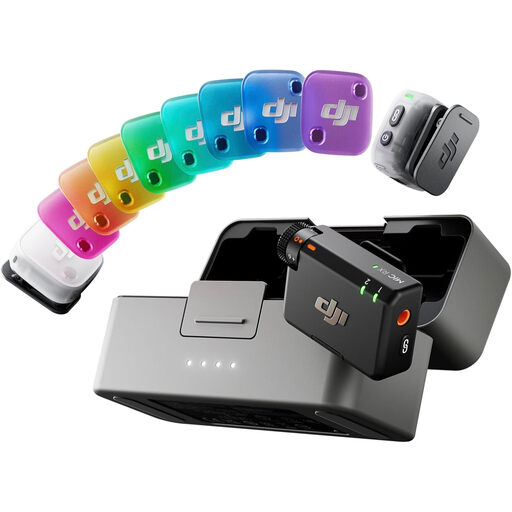
This DJI microphone bundle is a choice to examine if you want a mobile recording setup for introductions. Confirm how it connects to your recording device and whether its attachment suits the lavalier placement you need.
 No image available
Consider this bundle for introductions where you need to move while recording, provided its connection and attachment method suit your setup.
The bundle is listed with two transmitters, one receiver and a charging case. Confirm compatibility with your phone or other recording device and the app you intend to use.
No: the plug’s TRS or TRRS wiring must suit the phone input or a compatible adapter. Shure specifies the MOTIV MVL for suitable mobile TRRS connections, while RØDE notes that TRS/TRRS mismatches commonly cause connection problems.
A wireless system is not necessary solely because you are recording a podcast introduction. A compatible wired lavalier avoids pairing when you record seated near your device; wireless is worth considering if you need to move or keep cables out of the frame.
Some wireless microphone frequencies can be used without a licence in the UK, but check the equipment’s frequency and applicable conditions. Ofcom lists 173.8–175 MHz, 863–865 MHz and 2400–2483.5 MHz as licence-exempt ranges; shared use can still mean interference.
Secure the microphone in a suitable position and use its supplied or compatible wind protection. RØDE lists a pop filter for the Lavalier GO and a furry windshield for the Lavalier II; Shure supplies a windscreen with the MVL.