Choose the connection to your recording device before comparing lavalier microphones: a phone-oriented TRRS model, a 3.5 mm TRS model and a professional bodypack microphone need different compatible inputs. A wired setup suits an introduction delivered near the recorder; wireless is worth considering when the presenter needs to move, provided the recording path, power and UK wireless-use conditions are checked. In a busy hall, secure placement and a test recording also matter.
Who this setup suits
Phone-first solo presenters
If you record an introduction directly to a phone or tablet, check its external-microphone input and any adapter before choosing a lavalier. Shure documents its MVL as a TRRS microphone for compatible portable recording devices; a TRS plug is a different connection.
Fixed-position hall hosts
If you can stay near the recorder, a wired microphone avoids a wireless transmitter and receiver setup. Confirm the recorder’s microphone input, the lavalier’s power requirement and a safe route for the cable.
Mobile event presenters
If you need to walk while delivering the introduction, a wireless bodypack or wearable system avoids a trailing cable. Allow time to check the recording connection, batteries, interference at the hall and applicable UK wireless-use conditions.
What matters when choosing
Start with the device that will record the introduction, then decide whether the presenter needs to move. Use a short recording in the hall to judge placement and unwanted sound.
| Concern |
What to check |
Who this matters to |
| Recording-device compatibility |
Match the microphone connector and power requirement to the exact device input; confirm any adapter and external-microphone recording path. |
If I record straight to a phone or an existing recorder, I need the microphone to connect and receive the right power. Roughly 33% of consumers put recording-chain compatibility first. |
| Speech amid hall noise |
Consider the presenter’s position and pickup pattern, then test-record in the hall. A directional capsule also needs suitable placement and a compatible audio chain. |
With other sounds in the hall, I want the spoken introduction to remain clear. Around 27% of consumers make control of background sound their main concern. |
| Movement and setup |
For wired use, check cable routing; for wireless use, check batteries, the operating arrangement and interference at the venue. |
If I need to walk while speaking, a trailing cable may get in the way. Roughly 27% of consumers prioritise movement and a workable recording setup. |
| Mounting and speech noise |
Check the clip and windscreen, secure the cable, and record a clothing-and-movement test. Shure recommends a 15–25 cm mouth distance for the MVL specifically. |
When the presenter turns or handles notes, I want the microphone to stay in place without distracting rustle. Around 13% of consumers put secure mounting and speech-noise control first. |
Mistakes to avoid
-
Assuming every 3.5 mm plug works with the same device
RØDE specifies a TRS connector and plug-in power for the Lavalier GO, while Shure specifies a TRRS connector for the phone-oriented MVL. The shared plug diameter does not establish compatible wiring or power.
Check the exact input on your recording device, the microphone’s connector and power needs, and any required adapter before ordering.
A compatible adapter or a different recording interface may be needed.
-
Choosing wireless to fix room sound
Wireless allows movement; it does not, by itself, remove audience noise or hall ambience. Shared wireless spectrum can also be subject to interference.
Use a wired connection if the presenter can stay in place. If movement calls for wireless, check current Ofcom requirements for the system and test it at the hall with charged components.
-
Expecting an omnidirectional lavalier to isolate speech
An omnidirectional capsule also picks up sound around the microphone. Shure describes ambient-noise rejection for its directional MX184 and MX185, but those models require compatible professional connections and careful placement.
Choose a pickup pattern alongside the complete recording setup, then listen to a test from the presenter’s actual position.
-
Leaving clip position until recording starts
Clothing contact, loose cable and breath noise can distract from an otherwise usable introduction. Shure supplies a clip and windscreen with the MVL; RØDE lists a clip and pop filter for the Lavalier GO.
Fit the microphone before the session and listen while the presenter speaks, turns and handles notes.
Brands to consider for these setups
RØDE
The Lavalier GO is a wearable option for a compatible 3.5 mm TRS microphone input or RØDE Wireless GO transmitter.
- RØDE lists an omnidirectional capsule, mounting clip, pop filter and cable management for the Lavalier GO.
- It requires plug-in power from a compatible TRS socket; do not treat it as a direct replacement for a TRRS phone microphone.
Shure
Shure’s MVL serves a compatible phone or tablet recording path, while its Microflex MX184 and MX185 belong to professional directional-microphone setups.
- The MVL has a 3.5 mm TRRS plug, tie clip and windscreen; Shure documents directional ambient-noise rejection for the MX184 and MX185.
- The Microflex models’ TA4F connection calls for a compatible bodypack or other appropriate audio chain, rather than a direct phone connection.
Sennheiser
Sennheiser describes the MKE Essential Omni as a lavalier intended for demanding live-stage use.
- Its described features include moisture protection, strain-resistant cable connections and mounting options.
- Check the exact variant, connector and complete recording or transmitter path before choosing it for a hall introduction.
Joybuy wireless microphone option
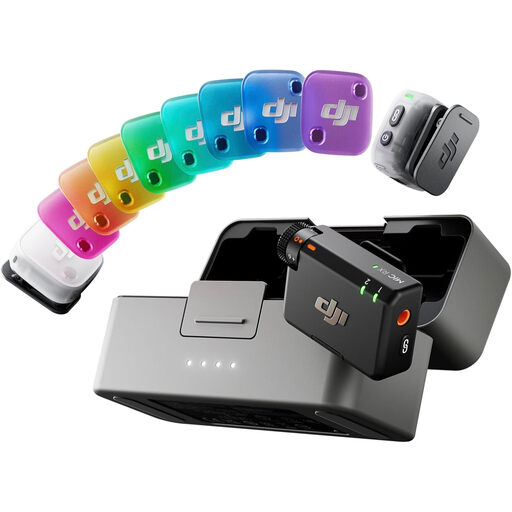
This wearable wireless option is relevant if the presenter needs to move during an introduction. Before choosing it, confirm how its audio reaches your intended recording device and app, and check the wireless-use arrangement for the hall.
 No image available
DJI Mic Mini 2 (2 TX + 1 RX + Charging Case)
A wearable wireless option to consider when the presenter needs to move rather than remain beside a wired recorder.
The named bundle has two transmitters, one receiver and a charging case. Confirm compatibility with your recording device and app, the operating band and applicable UK use conditions before purchase.
Joybuy
Frequently asked questions
Will any 3.5 mm lavalier work directly with my phone?
No: the connector and the phone’s external-microphone path must match. Shure specifies TRRS for the MVL, whereas RØDE specifies TRS for the Lavalier GO; check your phone, recording app and any adapter before buying.
Should I use wired or wireless for a community-hall introduction?
A wired lavalier is a simpler route when the presenter can remain near a compatible recorder and the cable can be routed safely. Choose wireless when movement makes a cable impractical, and allow for power, connection and venue interference checks.
What should I check before using a wireless mic in a UK hall?
Check the system’s operating band against current Ofcom requirements and any applicable licensing conditions before use. Shared wireless spectrum may experience interference, so test the complete recording setup at the venue.
Where should I clip a lavalier for spoken introductions?
Secure it where clothing will not rub the capsule, then listen to a test while the presenter speaks and moves normally. For the Shure MVL specifically, Shure recommends a position 15–25 cm from the mouth; do not assume that distance applies to every model.


