Who is this for?

Recording directly on a phone

If you want to record the greeting on your phone or tablet without a separate recorder, check its microphone connection and any adapter before choosing a lavalier. Shure specifies a compatible TRRS connection or CTIA-compliant adapter for its mobile-focused MVL.

Using an existing recording setup

If you already have a recorder, camera, computer microphone input or wireless transmitter, start with the input it accepts. RØDE Lavalier GO and Deity W.Lav Pro illustrate TRS routes, but their connectors must match the equipment you intend to use.

Recording in an echo-prone room

If hard surfaces make speech sound distant, a securely clipped lavalier lets you place the capsule close to your mouth. Shure’s placement guidance cautions that a microphone cannot correct the room itself, so listen to a test recording before using the greeting.

What matters when choosing?

Start with the device that will capture the greeting: a compatible TRRS lavalier is a direct mobile route, while TRS suits an appropriate microphone input or transmitter. Consider a wireless receiver if you also need mobility or regular reuse; whichever route you choose, placement and the room still matter.

Concern What to check Who this matters to
Device connection Check whether your device accepts a TRRS headset microphone, a TRS microphone or a compatible receiver. If you need an adapter, confirm that it carries microphone input. I want to record straight into my phone or existing equipment without discovering that the plug only fits physically; around 42% of consumers would put connection compatibility first.
Room sound and placement Check how you can secure the capsule and cable close to your mouth. Listen for reverberation, background noise and clothing rub in a test recording. If the room makes my voice sound distant, I need a usable close-mic position while accepting that the microphone will not remove echo; room sound would be the primary concern for around 33% of consumers.
Setup and reuse Decide whether a wired recording is enough or whether you need wireless mobility. For wireless kits, check the receiver connection and charging arrangements. For one short greeting, I would rather avoid extra components unless I will use them for mobile recordings later; around 25% of consumers would prioritise setup simplicity and reuse.

Buying pitfalls

  • Assuming all 3.5 mm plugs work alike

    Shure specifies a TRRS mobile connection for the MVL, while RØDE Lavalier GO uses TRS for compatible microphone inputs and wireless transmitters. A plug fitting a socket does not establish that the microphone will work.

    Check your recording device’s input and the microphone’s plug standard. If an adapter is required, confirm that it supports an external microphone.

    A mismatched connection can mean needing a suitable microphone-capable adapter or audio interface.

  • Expecting the lavalier to remove room echo

    Reflected speech remains audible in an untreated room. RØDE advises against placing a microphone too far away, and Shure notes that a microphone cannot improve the room’s acoustics.

    Clip the microphone close to your mouth, choose a quiet time and listen to a test recording before submitting the greeting.

  • Choosing wireless for a stationary one-off recording

    A wireless kit still needs a receiver that connects to your device and a charged transmitter. Its mobility does not, by itself, address room reverberation.

    Compare a compatible wired connection first; choose wireless if movement or later reuse makes the additional setup worthwhile.

    Check how the transmitter and receiver charge and whether the cables needed for your device are included.

  • Overlooking clothing and cable noise

    Shure warns that fabric rubbing against the capsule or cable can create contact noise, which may stand out in a brief spoken greeting.

    Secure the capsule and loose cable, then record a spoken test while wearing the clothing you plan to use.

Relevant brands for reference

Shure

The MOTIV MVL is a mobile-focused lavalier with a 3.5 mm TRRS connector for compatible phones and tablets.

  • Shure lists a clothing clip and windscreen with the MVL.
  • Confirm the device’s TRRS connection or an appropriate CTIA-compliant microphone adapter; do not assume a TRS input or USB-C port will accept it directly.

RØDE

Lavalier GO uses a 3.5 mm TRS connector for compatible microphone inputs and RØDE Wireless GO transmitters.

  • RØDE specifies a mounting clip and pop filter for this model.
  • Check the connected device’s input and plug-in power; Lavalier GO is not presented as a direct TRRS-phone microphone.

Deity

W.Lav Pro (3.5 mm) is a wired option for a compatible locking-connector wireless system or recording setup.

  • Deity specifies a 1.8 m cable, foam pop filter and IP57-rated construction for this variant.
  • Its locking 3.5 mm connector needs compatible equipment; those construction features do not resolve untreated-room reverberation.

Sennheiser

Sennheiser describes the MKE Essential Omni EW as a lavalier designed for demanding stage use.

  • Its wearable format is relevant when a discreet microphone can be mounted close to the mouth.
  • Check the exact connector variant and receiving equipment rather than treating it as a direct-phone option.

Joybuy product choices

This lavalier is listed with an iOS interface and may be worth considering for phone-based recording once you have confirmed how it connects to your device. For a telephone greeting, check that it can be secured close to your mouth and test the result in the room where you will record.
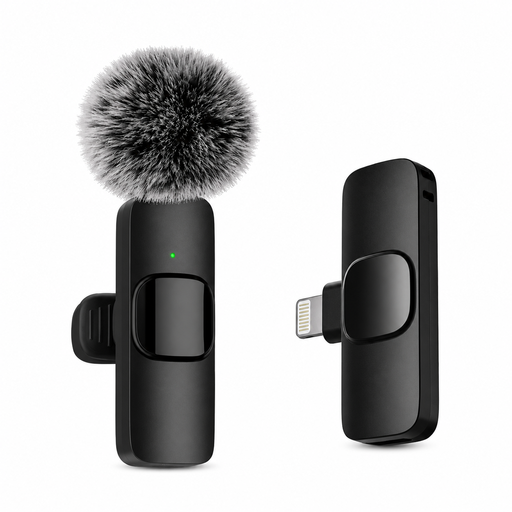
Verbex K9-Black Single-Mic lavalier microphone

Verbex K9-Black Single-Mic lavalier microphone

A phone-oriented option to consider if its stated iOS interface matches the device you will use to record the greeting.

Confirm the exact connector and connection method before ordering: the product information describes it as wireless but also gives conflicting wireless details. Check how the microphone is mounted for close speech pickup.

Joybuy

Frequently asked questions

Will a lavalier remove echo from an untreated room?

No. Shure’s placement guidance explains that a microphone cannot separate direct speech from room reflections or improve the room itself. Placing the capsule close to your mouth can help your voice stand out, but make a test recording and reduce nearby noise where practical.

Where should I clip the microphone for a greeting?

Clip it securely on your chest or lapel, roughly a hand-span from your mouth, and keep the capsule and cable clear of rubbing fabric. Shure identifies clothing contact as a source of noise, so listen to a short test before recording the final greeting.

Can I plug any 3.5 mm lavalier into my phone?

No. Shure specifies TRRS for compatible mobile use with the MVL, whereas RØDE specifies TRS microphone inputs or compatible transmitters for Lavalier GO. If your phone needs an adapter, check that it accepts an external microphone and matches the required connection.

What audio file should I make for my telephone greeting?

Use the format required by your telephone, voicemail, PBX or IVR provider rather than assuming one format will work everywhere. Before the final recording, check its accepted file type, sample rate, channel configuration, maximum duration and upload method.