Who needs which setup?

Teachers recording short scenes with small groups

If two pupils need to move while delivering dialogue, a two-transmitter wireless system can capture both microphone sources. Check how its receiver handles the recordings, and monitor a rehearsal: Ofcom notes that the licence-exempt 2.4 GHz band is shared with equipment including Wi-Fi and Bluetooth.

Teachers running a simple recording station

For one narrator or performer at a time, a wired lavalier avoids wireless setup. Check the recording device's microphone input before choosing a plug: RØDE's Lavalier GO uses 3.5 mm TRS, while Shure's MVL is designed for compatible mobile-device connections.

Drama and media staff working around classroom noise

A cardioid lavalier may help limit unwanted sound when several pupils are active nearby. Shure describes this pickup pattern for its CVL, but the microphone still needs careful placement and a compatible wireless bodypack.

What matters when choosing?

Wired lavalier

Choose it when: One pupil records at a time and can remain close to a compatible device.

Accept: The cable restricts movement, and a similar-looking 3.5 mm socket does not guarantee the right microphone connection.

Two-transmitter wireless system

Choose it when: Two speaking performers need to move during the same scene.

Accept: Transmitters need charging and the audio needs monitoring; two microphone sources do not cover a larger cast individually.

Concern What to check Who this matters to
Dialogue while moving Count simultaneous speakers and check whether the system can record the tracks your scene requires. Rehearse wireless recording in the intended room. If pupils move through their lines, I need a usable take without losing a speaker's dialogue. Around 36% of consumers put reliable moving-speaker capture first.
Simple solo recording Confirm the device has a compatible microphone input and that the cable permits the planned movement. For narration or solo lines, I would rather manage a cable than set up wireless equipment. Simplicity is the primary concern for around 29% of consumers.
Nearby classroom noise Consider the lavalier's pickup pattern and placement; check that a directional model connects to the intended bodypack. When other pupils are active nearby, I want the speaker's voice to remain understandable. Around 21% of consumers prioritise limiting surrounding sound.
Recording-device compatibility Check the exact device's input, plug or adapter requirements and, for wireless recording, the receiver and app workflow. I need the microphone to work with the phone, tablet, camera or recorder the school already uses. For around 14% of consumers, that compatibility is the main concern.

Mistakes to avoid

  • Expecting two channels to cover the whole cast

    A two-transmitter kit captures two microphone sources at once, not an individual track for every pupil in a group scene.

    Count the speaking roles in each take and decide whether to record scenes in pairs or arrange a suitable multi-channel workflow.

    A larger cast may require more recording equipment or time to stage separate takes.

  • Assuming licence-exempt wireless cannot suffer interference

    Ofcom identifies the 2.4 GHz range as licence-exempt for wireless microphones and notes that it is shared with Wi-Fi, Bluetooth and other equipment.

    Rehearse in the intended classroom during normal wireless activity, monitor the audio where possible and keep a fallback recording plan.

  • Choosing the microphone before checking its connection

    TRS and TRRS plugs can look alike while serving different microphone inputs. RØDE and Shure specify different connection requirements for their wired lavaliers.

    Identify the exact recording device and confirm the microphone-input standard and any adapter requirement before ordering.

    The recording setup may also need a compatible adapter, interface or cable.

  • Overlooking how pupil recordings will be handled

    The Information Commissioner's Office says children have data-protection rights over their personal information. Recording and sharing pupils' voices therefore calls for the school's own procedures, particularly if a finished play will leave the classroom.

    Check the school's process for informing pupils and families, controlling access, retaining recordings and approving any sharing before the project begins.

Brands to consider for these setups

RØDE

Its relevant products span a wired lavalier for compatible inputs and a two-channel wireless system.

  • RØDE specifies two channels, 32-bit float onboard recording and 32 GB per transmitter for Wireless PRO.
  • Lavalier GO has a 3.5 mm TRS connector; check the input or adapter rather than assuming it plugs directly into a phone.

Shure

Its relevant products include a mobile-device lavalier, a cardioid bodypack lavalier and a two-microphone wireless kit with a receiver.

  • The MVL is designed for compatible portable-device inputs, while Shure describes the CVL's cardioid pattern as rejecting unwanted noise.
  • The CVL needs a compatible Shure bodypack. For MoveMic Two, Shure recommends MOTIV apps for direct-to-phone use.

Sennheiser

The MKE Essential Omni is a theatre-oriented lavalier component that may be relevant to a drama department's recording system.

  • Sennheiser describes the MKE Essential Omni as designed for demanding everyday stage use.
  • It is not a complete classroom recording setup; confirm the compatible transmitter, receiver and recording path.

Joybuy product choices

This two-transmitter wireless kit is a choice to examine for scenes with two moving performers. Confirm how it records each speaker and whether it works with the school's intended device and recording app.
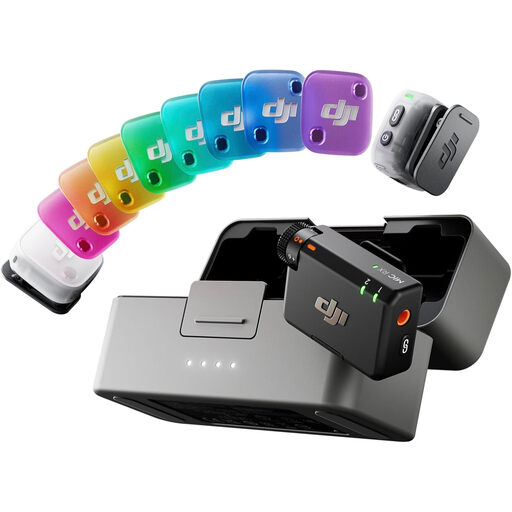
DJI Mic Mini 2 kit with two transmitters, receiver and charging case

DJI Mic Mini 2 (2 TX + 1 RX + Charging Case)

For a scene involving two performers, this kit lists two transmitters and one receiver. Check whether the intended recording workflow captures their voices on separate tracks.

The kit includes a charging case. Confirm compatibility with the school's recording device and app, and test the wireless setup in the classroom.

View on Joybuy

Frequently asked questions

Can a school use a 2.4 GHz wireless lavalier without a UK wireless-microphone licence?

Ofcom lists 2400–2483.5 MHz among licence-exempt ranges for wireless microphones, subject to the applicable exemption requirements. That does not guarantee a clean recording: the band is also shared with Wi-Fi, Bluetooth and other equipment, so test the intended system in the classroom.

Will a two-transmitter kit record a whole class on separate tracks?

No: a two-transmitter kit provides two microphone sources at once, not a separate source for every pupil. For a larger cast, plan smaller recording groups or check the channel capacity of a suitable multi-channel setup; also confirm how the chosen kit saves or routes its two sources.

Will any 3.5 mm lavalier work with a school phone or tablet?

No. A matching socket shape does not establish microphone compatibility: RØDE's Lavalier GO uses TRS, while Shure specifies a compatible mobile connection or appropriate CTIA-compliant adapter for its MVL. Check the exact device's input and the microphone's plug before buying.

What should a school check before recording pupils' voices?

Check the school's procedures for informing pupils and families, storing recordings, controlling access and approving any sharing. The Information Commissioner's Office says children have data-protection rights over their personal information; the arrangements for a particular radio-play project need to follow the school's own process.