Choose the connection to your recording device before choosing between wired and wireless: a compatible phone can use a TRRS lavalier, while a recorder, camera or suitable transmitter may take a TRS lavalier. Wireless makes more sense if you need to stand or move away from the device; at a shared desk, placing the microphone close to your mouth and finding a quiet recording interval matter more than expecting it to remove another person’s speech.
Who each setup suits
Phone-first language learners
If you record directly on a phone or tablet, establish its microphone input and adapter requirements before choosing a lavalier. Shure describes its MVL as a mobile-device option for a compatible TRRS jack or CTIA-compliant adapter.
People recording beside a desk mate
Close placement helps you capture more of your own speech relative to room sound, but it cannot erase nearby voices. Keep the capsule clear of rubbing fabric and arrange a quieter interval when intelligibility is especially important.
Learners practising standing presentations
If you need to move away from a phone, computer or camera for a presentation or role-play, consider a wireless system rather than remaining attached to the recording device by a cable.
What to check before buying
Wired TRRS for a phone or tablet
Choose it when: Your mobile device has a compatible TRRS jack or you have confirmed a suitable CTIA-compliant adapter, as required for the Shure MVL route.
Trade-off: There is no wireless link to manage, but a USB-C or Lightning socket alone does not establish that an adapter will accept microphone input.
Wired TRS for a recording input
Choose it when: Your recorder, camera or compatible transmitter has a suitable 3.5 mm TRS microphone input. RØDE lists its Lavalier GO for this type of connection.
Trade-off: You avoid radio-link setup, but the cable limits movement and the input must supply the microphone’s required plug-in power.
Compact wireless
Choose it when: Standing or moving away from the recorder is part of your exercise. RØDE describes Wireless ME as working with cameras, computers and smartphones.
Trade-off: A wireless system adds charging and a radio link; confirm its connection to your recording device and how you will position the microphone.
UHF wireless
Choose it when: You need a coordinated setup for regular presentations or several microphone channels, rather than a single seated recording.
Trade-off: Check the exact system variant and UK frequency-use conditions before purchase or use. Sennheiser states a 470.200–526.000 MHz tuning range for its EW-D ME2 Q1-6 variant; Ofcom distinguishes licence-exempt use from licensed wireless-microphone routes.
| Concern | What to check | Who this matters to |
|---|
| Speech beside another person |
Check how the microphone clips near your mouth without rubbing against clothing, and whether you can record during a quieter interval. |
If someone is speaking at the same desk, I want my own words to come through clearly without assuming the microphone can remove theirs. Around 36% of consumers would put that speech balance first. |
| Device compatibility |
Identify the actual microphone input: a TRRS phone connection, a powered TRS microphone input or a specifically compatible adapter or receiver. |
When I record on my chosen phone, tablet or recorder, the connection has to work before other features matter. For around 29% of consumers, that is the primary need. |
| Everyday setup |
Check the mounting method and cable route, or the charging and connection steps for a wireless system. |
For frequent short exercises, I want to attach the microphone and start recording without an awkward routine. About 21% of consumers would prioritise that ease of setup. |
| Movement during practice |
Decide whether you need to stand away from the device, capture more than one speaker or use a model-specific recording feature. |
If I practise presentations or role-play away from the desk, a fixed cable can restrict the exercise. Freedom to move would be the main concern for around 14% of consumers. |
Common buying mistakes
-
Assuming all 3.5 mm lavaliers connect the same way
RØDE Lavalier GO uses a TRS plug for a compatible powered microphone input, whereas Shure MVL follows a TRRS mobile-device route. Matching plug diameter does not establish compatibility.
Identify the recording device’s input, then choose the matching microphone or confirm a specific adapter path.
A compatible adapter or a different microphone connection may be needed.
-
Expecting the microphone to erase a desk mate’s voice
Close placement can improve the balance of your speech against room sound, but Shure’s microphone-placement guidance explains that a microphone cannot effectively separate desired speech from unwanted reverberation.
Clip the capsule near your mouth, keep it clear of rubbing fabric and use a quieter recording interval when possible.
-
Choosing UHF wireless without checking the UK frequency route
Ofcom distinguishes licence-exempt ranges from licensed wireless-microphone use. A system’s UHF label does not establish which conditions apply to its exact variant.
Before buying or using a UHF system, check its operating frequencies against the applicable Ofcom conditions.
Frequency checks and, where applicable, coordination add work before recording.
-
Assuming wireless improves every seated exercise
Wireless allows movement but adds charging and radio-link considerations. A wired connection remains a practical route when you stay beside the recording device.
Decide whether the exercise actually requires movement or distance; otherwise, prioritise a compatible wired connection and careful placement.
Relevant brands for reference
RØDE
Its Lavalier GO represents a wired TRS route, while Wireless ME and Wireless GO (Gen 3) represent compact wireless routes.
- RØDE specifies a 3.5 mm TRS plug and plug-in power for Lavalier GO; it describes Wireless ME as compatible with cameras, computers and smartphones.
- A TRS lavalier is not automatically a direct-phone microphone. Wireless setups also require attention to charging and the radio link.
Shure
Its MVL is a phone-oriented lavalier for portable speech recording.
- Shure specifies compatibility with most Android and iOS devices that have a TRRS 3.5 mm jack or an appropriate CTIA-compliant adapter.
- Check the actual device input or adapter; that specification does not establish compatibility with every USB-C, Lightning or computer audio connection.
Sennheiser
Its EW-D ME2 illustrates a UHF wireless route for setups beyond a basic single-learner desk recording.
- Sennheiser describes the system as using an omnidirectional ME 2 clip-on microphone and frequency-selection tools.
- The stated Q1-6 tuning range is 470.200–526.000 MHz. Check the exact variant and applicable Ofcom frequency-use conditions before purchase or use.
Wireless microphone options on Joybuy
These wireless options are relevant if movement is part of your language practice. For shared-desk recording, check both the connection to your device and whether the microphone can be positioned close to your mouth.
 No image available
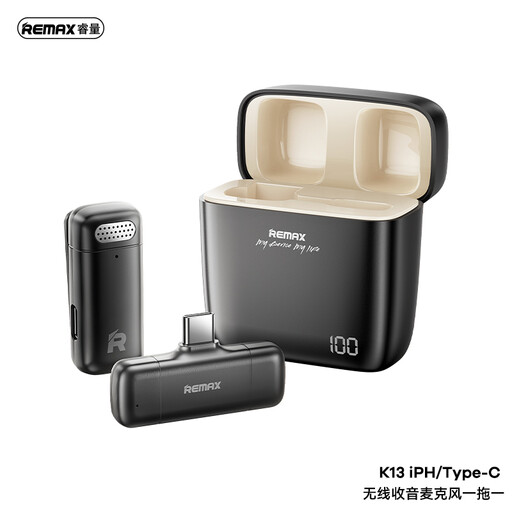
REMAX K13 1-to-1 USB-C Wireless Microphone – Black
Consider this wireless option if you record on a USB-C device and need to move during practice. Confirm that its receiver works with your particular device and that the microphone can be worn close to your mouth.
Joybuy
 No image available
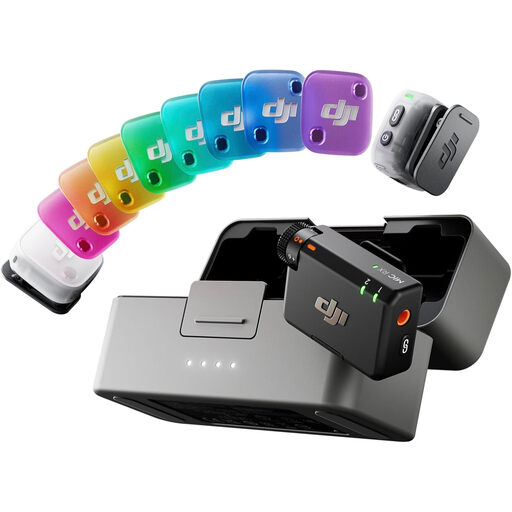
DJI Mic Mini 2 (2 TX + 1 RX + Charging Case)
Consider this bundle if your exercises may involve two speakers or movement away from the recording device. It includes 2 TX, 1 RX and a charging case; confirm the receiver connection, device and app compatibility, and how each microphone attaches before choosing it for close speech recording.
Joybuy
Questions about recording and compatibility
Will any 3.5 mm lavalier work directly with my phone?
No: the plug and microphone-input standard must match. Shure describes its MVL for a compatible TRRS mobile-device jack or CTIA-compliant adapter, while RØDE Lavalier GO uses TRS for a compatible microphone input or transmitter. Check the exact phone and adapter rather than relying on plug size.
Can a lavalier stop my desk mate’s voice being recorded?
Not reliably. Placing the lavalier close to your mouth can improve your speech’s balance against room sound, but it will not remove all nearby speech. Keep it away from rubbing fabric and choose a quieter time for important recordings.
Do I need a UK licence for a wireless lavalier?
That depends on the equipment’s operating frequencies and the conditions that apply to them. Ofcom identifies 2400–2483.5 MHz as a licence-exempt range subject to technical requirements, while other wireless-microphone use may require a licensed or coordinated route. Check the exact model and variant before use.
What if I need to return a microphone bought online from a UK trader?
For an eligible distance purchase, GOV.UK says customers generally have 14 days from receiving the item to tell the trader they wish to cancel, followed by another 14 days to return it. Change-of-mind cancellation and remedies for faulty or misdescribed goods are separate matters; check the terms and circumstances that apply to your purchase.


