Who needs which setup?

Phone-based language learners

If you record a short exercise on a phone or tablet, start by checking its microphone input and any adapter you plan to use. Shure and RØDE specify different connections for their mobile lavaliers, so a familiar-looking 3.5 mm plug is not enough to establish compatibility.

Learners using a camera or recorder

If the recording device can stay nearby, a wired lavalier may meet the need without a wireless system. Check that its plug and power requirements match the device’s microphone input; RØDE specifies a 3.5 mm TRS connection and plug-in power for Lavalier GO.

Presenters and teachers who move while speaking

If the exercise involves moving away from the recording device, a wireless lavalier can avoid a cable between speaker and device. Check the system’s connection method, included components and charging routine before choosing it.

What matters when buying?

For a pronunciation exercise, match the microphone to the recording input first. Then decide whether a cable can reach comfortably and how you will keep the capsule steady during speech.

Concern What to check Who this matters to
Device connection Identify the device’s microphone input and confirm the required TRS or TRRS plug, or a compatible adapter. If my microphone cannot connect to the device I use for the exercise, its other features will not help me record. Around 42% of consumers put connector compatibility first.
Speech placement Look for a secure clip and check whether a windscreen or pop filter is supplied; make a short test take. I need my pronunciation to remain intelligible without the capsule shifting or brushing against clothing. Close-speech placement is the main concern for around 33% of consumers.
Simple setup For a stationary exercise, check cable reach and whether the wired microphone needs plug-in power or its own battery. When I can sit near the recorder, I would rather manage a cable than set up and charge wireless components. Around 17% of consumers prioritise this simpler routine.
Movement If the speaker must move away, check the wireless connection method, included components and charging requirements. I need to stand or move while speaking without staying beside the recording device. That freedom is the primary concern for around 8% of consumers.

Mistakes to avoid

  • Treating every 3.5 mm plug as interchangeable

    TRS and TRRS plugs can look similar, but RØDE notes that their different wiring is a common cause of connection problems. Shure specifies a TRRS jack or an appropriate CTIA-compliant adapter for its MVL mobile microphone.

    Check the recording device’s input, then choose a microphone or adapter explicitly specified for that connection.

    A mismatched plug may mean obtaining a compatible adapter or changing microphones before you can record.

  • Choosing wireless for a speaker who stays put

    Wireless addresses distance and movement, but it also brings components that need connecting and charging. It does not remove the need to confirm device compatibility.

    For a seated, single-speaker exercise, compare a compatible wired connection first. Consider wireless if the speaker must move away from the recording device.

  • Skipping a test recording

    A suitable connector does not prevent clothing contact, breath noise or an incorrect input selection in the recording app from affecting a take.

    Test the actual device, adapter and microphone position with normal speech and strong consonants, then listen back before recording the exercise.

Brands to consider for this setup

Shure

Shure lists the MVL for compatible mobile 3.5 mm connections and MoveMic One as a wireless mobile microphone that pairs through supported Shure MOTIV apps.

  • The two named models provide distinct direct-wired and wireless mobile routes.
  • Check the MVL’s TRRS or CTIA-adapter requirements, or the MoveMic One’s app compatibility and charging needs, according to the model chosen.

RØDE

RØDE distinguishes the smartphone-oriented smartLav+ with a TRRS plug from Lavalier GO, which it specifies for compatible 3.5 mm TRS microphone inputs and Wireless GO transmitters.

  • The stated connector types help narrow the choice once the recording device is known.
  • The TRRS and TRS models are not automatically interchangeable; Lavalier GO also requires a compatible powered input.

Audio-Technica

Audio-Technica specifies the wired ATR3350xiS with a clip, foam windscreen, LR44 battery and mic/headphone adapter for compatible 3.5 mm headset connections.

  • The named accessories are relevant when preparing a wired speech recording.
  • Check the battery and the recording device’s connection, including whether its headset input can use the supplied adapter.

Saramonic

Saramonic describes its Blink500 ProX B2/B2R range as a dual-channel wireless system with lavaliers.

  • Its wireless configuration is relevant when speakers need to move or a second speaker must be recorded.
  • For one stationary pronunciation exercise, check whether the additional wireless components and charging routine serve an actual need.

Joybuy wireless lavalier option

This wireless clip-on kit is worth considering when the speaker needs room to move during a pronunciation exercise. Confirm its USB-C connection works with your recording device and app before buying.
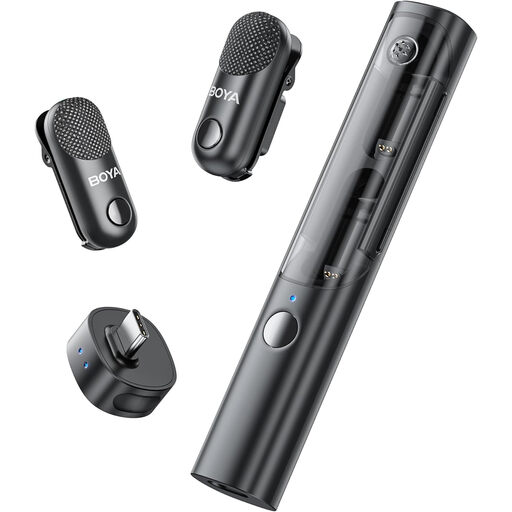
BOYA Magic-05 USB-C wireless lavalier microphone kit with two transmitters, one receiver and a charging case

BOYA Magic-05 USB-C Wireless Lavalier Microphone (2 TX + 1 RX + Charging Case)

A clip-on wireless option for recording while the speaker moves away from the device; confirm compatibility with your device and recording app.

The named bundle has two transmitters, one receiver and a charging case. Allow time to charge the components, and check whether a windscreen or pop filter is included if breath noise is a concern.

View on Joybuy

Common questions

Can I plug any 3.5 mm lavalier straight into my phone?

No: check both the microphone plug and the phone’s input. RØDE distinguishes TRS from TRRS connections, while Shure specifies that its MVL works with most Android and iOS devices with a 3.5 mm TRRS jack or an appropriate CTIA-compliant adapter. Do not assume a TRS lavalier intended for a camera or recorder will connect directly.

Do I need a wireless microphone for a pronunciation exercise?

A compatible wired lavalier is usually the simpler route when one speaker can stay near the recording device. Consider wireless if the exercise requires movement or distance, and check its exact device connection and charging requirements.

What should I check before recording the exercise?

Secure the capsule to clothing, keep the cable from rubbing where applicable, and use a supplied windscreen or pop filter if the model has one. Make a brief test recording with normal speech and strong consonants, then listen back to confirm the recording app used the intended microphone.

What if a school asks for the recording?

Use the school’s approved method for recording and submitting the exercise, and ask how identifiable audio should be stored or shared. Department for Education guidance on identifiable images addresses photos and videos; it should not be treated as a universal rule for audio-only exercises.