Presenters recording in a noisy flat
If household noise reaches your recording from outside the direction of your voice, a directional lavalier may be worth investigating. It still needs a compatible recording setup and careful positioning.


Choose a lavalier that connects to your recording device before comparing microphone designs: a mobile TRRS model, a TRS model and a professional bodypack microphone are not interchangeable. If persistent noise comes mainly from outside the direction of your voice, a compatible cardioid or supercardioid lavalier is worth considering, but careful placement and a quieter recording environment still matter.
If household noise reaches your recording from outside the direction of your voice, a directional lavalier may be worth investigating. It still needs a compatible recording setup and careful positioning.
A direct-to-mobile lavalier can keep the recording setup compact, provided its connector or adapter matches the device's microphone input.
If you use a wireless bodypack, choose a lavalier made for its connector and system. This route can support hands-free movement, but it requires more compatibility checks than a direct mobile connection.
For presentation voiceovers in a noisy flat, start with the recording device's microphone input, then weigh noise pickup against the ease of mounting the lavalier consistently.
| Concern | What to check | Who this matters to |
|---|---|---|
| Household noise | Consider a cardioid or supercardioid pattern when noise is mainly off-axis; check the required audio connection and whether the noise source can be reduced. | If household sounds keep entering my narration, I need to put speech ahead of off-axis noise, even if that means a more specialised setup; around 38% of consumers would put noise control first. |
| Device compatibility | Match the microphone's TRRS, TRS or bodypack connector to the actual input, including any required adapter or power arrangement. | I want to record on equipment I already own without discovering that the plug will not work; compatibility would be the primary concern for around 37% of consumers. |
| Placement and clothing noise | Check the clip and windscreen supplied, and find a mounting position away from moving fabric or jewellery. | For a hands-free presentation, I need a position I can repeat without rustling against the mic; around 25% of consumers would prioritise straightforward placement. |
An omnidirectional lavalier picks up sound from all directions. A directional model can be more relevant to off-axis noise, but it will not replace controlling the noise source or positioning the microphone well.
Record at a quieter time or move away from the noise where possible. Consider directional pickup if its connection and mounting requirements suit your setup.
Plug size alone does not establish compatibility: mobile TRRS microphones, TRS models and lavaliers for wireless bodypacks serve different inputs.
Identify your recording device's microphone input and confirm the manufacturer's adapter or bodypack requirements before choosing a model.
Clothing, jewellery, breath and cable movement can distract from a voiceover; DPA Microphones also notes handling, pop and breath noise as considerations for its directional 4080.
Secure the cable, keep the capsule clear of moving fabric and make a short test recording while speaking and moving as you normally would.
Wireless microphone use depends on the transmitter's frequency and the applicable Ofcom rules; choosing a lavalier does not, by itself, settle the radio requirements.
Check the transmitter's frequency range and current Ofcom conditions before buying or using a wireless system.
Shure offers both a direct-to-mobile option and directional lavaliers intended for compatible wireless systems.
RØDE's compact TRS lavaliers are relevant to compatible wireless transmitters and recording equipment.
DPA's cardioid 4080 is a specialist directional option for a compatible audio setup.
Sennheiser has clip-on microphones with different pickup patterns for speech and audio-system use.
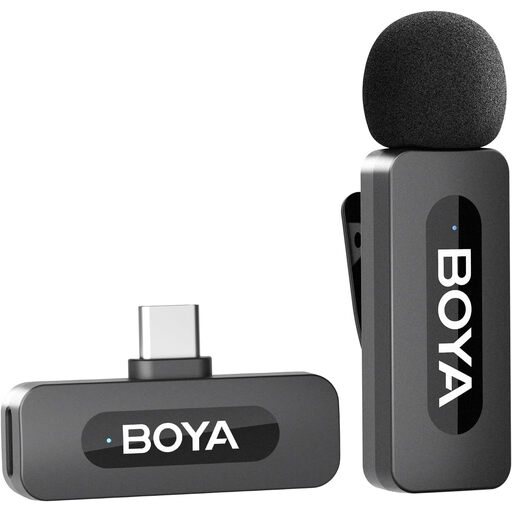
This wireless lavalier option is geared towards hands-free recording with a compatible USB-C phone. Check its pickup pattern and how it handles noise before choosing it for a noisy flat.
 No image available
For hands-free presentation recording on a compatible USB-C phone, this setup pairs one transmitter with a USB-C receiver.
The product name states a 9-hour battery life. Confirm compatibility with your exact phone and recording setup, along with the supplied mounting accessories and pickup pattern, before relying on it in a noisy flat.
No. An omnidirectional lavalier picks up sound from all directions, although positioning it close to your mouth can make your voice more prominent. If persistent noise is mainly off-axis, consider a compatible directional model and reduce the noise source where possible.
Start around breast-pocket level and make a test recording before the full presentation. Shure recommends that level for presenters and specifies a mouth distance of 15–25 cm for its MVL; keep clothing and jewellery from touching the capsule.
No. Match the plug to the device's microphone input: Shure's MVL uses mobile TRRS and may need a CTIA-compliant adapter, while RØDE Lavalier II uses locking TRS. A matching plug size alone does not confirm that a laptop or other recorder accepts the microphone.
Not automatically. The requirements depend on the transmitter's frequency and how it is used. Check its exact frequency range against the current Ofcom licensing and licence-exemption conditions before purchase or use.