What matters when choosing?
Decide which voices need close capture, then match the microphone connector to the device and check how it will be worn during the interview.
| Concern |
What to check |
Who this matters to |
| Connection compatibility |
Identify the device’s microphone input, including whether it accepts TRRS, TRS or another connector; confirm any adapter and power requirements. |
If I am recording on a device I already own, I need the microphone to connect correctly before other features matter. Around 29% of consumers put connection compatibility first. |
| Both interview voices |
Decide whether the interviewer needs close capture too; if so, check microphone count and available inputs or recording channels. |
If my questions must remain clear in the oral-history record, one microphone on the narrator may not capture enough of the exchange. For around 36% of consumers, recording both voices is the primary concern. |
| Placement and clothing noise |
Check how the microphone and cable attach, and whether a clip and windscreen or pop filter are included. |
When the speaker shifts in their seat, I want speech to stay intelligible without fabric rubbing against the microphone. Secure placement comes first for around 21% of consumers. |
| Movement and system fit |
If a cable would disrupt the session, check the wireless transmitter’s microphone connection and the system’s suitability for UK use. |
If the speaker needs to move, I may accept the extra equipment involved in wireless recording. Around 14% of consumers prioritise movement or system expansion. |
Wireless kits for home interviews
These DJI Mic Mini 2 kits offer one- and two-transmitter wireless configurations for interview recording. Check how either kit connects to your recording device and attaches to each speaker; neither configuration establishes separate recording tracks from its transmitter count alone.
 No image available
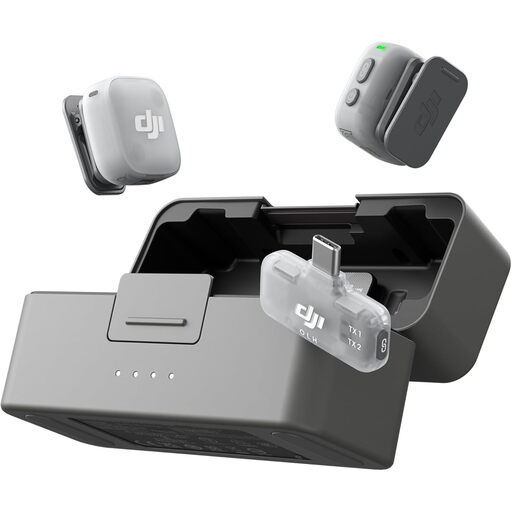
DJI Mic Mini 2 (2 TX + 1 Mobile RX + Charging Case)
The two-transmitter configuration is worth considering when both interview voices need a microphone. Confirm how the intended recording device receives the audio and whether it can capture separate tracks if your workflow requires them.
The kit name specifies one mobile receiver and a charging case. Check the supported device connections and supplied mounting accessories before ordering.
Joybuy
 No image available
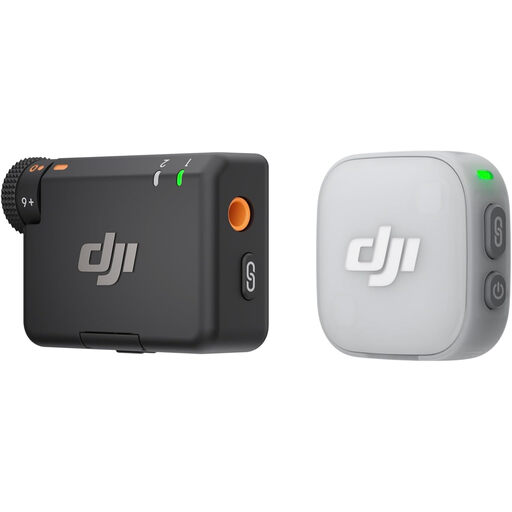
DJI Mic Mini 2 (1 TX + 1 RX)
The one-transmitter configuration suits a narrator-focused recording if it connects to your intended device. If the interviewer must also be close-miked, plan a second microphone and a suitable way to record it.
Check device compatibility and the supplied mounting accessories before ordering.
Joybuy
Common questions
Will any 3.5 mm lavalier work with my phone or recorder?
No: match the microphone’s TRS or TRRS connection to the device’s input. RØDE explains that the plugs are wired differently, while Shure specifies that its MVL needs a suitable TRRS mobile jack or CTIA-compliant adapter.
Is one lavalier enough for an oral-history interview?
One may be enough if only the narrator needs close capture. If the interviewer’s questions must also be clear, plan separate microphone coverage; Norfolk Record Office recommends a recorder with two external microphone sockets, one for each speaker.
Should I use wireless for a seated interview?
A wired lavalier is a sensible starting point when the speaker will stay seated and the cable can be placed safely. Choose wireless when movement or cable routing makes it useful, while allowing for the extra equipment and the interference possible in shared spectrum noted by Ofcom.
How can I reduce clothing and breath noise?
Secure the microphone and cable so they do not rub against clothing or jewellery, and use a suitable windscreen or pop filter where supplied. The Oral History Society advises placing the microphone close to the interviewee’s mouth, around 15 cm away; make a short test recording in the intended position before the interview.
What should an organisation tell an interviewee about the recording?
If the organisation relies on consent as its UK GDPR lawful basis, it should give specific, informed information about the intended processing. The Information Commissioner’s Office says this includes who is relying on consent, why the data is wanted, what will happen to it and the ability to withdraw consent; check the organisation’s current policy for the interview.


