What matters when choosing?
Decide how far the speaker needs to move and how many people need microphones before choosing a connection type. Then check placement, the recording-device connection and what happens if a take fails.
Wired lavalier
Choose when: One speaker can remain within cable distance of the recorder and a direct connection suits the session.
Trade-off: Movement is limited, and the microphone's connector, power requirements and any preamp must match the full recording chain.
Compact wireless
Choose when: A speaker needs to walk between drills or demonstrations and the receiver can connect to the intended recorder.
Trade-off: The link needs a test in the actual hall; a published range does not establish how it will behave around other radio equipment.
Licensed or co-ordinated UHF
Consider when: Several wireless microphones or an important formal session warrant site-specific frequency planning.
Trade-off: Licensing and co-ordination add preparation. Ofcom distinguishes non-protected shared frequencies from co-ordinated frequencies licensed for a specific site.
| Concern |
What to check |
Who this matters to |
| Speech detail in the hall |
Check that the lavalier can sit securely near the speaker without rubbing on clothing; make a short recording with the intended speech material. |
If I need to hear consonants and vowel contrasts later, I want the speaker's voice to stand out from the room without clothing rustle. Around 33% of consumers would put speech detail first. |
| Freedom to move |
Check the wireless system's operating band, monitoring options and runtime for the session; test its link at the venue. |
While leading drills across the hall, I need to move without a trailing cable and still capture usable speech. Roughly 27% of consumers would make mobility their primary concern. |
| Recording recovery |
For a session that cannot be repeated, check whether the exact transmitter records internally and how to retrieve those files. |
When a class happens only once, I need another recording path if levels change or the wireless feed drops. About 20% of consumers would prioritise that safeguard. |
| Compatibility and setup |
Identify the recorder's input and confirm the exact microphone or receiver connection, required power and included adapters. |
I may stay in one place, but I need the microphone to work with my existing phone, camera or recorder without sorting out connections during the session. Around 20% of consumers would put compatibility first. |
Joybuy wireless options
These DJI kits cover wireless recording for a moving speaker or two-person exercise. Choose between them by transmitter count, receiver connection and whether you need the internal recording stated for the Mic 2 kit; a wired or planned UHF setup remains a separate decision.
 No image available
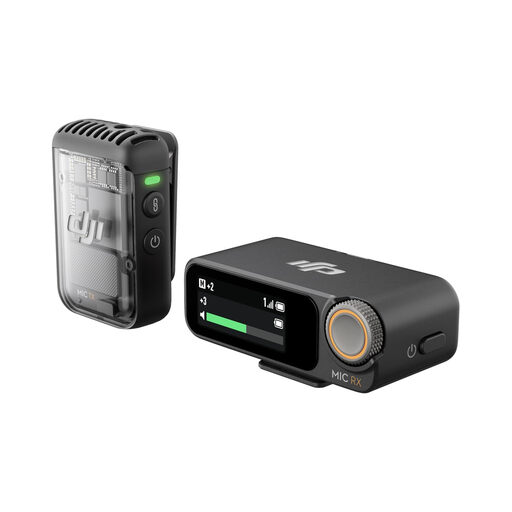
DJI Mic 2 (1 TX + 1 RX)
A single-transmitter wireless kit to consider when one speaker needs to move during pronunciation practice. The listed transmitter has a clip and magnet and records internally in 32-bit float, with up to 14 hours of internal recording stated in its description; that figure is not the live wireless battery runtime. Confirm the included connection options against your recording device and test the link in the hall.
Joybuy
 No image available
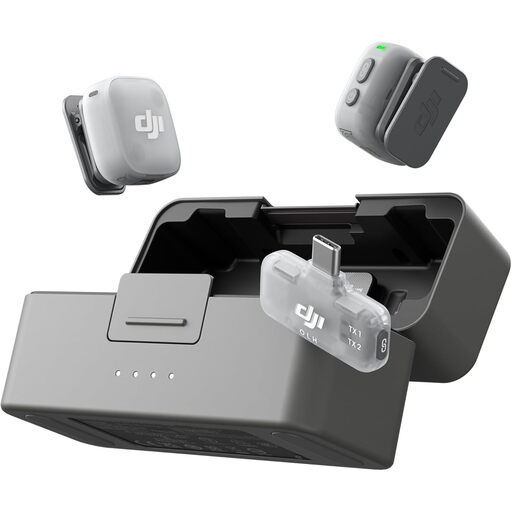
DJI Mic Mini 2 (2 TX + 1 Mobile RX + Charging Case)
Two transmitters offer a way to microphone two speakers in a pronunciation exercise, with a mobile receiver and charging case in this bundle. Its magnetic microphone design supports clothing placement. Check that the mobile receiver connects to your recording device, that one charge covers the session and whether the exact kit offers internal backup recording if a retake would be difficult.
Joybuy
 No image available
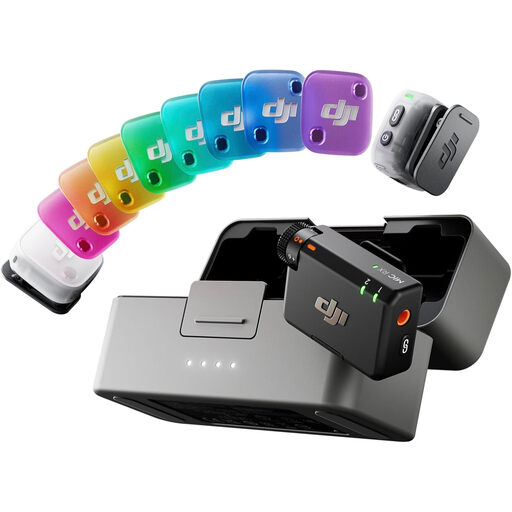
DJI Mic Mini 2 (2 TX + 1 RX + Charging Case)
This two-transmitter bundle is another option for recording two speakers, with a receiver and charging case rather than the mobile-receiver bundle above. The described magnetic design supports wearable placement. Confirm the included receiver's connection to your recorder, the transmitter runtime per charge and whether the exact kit records internally; test its wireless link in the hall.
Joybuy
Common questions
Does a 2.4 GHz wireless lavalier need a UK wireless-microphone licence?
Ofcom lists the 2400–2483.5 MHz band as licence-exempt, subject to the applicable exemption requirements. That status does not promise a clear recording: the band is shared with Wi-Fi, Bluetooth and other equipment, so test the system in the hall.
When should I consider licensed or co-ordinated UHF?
Consider a planned UHF setup when several wireless microphones are needed or interference would seriously affect an important session. Ofcom distinguishes non-protected shared frequencies from co-ordinated frequencies licensed for a specific site; check which arrangement fits the venue and equipment before use.
Will a lavalier capture clearer pronunciation than a phone across the hall?
A correctly placed lavalier can give the intended voice a stronger balance against room sound than a distant phone recording. Shure and RØDE both stress placement; a lavalier will not eliminate nearby voices, and clothing contact can still spoil a take.
How should I attach a lavalier for a practice recording?
Clip it securely to a suitable clothing edge and make a short recording while the wearer speaks and moves as they will during practice. RØDE recommends securing the cable below the clip to reduce movement noise; listen for rustling before the group starts.
Do recordings of pronunciation sessions raise data-protection questions?
They can when an organisation records identifiable participants: the Information Commissioner's Office explains that information relating to an identified or identifiable person is personal information. The organiser should consider who is identifiable, why the audio is kept and who can access it, following UK data-protection guidance appropriate to its circumstances; a private practice recording does not necessarily call for the same process.


