Learners recording individually
For one voice at a time, start with the phone, tablet or recorder that will save the audio. A lavalier is useful only if its connector and any required adapter work with that device’s microphone input.


Choose the recording connection and the number of voices you need to capture before choosing a lavalier microphone. A compatible wired mic can suit one learner at a fixed device; a two-transmitter wireless system is worth considering for moving pairs, provided it records the voices in the way you need. Check device inputs, classroom interference and the school’s procedures for handling pupil recordings before buying.
For one voice at a time, start with the phone, tablet or recorder that will save the audio. A lavalier is useful only if its connector and any required adapter work with that device’s microphone input.
For dialogue or role-play, two microphones and separately captured voices can make it easier to review each speaker. Check the receiver’s recording modes as well as the number of transmitters supplied.
For recurring activities with several speakers or stations, plan the number of simultaneous channels, charging routine and frequency use. Check the intended UK operating arrangement and test the equipment in the classroom.
Match the microphone to the recording device first, then decide whether learners need to move and how many voices must be captured separately.
Choose when: One learner records close to a compatible phone or tablet.
Trade-off: The device needs a suitable TRRS microphone input or a CTIA-compatible adapter that supports microphone input.
Choose when: A fixed recording station or compatible bodypack transmitter has a 3.5 mm TRS microphone input.
Trade-off: A cable can restrict movement; confirm the input and required plug-in power.
Choose when: Two learners need to move during a paired exercise and their voices must remain identifiable.
Trade-off: Charging and classroom radio conditions become part of the recording routine.
Choose when: A school is planning recurring activities that need a managed choice of wireless configurations.
Trade-off: The exact kit and UK frequency arrangement need planning before purchase.
| Concern | What to check | Who this matters to |
|---|---|---|
| Device connection | Check the recording device’s microphone input and whether a TRRS, TRS or microphone-capable adapter is required. | If I record one learner on an existing phone or recorder, I need a connection that works each time. Around 42% of consumers would put that compatibility need first. |
| Paired recording | Check how many transmitters and microphones are supplied and whether the recording keeps two voices separate. | For moving dialogue partners, I need to identify each voice when reviewing their pronunciation; around 33% of consumers would prioritise that paired-recording need. |
| Wireless planning | Confirm the operating band, simultaneous-channel needs and charging routine; test the intended classroom arrangement. | When I organise repeated activities across several users, I need a workable frequency and equipment plan. That would be the primary concern for around 25% of consumers. |
A TRRS mobile microphone and a TRS microphone for a compatible recorder or transmitter have different connection requirements.
Identify the device that will record the audio, then confirm that its input supports the chosen microphone, not just that it has a socket of the same size.
A mismatched connection may call for a suitable microphone-capable adapter or a different mic.
Ofcom notes that licence-exempt wireless-microphone ranges are shared with other low-power equipment and can experience interference.
Test the exact system in the intended room during normal school wireless use, and check its operating band before planning several systems together.
One microphone between two learners may not give the teacher separately identifiable voices. Even a dual-channel kit does not, by itself, capture an entire class separately.
Count the voices that must be recorded at once and decide whether pairs will record simultaneously or take turns.
Expanding simultaneous recording may require additional compatible equipment; rotating speakers instead takes more activity time.
Recordings that identify pupils need to fit the school’s arrangements for access, storage, sharing and retention. Department for Education data-protection guidance addresses these responsibilities for maintained schools and academies.
Agree the approved recording and storage workflow before a recurring activity, and ask the school’s data-protection lead when the arrangements are unclear.
Shure offers the MVL for compatible mobile-device recording and BLX wireless systems in lavalier configurations.
RØDE’s Lavalier GO is a TRS microphone for compatible inputs; Wireless PRO is a two-transmitter system supplied with two lavaliers.
DJI describes Mic 2 as a wireless microphone system with USB-C, Lightning and 3.5 mm TRS output options.
These lavalier-related choices include mobile recording kits and options to investigate for paired activities. Confirm each kit’s connection and whether its recording setup keeps two speakers’ voices separate before assigning it to a classroom task.
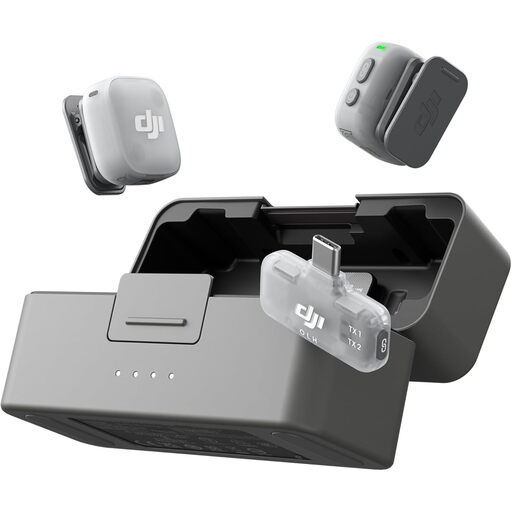 No image available
Consider this kit for mobile recording or a paired task where two transmitters are useful. Confirm how the mobile receiver works with the school’s device and whether its recording workflow keeps the speakers’ voices separate. Check the UK wireless version and test it in the classroom.
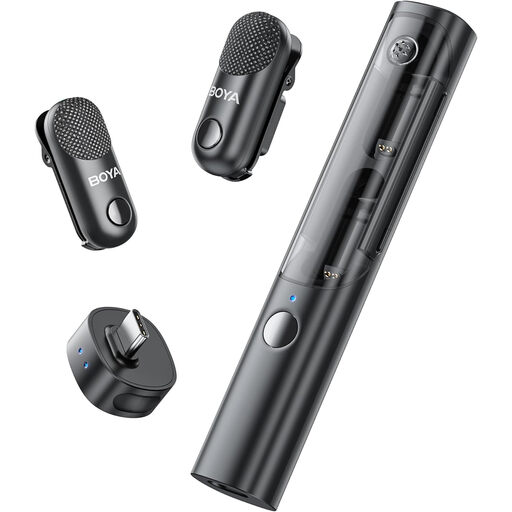 No image available
The two-transmitter kit is worth checking for paired speaking practice. Confirm the receiver connection with the intended recording device and whether it can save each voice separately. Check its UK wireless operating arrangement and classroom interference before use.
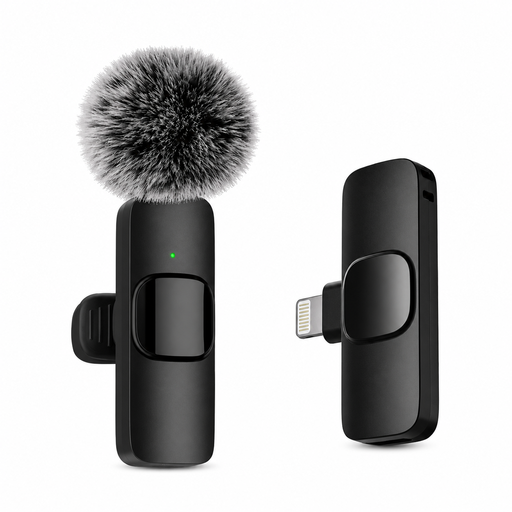 No image available
The single-microphone format is relevant to one learner recording at a time. Its connection descriptions conflict, so confirm whether it connects wirelessly, which iOS devices it supports and whether it works with the intended recording app.
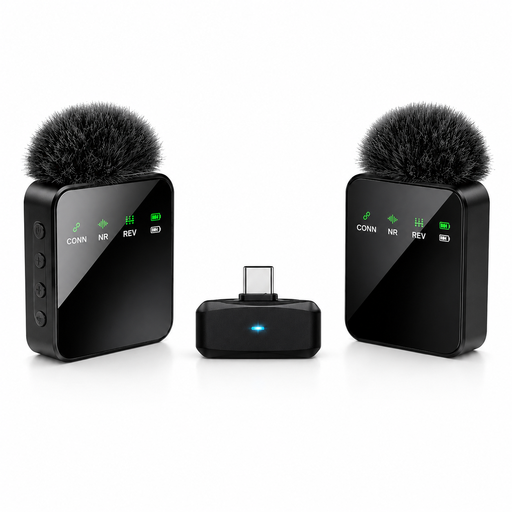 No image available
Check this model against the device intended for pronunciation recording. Its descriptions conflict on both microphone count and wireless operation, so confirm what is supplied, how it connects and whether the setup can record the required number of voices.
No: the plug and the device’s microphone input must be compatible. Shure specifies a 3.5 mm TRRS connection for its MVL and compatibility with most Android and iOS devices that have a suitable TRRS jack or an appropriate CTIA-compliant adapter; a TRS mic intended for a recorder or transmitter should not be assumed to work in the same way.
No. Ofcom identifies licence-exempt wireless-microphone ranges, but the intended equipment and use must meet the applicable conditions. Check the exact operating band and current Ofcom requirements for the proposed setup; licence-exempt ranges can also experience interference.
Not by itself: a two-transmitter, two-channel kit captures two transmitter sources separately, not every pupil at once. RØDE specifies two discrete receiver channels for Wireless PRO; for more speakers, plan a rotation or a suitably checked multi-system arrangement.
Agree how recordings that identify pupils will be stored, accessed, shared and retained before starting the activity. Department for Education data-protection guidance for maintained schools and academies covers protecting personal data and following school procedures; consult the school’s data-protection lead if the recording workflow is unclear.