Solo walking-script presenter
You need to speak hands-free while moving through the rehearsal-room route. A secure clothing mount and a confirmed connection to your phone, camera or recorder matter more than a long list of features you will not use.


For a solo presenter walking through a rehearsal-room script, choose the connection to your recording device first. A wired lavalier can suit a controlled route within cable reach; a wireless system gives you more freedom to move, while onboard recording and monitoring matter more when repeating a take would be difficult. If you choose 2.4 GHz wireless, test the full route in the room: Ofcom notes that the band is shared with Wi-Fi, Bluetooth and other equipment.
You need to speak hands-free while moving through the rehearsal-room route. A secure clothing mount and a confirmed connection to your phone, camera or recorder matter more than a long list of features you will not use.
You want to hear problems before recording the full script and have another recording path if the receiver feed fails. Depending on the system, that may mean onboard recording, a safety channel or both.
You expect Wi-Fi, Bluetooth or several microphone systems in the venue. Ofcom’s guidance makes the operating band and, where relevant, frequency coordination important checks alongside an in-room walking test.
Choose the recording-device connection and the amount of movement you need before deciding how much take protection or wireless planning the session warrants.
Choose when: The presenter can keep a compatible recording device within cable reach throughout a controlled take.
Trade-off: There is no radio link to manage, but the cable can restrict walking and its connector must match the recording chain.
Choose when: The presenter needs to move away from a camera, phone or recorder left in position.
Trade-off: Ofcom says this licence-exempt band is shared with other equipment, so the actual room needs testing.
Consider when: Several wireless systems or a demanding venue justify formal frequency planning.
Trade-off: The exact UK frequency variant and any licensing or site-specific coordination need checking before purchase.
| Concern | Buying check | Who this matters to |
|---|---|---|
| Movement and connection | Match the microphone, receiver or cable to the exact recording-device input; check how the mic will stay attached while walking. | If I need to follow the route without managing a cable, I want the mic to stay in place and the recording device to receive my speech. Around 42% of consumers put movement and connection first. |
| Take protection | Check for onboard recording, a safety channel and a way to monitor the signal; confirm how each works with your recorder. | Repeating the whole script would be inconvenient, so I want to spot a problem early or have another recording to use. Roughly 33% of consumers make take protection their main concern. |
| Wireless environment | Test 2.4 GHz equipment along the full route; for UHF, check the selected frequency variant and applicable UK arrangements. | With other wireless equipment in the venue, I need to know whether my chosen system works along the walking route. Approximately 25% of consumers prioritise the wireless environment. |
DJI measured the cited maximum CE range for Mic 2 outdoors without obstructions or interference. That condition does not describe a rehearsal room, and Ofcom notes that 2.4 GHz users share the band with other equipment.
Record a complete walk-through with the venue’s usual wireless equipment active, then listen to the result rather than relying on the range figure.
RØDE specifies a locking 3.5 mm TRS connector for its Lavalier II. That does not establish a connection to every phone, camera, recorder or transmitter.
Check the exact input, locking arrangement and any required adapter against the device you will use to record.
A clip-on transmitter microphone and a separate wired lavalier capsule allow different placement choices. RØDE says Wireless PRO includes two Lavalier II microphones; Sennheiser describes clip-on microphones and inputs for optional external lavaliers in its Profile Wireless 2-Channel Set.
Read the contents list and decide whether the supplied clip-on microphone gives you the clothing placement you need.
Choosing a separate capsule may also mean carrying and securing its cable and mounting accessories.
Ofcom distinguishes licence-exempt use from licensed shared frequencies and site-specific coordinated frequencies. The arrangements that apply depend on the frequency selected and how it will be used.
Confirm the exact frequency range of the variant, the intended UK venue and any applicable licensing or coordination before ordering.
These product lines illustrate different ways to connect and safeguard a walking-script recording; check the particular kit and recording device rather than choosing by brand alone.
RØDE offers separate lavalier capsules as well as wireless systems. Its Wireless PRO kit is relevant when a separate clothing-mounted capsule and onboard recording are both part of the plan.
The Profile Wireless 2-Channel Set can be used with its clip-on microphones or with compatible optional external lavaliers through lockable inputs.
DJI Mic 2 is a compact wireless option with internal recording features for a moving presenter.
These wireless microphone configurations are relevant to a presenter who needs to walk while recording. Compare their stated connections and recording features with your device and retake plan; the inclusion of a separate lavalier capsule depends on the particular kit.
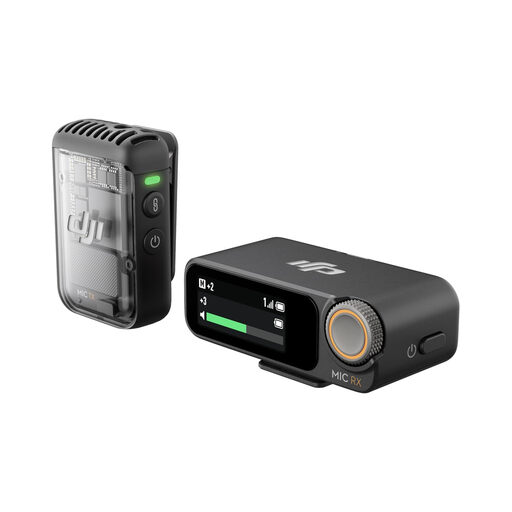 Image unavailable
The one-transmitter configuration is worth considering for a solo walking script when you want wireless movement and a recording feature for a difficult-to-repeat take.
The product name lists 32-bit float recording. Confirm the connection supplied for your exact phone, camera or recorder, and check whether you need a separate lavalier capsule for your intended placement.
DJI specifies 2.4 GHz operation for Mic 2; test the complete route with the room’s normal wireless equipment active.
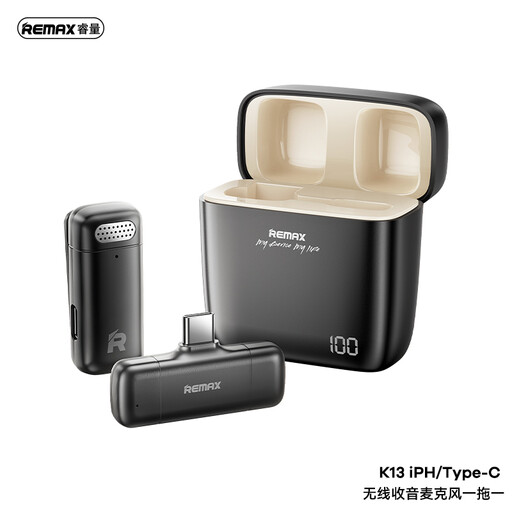 Image unavailable
This one-to-one wireless configuration is relevant if a solo presenter needs to move away from the recording device.
The product name identifies a USB-C connection. Check compatibility with your exact device and whether its recording workflow provides the monitoring or backup you need.
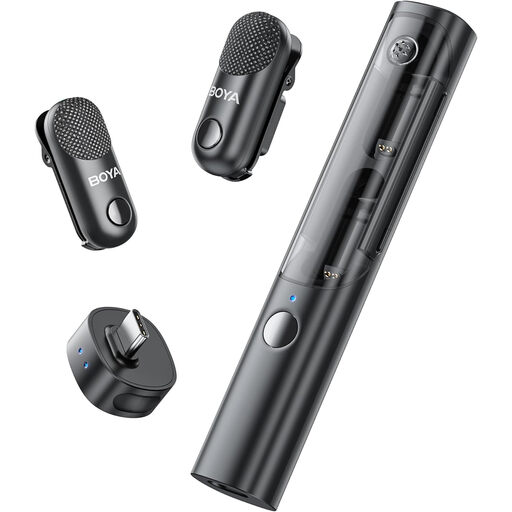 Image unavailable
Consider this configuration if a second speaker may join the walking script; for a solo take, decide whether the two-transmitter kit suits what you will carry and set up.
The product name lists two transmitters, one receiver and a charging case. Confirm how the kit connects to your exact recording device and whether its microphones can be placed as you intend.
Test the full walking route before relying on the wireless recording.
Ofcom describes licence-exempt use of the 2400–2483.5 MHz band, subject to the applicable exemption requirements. Licence-exempt does not mean interference-free: Wi-Fi, Bluetooth and other equipment also use the band, so test the system in the rehearsal room.
Consider UHF frequency planning when the venue uses several wireless systems or the production needs a more formally managed radio setup. Ofcom distinguishes shared licensed frequencies, which are not protected from other local users, from coordinated frequencies licensed for a specific site; check the exact equipment variant and intended location.
No. On systems that support it, 32-bit float internal recording is one possible recovery feature, not a fix for every connection, clothing-noise or room-sound problem. Record and listen to a short take at your normal walking pace before starting the full script.
Secure the supplied clip or mount, keep any cable from being tugged as you walk, and make a movement test in the outfit you will wear. Listen to that recording to judge whether the placement stays consistent without unwanted clothing noise.
Check the exact model’s manufacturer or seller documentation for the market in which you will use it. GOV.UK’s guidance says the Radio Equipment Regulations 2017 framework for Great Britain addresses safety, electromagnetic compatibility and spectrum use; provisions for Northern Ireland may differ, so do not assume Great Britain documentation answers every Northern Ireland question.