Two-person documentary narrators
If both speakers narrate in the same session, each needs a close microphone. Separate recording paths also let an editor manage the voices individually.


For two people recording documentary narration at one desk, start with a close-mounted lavalier for each speaker and check that your recording setup can keep their voices on separate channels. A two-transmitter wireless kit suits sessions that involve movement or need local backup recording, provided the chosen kit offers those recording modes. Wired lavaliers suit a fixed desk when cable routing is acceptable and their connectors and powering match the recorder.
If both speakers narrate in the same session, each needs a close microphone. Separate recording paths also let an editor manage the voices individually.
A seated speaker who can route a cable may prefer a wired lavalier, provided its connector and powering suit the recording device.
Teams moving between desk and location recording may need to connect to a camera or phone and plan a local backup for important takes.
Decide how many voices need their own channels, then choose a connection route that works with your recorder. Placement and the room matter whichever route you take.
Choose it when: Both narrators need wearable microphones and may move, or the kit’s local recording could protect an important take.
Allow for: Charging, pairing and monitoring a radio link; check that the particular kit records each voice as required.
Choose it when: A narrator stays at a fixed desk and a cable can reach a compatible recorder, camera or interface.
Allow for: Restricted movement and a connector and powering arrangement that must match the complete recording chain.
Choose it when: You already use a suitable bodypack system and need a lavalier with the right connector or pickup pattern.
Allow for: The lavalier alone is not a recording system; it needs a compatible transmitter, receiver or recorder.
| Concern | What to check | Who this matters to |
|---|---|---|
| Separate capture for two voices | Check for two microphones and separate per-speaker recording. If a backup matters, confirm how local files are saved and retrieved. | When both of us narrate, I need to adjust either voice without depending on one shared track. Around 36% of consumers put separate, recoverable capture first. |
| Speech clarity at a shared desk | Consider the room noise and the microphone’s pickup pattern; test its placement on the clothing you intend to wear. | Nearby activity or fabric noise could distract from my narration, so stable close placement matters most to me. Roughly 29% of consumers prioritise clarity in the shared workspace. |
| Fixed-desk simplicity | Match the connector and powering to your recorder or phone, and check whether an adapter is needed. | If I stay seated, I can accept a cable rather than manage a wireless connection. For about 21% of consumers, a straightforward fixed-desk setup is the main concern. |
| Movement and backup | Check the operating-time conditions for your configuration, the destination-device connection and whether each transmitter records locally. | I may move from desk narration to location work and cannot rely solely on the wireless feed for an important take. Mobility with a backup is the primary need for around 14% of consumers. |
A lavalier worn by one person does not give the second person an equally close microphone. Sharing one recording path also limits how independently the voices can be edited.
For two close-miked voices, choose two compatible wired inputs or a two-transmitter setup, and confirm its channel-routing options.
A distant second voice can mean extra editing or another take.
A 3.5 mm TRS lavalier, a phone headset input and a locking transmitter input need not work together directly. Connector variants can also require different powering.
Identify the destination device first, then check the microphone connector, input, powering and any adapter needed for that exact combination.
The finished setup may need an additional adapter or interface.
Ofcom lists the 2400–2483.5 MHz range for licence-exempt wireless-microphone use subject to its requirements; other low-power equipment also uses the band. Licence exemption is not a promise of a clear link at your desk.
Test the complete setup where you will record, monitor the take and check for local transmitter recording if losing a take would be disruptive.
The Radio Equipment Regulations 2017 guidance published by GOV.UK addresses radio equipment supplied in Great Britain, including safety, electromagnetic compatibility and spectrum use. Northern Ireland needs a separate check.
Before buying, check the applicable conformity information for the version being supplied and the destination where it will be used.
Relevant to a choice between a standalone wired lavalier and a two-transmitter wireless recording system.
Relevant to compact wireless recording when a camera or phone workflow is part of the decision.
Relevant when an existing bodypack, recorder or XLR-based setup determines which wired lavalier connector to choose.
Relevant when a bodypack-compatible lavalier’s pickup pattern and clothing placement matter at a shared desk.
Relevant to a small locking-3.5 mm lavalier for a compatible wireless system, including recording away from the desk.
These kits offer a two-transmitter route for narrators who each need a wearable microphone. Before choosing one, confirm that its receiver works with your recording device and that its channel and backup-recording modes meet your needs.
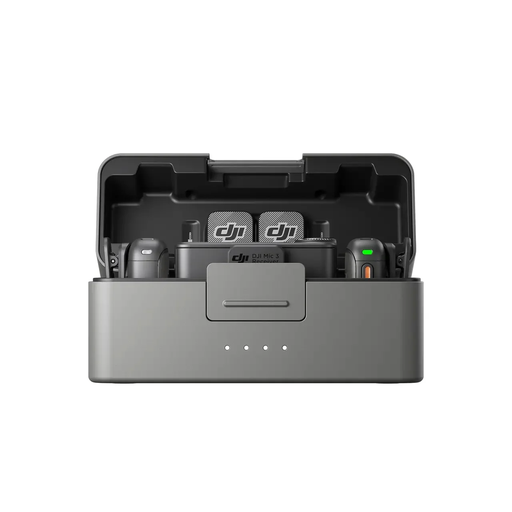 No image available
A two-transmitter option for narrators who each need a wearable microphone at the shared desk.
The named bundle has two transmitters, one receiver and a charging case. Confirm the channel routing your recorder can accept and the recording modes you need.
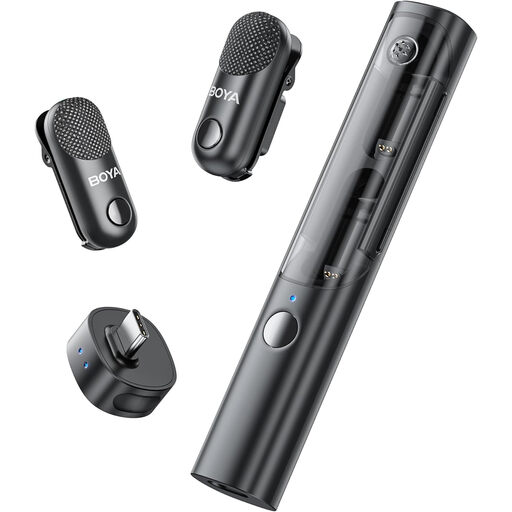 No image available
Its two-transmitter configuration is relevant when both desk narrators need a wearable microphone.
The named bundle has one receiver and a charging case. Check compatibility with your intended recording device, whether it saves separate speaker tracks and whether local backup recording is available.
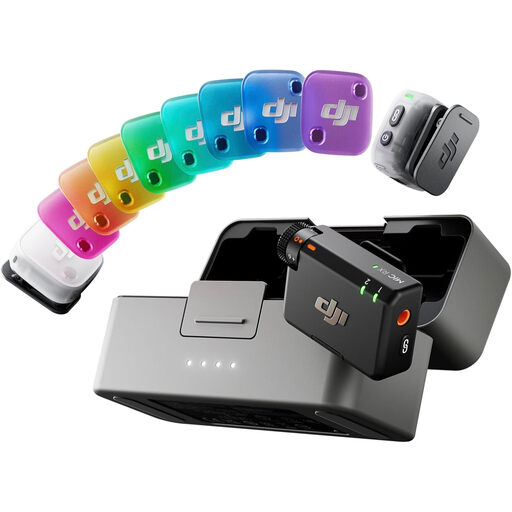 No image available
This two-transmitter kit is a route for giving each narrator a wearable microphone.
The named bundle has one receiver and a charging case. Confirm its connection to your recorder, separate-track options and any local backup mode before relying on it for an important take.
Use one close microphone per person if you need both voices independently manageable in editing. A two-transmitter kit can provide the microphones, but confirm that your chosen recording mode keeps their channels separate.
For the WL183, WL184 and WL185 family, Shure specifies placement approximately 76–152 mm below the neckline and advises against covering the microphone with clothing. Test the position on the outfit you will wear so fabric does not rub against it.
Not necessarily: the microphone output and phone input must match. RØDE says a TRS-output lavalier needs a TRS-to-TRRS adapter for a typical phone headset input; a phone without a 3.5 mm socket also needs a suitable USB-C or Lightning connection. Check the exact phone and adapter before buying.
Ofcom lists 2400–2483.5 MHz for licence-exempt wireless-microphone use in the UK, subject to the relevant requirements. Other low-power devices share the band, so test the link at your recording location rather than treating licence exemption as protection from interference.
Check the applicable conformity information for the version being supplied in Great Britain. GOV.UK’s guidance on the Radio Equipment Regulations 2017 addresses safety, electromagnetic compatibility and spectrum use for radio equipment there; if the destination is Northern Ireland, check its separate requirements.