For close inspection of printed photographs, look for a positionable, dimmable lamp with a published colour-rendering specification; a high CRI figure helps narrow the choice but does not establish photographic proofing accuracy. Check that you can light the prints without glare, fit the lamp beside the bed and reduce its brightness afterwards; selectable warmer and cooler settings offer another way to adapt the same lamp to both uses.
Who needs which features?
Print-colour checkers
If you compare colour casts, shadows or tonal differences across prints, look for a stated colour-rendering index (CRI) on the exact lamp model and light you can position evenly over the photographs. A published CRI is a selection aid, not proof of accurate photographic proofing.
Bedside photo reviewers
If you look through prints before settling down, choose controls you can reach from the bed. Dimming, careful aiming and, where available, a warmer setting let you change the light after close inspection.
Small-surface users
On a narrow bedside table or shelf, check the lamp's footprint and reach. A clamp needs a suitable edge; a monitor light bar is an alternative only when the prints sit in front of a compatible monitor.
What should you check?
Start with the light falling on your prints, then check whether you can control it and fit the lamp into the space beside your bed.
| Concern | What to check | Who this matters to |
|---|
| Print colour |
Find the exact model's published CRI or Ra and colour-temperature settings. View your prints under the intended light before making fine colour decisions. |
When I compare subtle colour casts across prints, I need more than a lamp described as daylight. Around 31% of consumers put colour-sensitive inspection first. |
| Bedside brightness |
Check for built-in dimming, a reachable control and, if wanted, a warmer setting at lower brightness. |
I want enough light to inspect a print, then a lower setting without changing lamps; around 25% of consumers prioritise that change of use. |
| Aim and glare |
Check arm and shade movement and whether the print area is lit without reflections or light directed towards your eyes. |
Glossy prints catch reflections at my viewing angle, so placing the light matters most; around 25% of consumers share that primary concern. |
| Fit and power |
Measure the available surface or clamp edge, then check reach, cable routing and the required power source. |
With little room beside the bed, I need a lamp that fits and reaches the prints; around 19% of consumers put installation first. |
Mistakes to avoid
-
Assuming “daylight” means accurate print colour
A colour-temperature description does not tell you how a lamp renders colours. Daylight Company publishes 95+ CRI for Tricolor and Slimline 4, while Anglepoise publishes CRI 86 for the 90 Mini Mini; those figures do not establish controlled print-proofing accuracy.
Compare the exact model's CRI or Ra and view your prints under the light you intend to use before finalising colour-sensitive edits or reprints.
-
Comparing lux figures without their distances
Daylight Company states 3,500 lux at 30 cm for Tricolor and 750–3,200 lux at 30 cm for Slimline 4. BenQ states 800 lux at 45 cm for ScreenBar Halo. The different distances and lamp arrangements prevent a direct comparison of those figures.
Check the measurement distance alongside each figure, then consider how far the lamp will actually sit from your prints.
-
Choosing a mount before measuring the space
Daylight Company specifies a clamp opening of up to 55 mm for Slimline 4. BenQ gives monitor-thickness ranges for ScreenBar Halo; neither mounting approach works on every bedside setup.
Measure the edge or monitor and allow room for the cable, drawers and any moving lamp arm before ordering.
-
Leaving the inspection setting on for every bedside task
Close print inspection and ordinary bedside use can call for different amounts of light. A lamp's brightest setting need not be its only useful setting.
Choose dimming and, if you want a change of colour temperature, confirm that the warmer setting can also be used at a lower brightness.
Brands and formats to consider
Daylight Company
Task lamps to consider when published colour-rendering figures and control over light placement matter.
- Daylight Company states 95+ CRI for Tricolor and Slimline 4. Tricolor offers 2,700 K, 4,000 K and 6,000 K settings; Slimline 4 has a diffuser and table-clamp option.
- These are manufacturer specifications, not controlled photographic proofing results. Tricolor needs space for its table-lamp form, while Slimline 4's fixed 6,000 K setting offers no colour-temperature change.
Anglepoise
A compact articulated-lamp option when bedside placement and aiming take priority.
- Anglepoise specifies the USB-powered, dimmable 90 Mini Mini at 38 cm fully extended, with a 3,200 K colour temperature.
- Its published CRI is 86, rather than the 95+ stated for the Daylight models above. Anglepoise says replacement of its integrated LED is for a professional or competent person.
BenQ
A monitor-mounted option if you review prints directly in front of a compatible screen and want to keep the nearby surface clear.
- BenQ specifies Ra≥95 and 800 lux at 45 cm for ScreenBar Halo.
- ScreenBar Halo requires a suitable monitor and USB power. Its mounting position may not suit prints spread beside a bed.
Joybuy product for bedside print review
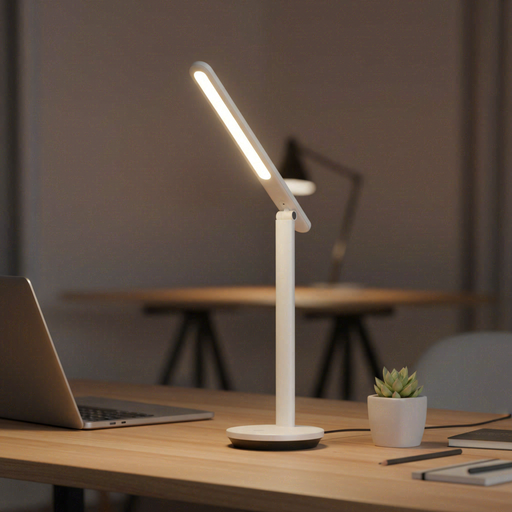
This foldable lamp offers adjustable brightness for looking through prints beside the bed. Check its colour-rendering specification before relying on it to judge subtle print colours.
 No image available
Yeelight LED Folding Desk Lamp Z1 Pro (White)
Consider this lamp if you want adjustable brightness while looking through prints at the bedside.
The product name identifies a foldable, rechargeable design. Check its dimensions and reach against your available space, and confirm its colour-rendering specification before using it for fine colour comparisons.
View on Joybuy
Questions about bedside print lighting
What CRI should I look for when reviewing printed photographs?
Look for a published CRI or Ra figure on the exact lamp model if colour comparison matters. Daylight Company states 95+ CRI for Tricolor and Slimline 4, BenQ states Ra≥95 for ScreenBar Halo, and Anglepoise states CRI 86 for the 90 Mini Mini. None of those figures alone establishes a controlled photographic proofing setup.
Is a 6,000 K setting necessary beside the bed?
No single colour-temperature setting suits every part of this task. Daylight Company's Tricolor offers both 6,000 K and 2,700 K settings, allowing you to change the light after inspecting prints; check its dimming control too, rather than relying on colour temperature alone to reduce brightness.
Will a clamp lamp fit my bedside table?
It will fit only if the table has a suitable edge within the clamp's stated range. Daylight Company specifies an opening of up to 55 mm for the Slimline 4 clamp; measure the edge and check cable clearance before choosing that mount.
Can I replace the LED if it stops working?
Replacement depends on the exact lamp. Anglepoise says the integrated LED in its 90 Mini Mini can be replaced by a professional or competent person, so check the model's maintenance information if repairability matters to you.


