For reviewing printed photographs, prioritise a lamp with a published colour-rendering specification and enough adjustable light to illuminate the print without distracting reflections. A specialist task lamp suits colour-focused review; a wide-beam lamp may fit a desk shared with paper and a monitor, while a replaceable-bulb lamp lets you choose the bulb but requires a separate check of its colour rendering.
Who needs which features?
Colour-focused print reviewers
If you compare colour, shadow detail or retouching across physical prints, look for published colour-rendering information and a setup that lights the print evenly. Brightness or a daylight label alone will not tell you how the lamp renders colour.
Students sharing one small desk
If prints, notes and a laptop occupy the same surface, consider where the lamp will stand or clamp, how far its light reaches and whether you can reposition it to keep reflections off the screen.
Students in managed accommodation
If you live in halls or another residence with equipment rules, check the lamp’s power arrangement against your accommodation handbook before ordering. Requirements can differ between providers.
What to check before buying
Start with the light you need for the prints, then check whether the lamp fits your workspace and your accommodation’s electrical requirements.
| Concern |
What to check |
Who this matters to |
| Print colour |
Look for CRI/Ra for the exact lamp or bulb, and check whether its light covers the print evenly. CRI is a starting point, not a guarantee that a print will look identical under other lighting. |
When I compare colours and shadow detail on physical prints, I need more than a bright, white-looking lamp. Around 46% of consumers would put colour rendering first. |
| Desk fit and reflections |
Check the stated coverage at its specified distance, brightness adjustment and the space needed for a base or clamp. Make sure you can direct light onto prints without reflecting it into a monitor. |
If my prints, notes and laptop share a compact desk, I need light I can position without taking over the work area. Roughly 36% of consumers would make workspace fit their primary concern. |
| Power and residence rules |
Confirm the supplied power or charging arrangement is suitable for UK use, then check your own residence’s rules on personal electrical equipment. |
Before bringing a lamp into my room, I need to know that I can power and use it under the applicable accommodation rules. About 18% of consumers would prioritise this compatibility check. |
Common buying mistakes
-
Treating a daylight or Kelvin label as a colour-rendering specification
Colour temperature describes how warm or cool light appears; it does not describe the full colour-rendering behaviour relevant to comparing prints.
Check the published colour-rendering metric for the exact lamp or bulb, and use a consistent lighting setup when comparing prints.
-
Choosing a clamp before checking the desk edge
A clamp frees surface space only when the desk has an accessible, stable edge that fits it. Daylight Company specifies a maximum 75 mm clamp opening for the Lumi.
Measure the desk edge and check for shelves, rear panels or cable trays that could obstruct the clamp.
-
Assuming every residence has the same lamp rules
Accommodation requirements vary. The University of St Andrews specifies UK power supplies and electrical-equipment inspection requirements for its residences.
Check your own provider’s handbook and ask its accommodation team about any inspection or equipment rules before buying.
-
Assuming a replaceable bulb will suit print review
Anglepoise specifies a 2,700 K, 470-lumen supplied bulb for the Original 1227. Those figures alone cannot establish how it renders print colours.
If you plan to change the bulb, check its colour-rendering specification, E27 fitting and compatibility with any dimming hardware you intend to use.
Relevant brands for reference
Daylight Company
Its Lumi and DuoPro task lamps are relevant when published colour-rendering information is a priority for reviewing prints.
- Daylight Company lists CRI 95+ for both models; the Lumi also has a 51 cm shade, while the DuoPro is clamp-mounted.
- Check the dimensions and mounting position against your desk before choosing either format.
BenQ
The e-Reading Desk Lamp addresses a workspace used for both paper and screen tasks.
- BenQ states that the lamp covers a desk up to 90 cm wide and provides separate paper and screen modes.
- Those modes do not, by themselves, establish how a particular photographic print will appear under the lamp.
Anglepoise
The Original 1227 is an adjustable desk-lamp option for someone who wants to choose a replaceable E27 bulb.
- Anglepoise specifies an E27 LED bulb fitting and a supplied bulb rated at 470 lumens and 2,700 K.
- For print-colour review, check the colour-rendering specification of the bulb you intend to use.
Joybuy products for compact desks
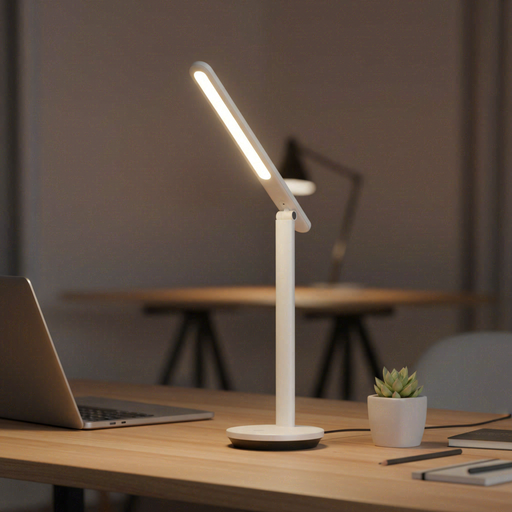
This folding desk lamp is a compact-workspace option. If judging printed colours is your main task, check its colour-rendering specification and print-area coverage before choosing it.
 No image available
Yeelight LED Folding Desk Lamp Z1 Pro (White)
The folding, rechargeable design may suit a desk where the lamp needs to be put away between study sessions.
Brightness is adjustable. Before relying on it to compare print colours, check its CRI/Ra and how evenly it lights the print area. Confirm the charging arrangement and your accommodation’s rules before ordering.
Joybuy
Frequently asked questions
Is colour temperature enough to judge a lamp for printed photographs?
No. Colour temperature tells you how warm or cool the light appears, not its full colour-rendering behaviour. Check a published colour-rendering metric for the exact lamp or bulb and whether the beam covers your prints.
Can I use a lamp with a non-UK plug in student accommodation?
Check your accommodation’s rules before buying rather than assuming the plug is acceptable. The University of St Andrews requires a UK power supply for electrical items used in its residences, apart from its stated exceptions for UK electrical toothbrushes and shavers; other providers may set different requirements.
Are personal desk lamps allowed in student halls?
Permission depends on your accommodation provider’s rules. The University of St Andrews sets conditions covering equipment safety, circuit loading and PAT testing in its residences; check your own handbook or ask the accommodation team before ordering.
How can I reduce glare when reviewing prints beside a monitor?
Position the lamp so it lights the print from the side without shining into your eyes or reflecting into the screen. Use head and brightness adjustments where available, then check the setup with the prints and monitor in their usual positions.


