What to check when choosing
Start with the area you need to light, then check how the lamp controls glare and fits around your paper, screen and desk edge.
| Concern |
What to check |
Who this matters to |
| Full-sheet lighting |
Check illuminated width and the distance at which illuminance is measured; centre brightness alone does not describe coverage. |
If I work across a large diagram, I want to see its edges without continually moving the lamp. Around 45% of consumers put full-sheet coverage first. |
| Glare and detail |
Look for adjustable brightness and head position; check published colour rendering information when markings rely on colour. |
When I switch between fine markings, glossy paper and a screen, reflections can get in the way of reading. Around 33% of consumers prioritise glare control and clear detail. |
| Desk fit |
Check the base footprint or measure the available clamp edge, including nearby drawers and cable trays. |
On a crowded or shared desk, I need to place the light without displacing my papers. For around 22% of consumers, fit and placement come first. |
Relevant brands for reference
These examples show different lamp designs and specifications; check the particular model rather than treating a brand name as a lighting specification.
BenQ
The E-Reading Intelligent is an integrated LED option for lighting a broad desk area.
- BenQ specifies a 90 cm illuminated width, Ra≥95 and 1,600 lux at a height of 45 cm.
- The lux figure applies to that height. If you need clamp mounting, confirm the required accessory and configuration.
Daylight Company
The DuoPro is a clamp-mounted task lamp with a flexible arm and double shade.
- Daylight Company specifies 95+ colour rendering index, four brightness levels and 2,100 lux at 30 cm.
- Measure your desk edge and check the surface before relying on its clamp mounting.
Anglepoise
The Original 1227 offers constant-spring arm adjustment and a replaceable E27 LED bulb.
- Its supplied bulb is specified at 470 lumens and 2,700 K, so buyers can assess that starting configuration before choosing a replacement.
- Dimming requires additional electrical hardware; check replacement-bulb specifications if colour rendering or a different light output matters to you.
Lumie
The Task combines directional adjustment and dimming with the brand’s high-output lighting specification.
- Lumie lists 95+ colour rendering index and 5,000 K LEDs for Task.
- Its stated 10,000 lux is measured at 15 cm and does not describe illumination across an entire desk.
Joybuy desk lamps to consider
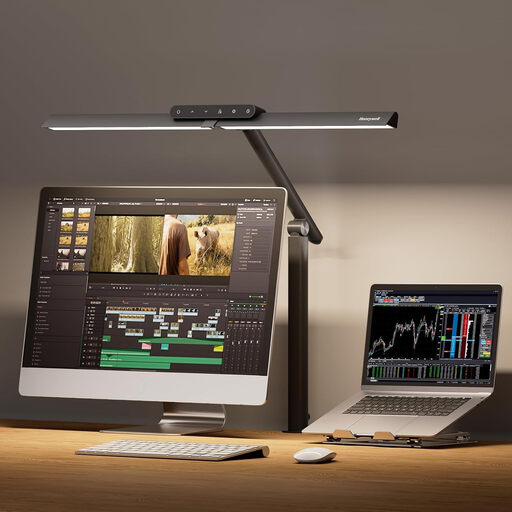
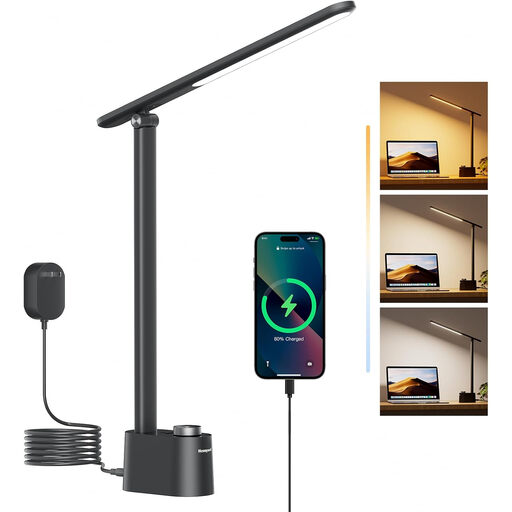
These two Honeywell desk lamps offer different ways to position light over paper: one clamps to a desk edge, while the other has a folding design. For either one, assess the light across your actual diagram rather than treating a lumen figure or a list of controls as a measure of full-sheet coverage.
 No image available
Honeywell HJ1 Sunturalux LED Clamp Desk Lamp, Black
Consider the clamp design if you want to keep the lamp base off a desk covered with diagrams; check that your desk edge can accommodate it.
The product name lists 1,200 lumens, four colour modes and stepless dimming. Lumens do not establish how evenly the lamp illuminates your sheet.
View on Joybuy
 No image available
Honeywell Sunturalux HWT-H01W-UK Foldable Desk Lamp, White
Consider the folding design if you need to change the lamp’s position around papers or clear part of the desk between study sessions.
The product name lists three colour modes, stepless dimming and USB-A and USB-C charging ports. Check whether its light reaches the full diagram at your intended working position.
View on Joybuy
Common questions
How bright should a lamp be for studying paper diagrams?
The light needs to suit the detail and area of your task; there is no single figure that establishes whether every diagram will be adequately lit. The Health and Safety Executive says studying an engineering drawing may require 750 lux. Check the light falling on your paper rather than relying on a lamp’s lumen figure alone.
Can I compare desk lamps by their lux figures alone?
No: a lux figure needs its measurement distance, and centre illuminance does not by itself show full-sheet coverage. BenQ’s E-Reading Intelligent is specified at 45 cm, Daylight Company’s DuoPro at 30 cm and Lumie’s Task at 15 cm.
Where should the lamp go if I use a laptop beside my diagrams?
Aim the lamp at the paper, then inspect both the page and screen from your normal seated position and adjust it to reduce reflections. The Health and Safety Executive advises arranging screens and lighting to avoid glare.
What should I check before choosing a clamp lamp?
Check that the desk has a clear, suitable edge and that the clamp will not interfere with drawers, cable trays or a vulnerable surface. A flexible arm can help position the light, but it cannot resolve an unsuitable attachment point.
Does a replaceable bulb mean I can dim the lamp?
No: bulb replacement and dimming are separate features. For the Anglepoise Original 1227, Anglepoise specifies a replaceable E27 LED bulb but says dimming requires additional electrical hardware; check the compatibility of any replacement bulb and control before buying them.


