Choose an LED desk lamp by the area of paper you need to light and where you can position the lamp to keep your drawing hand from casting a shadow. A wide, adjustable task lamp is worth considering for larger sheets; a compact lamp fits a shared desk more readily, while a monitor light bar suits sketching directly in front of a compatible screen. Compare stated brightness only at its stated measurement distance, and check the mounting space before ordering.
Who needs which lighting setup?
Detail-focused pencil artists
If you draw for long sessions or work across larger sheets, look for light you can direct over the paper without continually moving it. Compare illuminance at a stated distance as well as the lamp’s reach and coverage. The Health and Safety Executive gives studying an engineering drawing as an example of a task that may require 750 lux; that is a task-lighting reference, not a fixed requirement for home sketching.
Small-desk sketchbook users
If you mainly use an A4 sketchbook on a desk shared with study or work equipment, check the lamp’s footprint, adjustment and brightness controls before prioritising a long arm.
Screen-and-sketch users
If reference images stay on a monitor while you draw on paper, consider where the sketchbook sits in relation to the screen. A monitor-mounted light can leave more desktop clear, provided the mount fits and the light reaches the paper.
What matters when choosing?
Start with the paper position and available mounting space; then compare light output and controls for the way you draw.
Wide adjustable task lamp
Consider it: When you regularly draw across larger sheets and need to move the light around your drawing hand.
Allow for: Arm clearance and, for a clamp model, a desk edge that fits its stated opening.
Compact table lamp
Consider it: When a sketchbook shares the desk with other equipment and you need to adjust the light during a session.
Allow for: A smaller lamp may be harder to position across a wide sheet.
Monitor light bar
Consider it: When you sketch immediately in front of a compatible monitor and want to keep the desktop clear.
Allow for: Its fixed mounting position may not suit paper placed farther from the screen.
| Concern |
What to check |
Who this matters to |
| Paper coverage and light placement |
Compare illuminance at a stated distance, the illuminated area and how far the head or arm can move. |
When I work across a larger sheet, I need to see fine marks without shifting the paper every time my hand casts a shadow. Around 36% of consumers put broad, aimable coverage first. |
| Small-desk fit and adjustment |
Check the base footprint or clamp opening, plus the brightness and positioning controls. |
A shared desk leaves little room for a lamp that is awkward to move between drawing sessions. For around 29% of consumers, compact fit and everyday adjustment come first. |
| Colour judgement and glare |
Check colour-rendering and colour-temperature claims for the exact model, and whether you can angle the light away from your eyes. |
If I also use coloured materials or judge paper tone, I want lighting that lets me assess colour without an uncomfortable reflection. This is the primary need for around 21% of consumers. |
| Monitor fit and desk space |
Check the light bar’s monitor-fit range and whether its stated coverage reaches your paper. |
Drawing beside reference images makes clear desk space useful, but the light must still fall where my sketchbook sits. Around 14% of consumers prioritise a monitor-compatible setup. |
Mistakes to avoid
-
Comparing lux figures without their measurement conditions
A centre reading and an illuminated-area figure answer different questions. Daylight Company states illuminance at 30 cm for its Lumi and Tricolor lamps; BenQ states centre illuminance at 45 cm and a separate coverage figure for ScreenBar Halo.
Note the measurement distance and whether the figure describes one point or an area, then compare it with where your paper will sit.
-
Choosing a mount before measuring it
A clamp or monitor bar is useful only if its mounting point fits. Daylight Company lists a maximum 75 mm clamp opening for Lumi and Luminos, while BenQ gives separate flat- and curved-monitor thickness ranges for ScreenBar Halo.
Measure the desk edge or monitor and leave room for the cable and any arm movement before ordering.
-
Using a high colour-rendering claim as a substitute for coverage
A stated colour-rendering index describes a colour attribute; it does not tell you whether the lamp reaches the edges of a sheet or avoids a hand shadow.
Settle the paper area and lamp position first. Compare colour-rendering and colour-temperature settings if you also work with coloured materials or need to judge paper tone.
-
Assuming a monitor bar will light any drawing position
A light mounted on a screen directs light towards the desk in front of that screen. Paper on a separate drawing board may sit outside its stated coverage.
Check the intended paper position against the exact model’s coverage and monitor-fit specifications.
Relevant brands to consider
Daylight Company
Its task-lighting range includes compact table lamps and longer-reach clamp lamps for drawing and craft desks.
- Daylight Company specifies 4,500 lux at 30 cm, a 51 cm shade and a 100 cm reach for Lumi; Tricolor offers three stated colour-temperature settings.
- The models differ in size and mounting needs. Check the exact lamp’s reach, stated illuminance and desk-edge fit rather than applying one model’s figures to the range.
BenQ
Its ScreenBar Halo illustrates the monitor-mounted option for drawing beside a display.
- BenQ specifies 800 lux centre illuminance at 45 cm and 63 cm × 40 cm coverage at 500 lux for ScreenBar Halo.
- The mount has separate thickness limits for flat and curved monitors, and the fixed screen position may not suit paper placed farther away.
Anglepoise
Its adjustable desk lamps offer a movable task-light format for drawing and other desk work.
- Anglepoise says its Original 1227 and Type 75 desk and table lamps are supplied with an E27 LED bulb.
- For colour-sensitive work, check the supplied or replacement bulb’s output, colour temperature and colour-rendering specification for the lamp you choose.
Joybuy products for different desk setups
These choices cover a folding desk lamp for a smaller work area and a monitor-mounted light bar for sketching beside a screen. Check the light reaching your paper before deciding between them.
 No image available
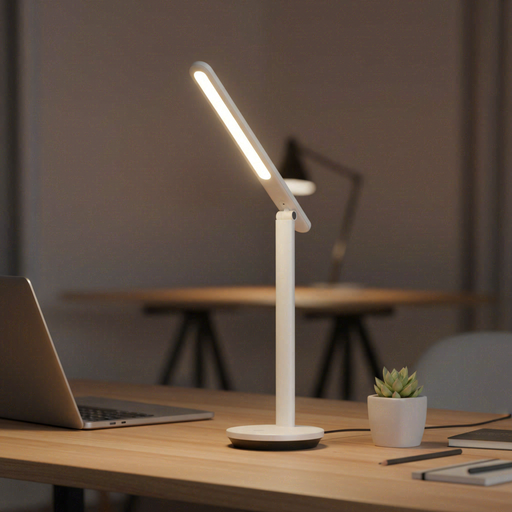
Yeelight LED Folding Desk Lamp Z1 Pro (White)
Consider this rechargeable, folding lamp when you want to adjust light at a shared drawing desk. Check its reach and the area it lights against the size and position of your paper.
View on Joybuy
 No image available
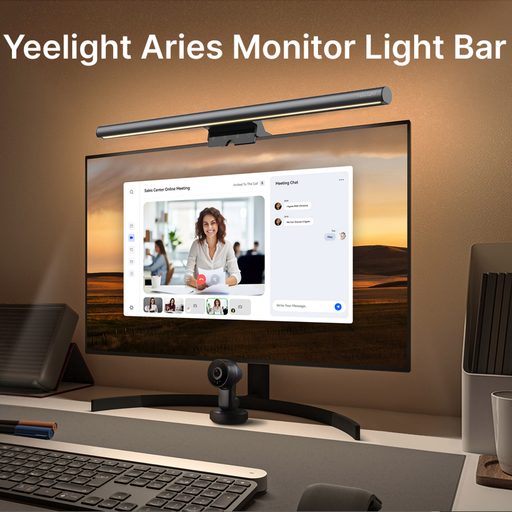
Yeelight Aries Monitor Bar Light (USB-C)
Consider this dimmable monitor bar if you sketch immediately in front of a screen and want to keep the desktop clear. Its title also specifies adjustable colour temperature. Check that the clip fits your monitor and that light reaches your usual paper position.
View on Joybuy
Questions about sketching lamps
How bright should a lamp be for pencil sketching?
Choose light you can adjust and direct across your paper rather than relying on a single headline lux figure. The Health and Safety Executive says studying an engineering drawing may require 750 lux, but that task-lighting example is not a fixed threshold for home sketches. Compare each lamp’s stated illuminance at its measurement distance and consider where the paper sits.
Do graphite sketches need a 95 CRI lamp?
A 95 CRI claim need not be your first selection criterion for graphite-only drawing. Prioritise coverage and controllable placement; colour-rendering specifications become more relevant if you also judge coloured materials or paper tone. Check that any quoted value applies to the exact model.
Can a monitor light bar replace a drawing lamp?
A monitor light bar can serve a sketchbook directly in front of a compatible screen if the paper falls within its illuminated area. BenQ specifies 63 cm × 40 cm coverage at 500 lux for ScreenBar Halo; that model’s figure should not be assumed for another bar or for paper positioned elsewhere.
What should I check about returns and warranties?
Check the actual seller’s change-of-mind return terms and the warranty that applies to the particular lamp. Confirm any conditions for returns and ask separately how the seller handles goods that arrive faulty, damaged or misdescribed; a manufacturer’s own-store policy does not automatically apply to a purchase from another retailer.


