For reviewing printed photographs, choose a lamp with stated colour-rendering information, controllable light and a position that keeps reflections off the prints. A broad task lamp suits prints spread across a desk; a monitor light bar makes more sense when prints sit directly below a compatible screen, while a lamp with a replaceable bulb lets you choose the bulb's specifications separately. For professional colour-critical approval, do not treat an ordinary desk lamp as a substitute for the controlled viewing conditions addressed by ISO 3664.
Who needs which sort of light?
Colour-conscious print reviewers
If you compare skin tones, neutrals or a print with an image on screen, look for the exact light source's colour-rendering information. The International Organization for Standardization addresses conditions for critical evaluation of photographic prints in ISO 3664; a lamp specification alone does not establish those conditions.
People with compact study desks
When prints share space with books and a computer, the lamp's base, clamp and reach affect where photographs can lie. Check the desk edge and the area the light needs to cover before choosing a mounting style.
Screen-and-print workers
If you inspect physical prints beside a monitor, consider both display fit and where the light falls. A monitor bar may serve prints directly below the screen, but its footprint needs checking against your print layout.
What matters when choosing?
Start with how you intend to judge the photographs and where they will lie; then check whether the lamp can illuminate that area without awkward reflections or mounting problems.
| Concern | What to check | Who this matters to |
|---|
| Colour rendition |
Check the exact lamp or bulb's stated CRI or Ra and colour temperature. Decide whether you need everyday print review or controlled, colour-critical viewing. |
When I compare tones in photographs, I want to know what the light source claims about colour rendering rather than rely on a “daylight” label. Around 34% of consumers put this information first. |
| Coverage and glare |
Look at brightness controls, shade or diffuser design, and the stated illuminated area or lux at a specified distance. |
Glossy prints catch reflections, and I may need to move the light while examining detail. For roughly 33% of consumers, usable light without troublesome glare is the primary concern. |
| Desk fit |
Measure usable desk-edge space for a clamp and check the lamp's reach and cable position against your print layout. |
I need room to spread out photographs without a lamp base or poorly placed arm getting in the way. That physical fit comes first for around 20% of consumers. |
| Monitor setup |
For a light bar, confirm display shape and thickness, power arrangements and whether its light reaches the prints. |
My prints sit in front of the screen, so the light has to fit the monitor and reach that part of the desk. Around 13% of consumers prioritise this screen-centred setup. |
Mistakes to avoid
-
Taking “daylight” to mean accurate print colour
Colour temperature describes the appearance of the light, not the complete conditions under which a photograph is judged. Even a stated high CRI does not show that the desk meets the controlled viewing conditions addressed by ISO 3664.
Check the exact light source's disclosed colour-rendering information, and keep everyday print inspection separate from professional colour-critical approval.
-
Choosing a mount before measuring
A clamp needs a suitable desk edge; a monitor bar needs a compatible display. Either can leave the intended print area poorly placed under the light if its reach or footprint is wrong.
Measure the mounting point and map out where your prints will lie before ordering.
-
Ranking lamps by lux figures measured at different distances
Daylight Company quotes illuminance for its Slimline 4 and DuoPro at 30 cm, while BenQ quotes the ScreenBar Halo's centre illuminance at 45 cm. Those figures do not describe equivalent desk setups.
Compare the stated measurement distance and coverage with the position of your own prints, rather than using a lux number alone to choose between them.
Relevant brands for reference
Daylight Company
Its Slimline 4 and DuoPro illustrate broad task-lighting options for a desk or clamp-mounted setup.
- Daylight Company specifies 95+ CRI for both models. It quotes up to 3,200 lux at 30 cm for Slimline 4 and 2,100 lux at 30 cm for DuoPro.
- Both cited models have a fixed 6,000 K light source. Check the mount and print-area coverage rather than treating the CRI figure as certification of a complete viewing setup.
BenQ
The ScreenBar Halo is a monitor-mounted option for prints inspected close to a screen.
- BenQ specifies Ra≥95, centre illuminance of 800 lux at 45 cm and 63 cm × 40 cm coverage at 500 lux for this model.
- Check its stated limits for flat or curved monitor thickness and whether the illuminated area accommodates your prints, particularly if you spread them away from the screen.
Anglepoise
Its adjustable desk lamps offer another approach when aiming the shade or choosing a separate bulb matters more than a monitor mount.
- Anglepoise says its UK Original 1227 and Type 75 desk and table lamps use E27 LED bulbs, allowing the bulb's specifications to be checked separately.
- Do not assume the same colour rendering across models or bulbs: Anglepoise specifies CRI 86 for its integrated-LED 90 Mini Mini. Check the exact light source you intend to use.
Monitor light bars on Joybuy
These monitor light bars are choices for a study where printed photographs sit near the screen. Before choosing one, check that it mounts on your display and lights the area where you review prints.
 No image available
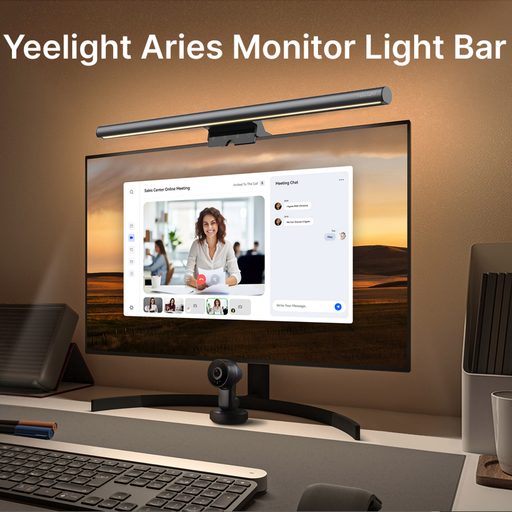
Yeelight Aries USB-C Monitor Light Bar
For prints reviewed close to a monitor, this USB-C light bar offers dimming and adjustable colour temperature as described in its product title. Check that its mount fits your screen and that the light reaches your print area.
View on Joybuy
 No image available
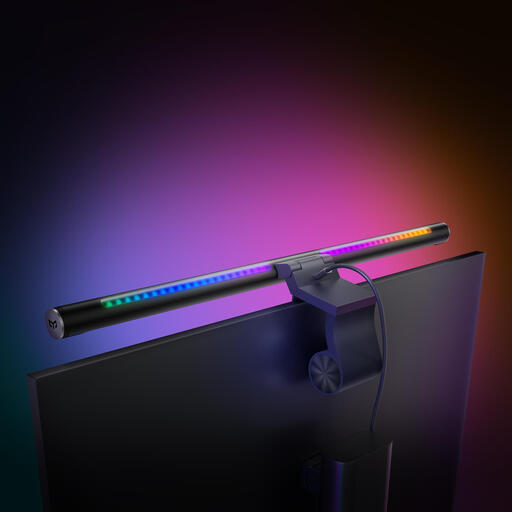
Yeelight Screen Light Bar Pro Libra 2
This monitor light bar may suit a screen-centred study if its light reaches the photographs. Its title identifies knob control and Matter compatibility; check monitor fit and the illuminated area separately before choosing it for print review.
View on Joybuy
 No image available
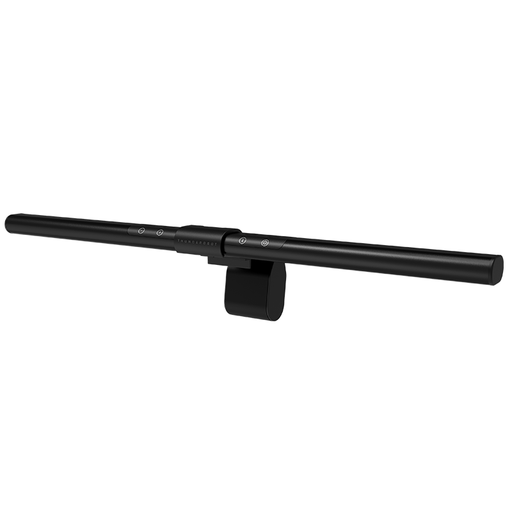
Thunderobot L1 Monitor Light Bar
For a monitor-based print-review space, the product title states Ra95 and ten-level dimming. Those claims do not establish colour accuracy across a complete viewing setup; confirm display fit and whether the light covers your photographs.
View on Joybuy
Questions about reviewing prints
Which lamp specification should I check first for printed photos?
Start with colour-rendering information for the exact lamp or bulb, then check brightness control and coverage at your print position. A stated CRI or Ra of 95+ helps you compare disclosed specifications, but it does not establish professional viewing conditions.
Will a monitor light bar illuminate physical prints?
It can illuminate prints placed within its light footprint below a compatible monitor. For instance, BenQ specifies 63 cm × 40 cm coverage at 500 lux for its ScreenBar Halo; check the particular bar's coverage and mounting limits against your own display and print layout.
Can a standard desk lamp be used to approve prints for colour-critical work?
Do not assume that it can. The International Organization for Standardization's ISO 3664:2025 addresses viewing conditions for critical evaluation and comparison of photographic prints; a consumer lamp's high-CRI claim alone does not show that the complete setup meets those conditions.


