For knitted-hat photos in a shared workshop, start with a bi-colour LED panel whose brightness you can adjust and whose light you can diffuse, then check its published colour-rendering specifications against your needs. A compact setup suits occasional shoots where space must be cleared afterwards; regular batch shoots may call for more output or additional lights, provided you can accommodate the stands, power supplies and leads.
Who this setup suits
Colour-conscious knit sellers
If listing photos need to show yarn shades and stitch detail, compare adjustable colour temperature and published CRI or TLCI figures. Those figures describe manufacturers’ specifications, not a guarantee that a photograph will match the physical hat; make a reference shot with the actual yarn.
Shared-table workshop photographers
If the shooting space must be cleared for other people, plan where the panel, stand and power lead will go before choosing a light. The Health and Safety Executive treats workplace lighting as a safety consideration, while Godox’s instructions for the P260C Pro warn against looking directly at illuminated LEDs.
Batch-content makers
For repeated hat shoots, accessible brightness controls or a planned multi-light arrangement may make the setup easier to repeat. Check whether the additional fixtures, supports and leads will fit the shared workspace.
What to check when choosing a light
Choose for the hat and the space together: decide how you will control colour and shadows, then check output, mounting and what comes in the package.
| Concern |
What to check |
Who this matters to |
| Yarn colour and knit texture |
Compare the exact model’s adjustable colour-temperature range and published CRI or TLCI figures; check whether diffusion is supplied or can be fitted. |
When yarn shades and raised stitches need to read clearly in listing photos, I want adjustable white light without losing the texture. Roughly 31% of consumers put colour and texture first. |
| Repeatable output and adjustment |
Check brightness controls and the light’s stated output at a declared distance and colour temperature; consider remote control if using several lights. |
If I photograph several hats in a limited session, I want to adjust the light without repeatedly resetting the scene. Around 31% of consumers prioritise repeatable output and controls. |
| Shared-space safety and footprint |
Confirm the mounting arrangement and plan where the stand and leads will sit; check whether the light can be dimmed when others are nearby. |
Working alongside others, I need a stable setup that keeps glare and leads out of their way. Roughly 23% of consumers put shared-space safety and footprint first. |
| A straightforward starter setup |
Read the exact package contents for a stand, diffuser and suitable power supply; check battery requirements if you intend to work without mains power. |
For an occasional shoot, I want equipment I can set up and put away without finding that it needs another support. Around 15% of consumers focus primarily on a straightforward starter setup. |
Setup mistakes to avoid
-
Assuming a panel comes with a stand
NEEWER UK lists a diffuser and carry bag with the NL480, but says a light stand or desk stand is required and not included. It also lists compatible NP-F batteries as not included.
Check the exact in-box list and arrange a stable support before setting the light beside a shared table.
The NL480 needs a separate light or desk stand; battery operation also requires compatible batteries.
-
Comparing lux figures without their test conditions
NEEWER UK specifies 17,200 lux at 1 m and 6500 K for the AP150B. Aputure specifies 5070 lux at 1 m and 5600 K for the amaran P60x. Those figures alone do not establish how soft or even either light will look on a hat.
Compare output at matching distances and colour temperatures where possible, then consider diffusion and the position you can actually use in the workshop.
-
Expecting any USB-C charger to deliver full brightness
Godox’s P260C Pro manual says USB-C input below 10 W is unsuitable and sets different maximum brightness levels for different input-power ranges.
If you plan to power that model through USB-C, check the charger’s stated USB-C output against Godox’s requirements; otherwise, consider the supplied adapter.
-
Treating a bright panel like ordinary room lighting
A stand, bright LEDs and a power lead affect other workshop users. The Health and Safety Executive identifies lighting as a workplace safety consideration, and Godox warns against direct viewing of illuminated LEDs.
Aim the panel at the hat rather than people, secure its support and keep leads clear of routes through the workspace.
Relevant brands to consider
NEEWER
NEEWER UK lists bi-colour panels with different output and control arrangements, including the NL480 and AP150B.
- The NL480 listing specifies 3200 K–5600 K adjustment, a diffuser and a carry bag.
- The NL480 requires a stand that is not included; the larger AP150B calls for a separate assessment of its placement and power needs at a shared table.
Godox
The P260C Pro is a diffused bi-colour panel to examine when yarn colour and shadow transitions matter.
- Godox specifies 2800 K–6500 K adjustment and average CRI and TLCI of at least 98 for the P260C Pro, and describes a side-emitting diffuser design.
- Its published colour figures are manufacturer specifications. Godox’s manual also sets power requirements for USB-C operation.
amaran
The amaran P60x is a bi-colour panel to consider for a planned, repeatable shooting setup.
- Aputure lists 3200 K–6500 K adjustment and Sidus Link app control for the P60x. A UK retailer also lists a three-light kit with softboxes, grids, power supplies, supports and a case.
- A multi-light arrangement needs room for its supports and careful lead routing in a shared workshop.
Joybuy product choices
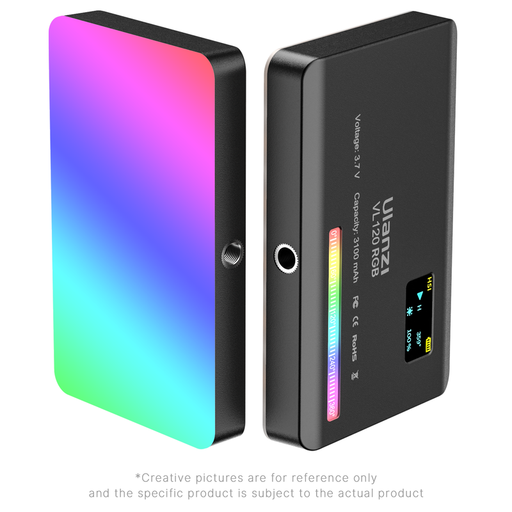
This compact camera light is a portable option to examine for photographing hats. Check how you would mount and diffuse it before relying on it as a shared-table light.
 No image available
ULANZI VL120 RGB Video Light, 3100 mAh
Consider this compact, battery-powered light if you need to put away your hat-photography setup after each session.
The product name specifies an integrated 3100 mAh battery, a 2500–9000 K range and CRI of at least 95. Before choosing it for knitted textures, check how it mounts, whether diffusion is supplied and whether its adjustable output suits your shooting distance.
View on Joybuy
Common questions
Does an LED panel come with a stand?
Not necessarily. NEEWER UK says its NL480 needs a light stand or desk stand, but neither is included; check the contents of the exact model you intend to buy.
Can I power a panel from any USB-C charger?
Only use USB-C power if the panel supports it and the charger meets that model’s requirements. Godox says input below 10 W is unsuitable for its P260C Pro, while other power ranges limit that model’s maximum brightness; those thresholds should not be applied to other panels.
How can I use a panel without disrupting a shared workshop?
Mount it securely, keep it out of other people’s direct eye lines and route its lead away from walkways. The Health and Safety Executive treats workplace lighting as a safety consideration, and Godox’s panel instructions warn against looking directly at illuminated LEDs.


