Colour-conscious knitwear makers
If yarn shades and contrast stitches need to look consistent across a portfolio, check the panel’s documented colour-rendering figures and use a repeatable camera white-balance setting.


For knitted-hat portfolio photos, choose an LED panel you can soften and position to show stitch relief, with documented colour-rendering figures for assessing yarn colour. An integrated diffuser can simplify a tabletop setup, but a reflector may still be needed on the shadow side. If you shoot farther from the hat or away from mains power, check output at a stated distance and the exact power accessories before choosing.
If yarn shades and contrast stitches need to look consistent across a portfolio, check the panel’s documented colour-rendering figures and use a repeatable camera white-balance setting.
If cables, ribbing or lace need to remain visible, plan how to position and soften the key light while using a reflector or fill surface to control deep shadows.
If you photograph hats both at home and elsewhere, check the panel’s power options, mounting arrangement and what you would need to carry separately.
For knitted-hat portfolio photographs, decide which matters most to your setup: controlling stitch shadows, keeping yarn colour consistent or moving the light between locations.
| Concern | What to check | Who this matters to |
|---|---|---|
| Stitch texture and shadows | Check diffusion and dimming options, and leave room for a reflector opposite the key light. | If ribbing disappears into shadow, I want the stitches to retain their shape without stark edges; around 42% of consumers put texture and shadow control first. |
| Yarn colour consistency | Check colour-rendering figures for the exact model and whether its colour-temperature setting suits a repeatable lighting setup. | When I photograph several yarn shades for one portfolio, I want the colours to remain credible from shot to shot; roughly 33% of consumers place colour consistency first. |
| Power and portability | Check the mounting method, battery type, bundle contents and any limits on output with portable power. | If I update my portfolio at home and at workshops, I need a light I can carry and power in both places; about 25% of consumers prioritise portability. |
More output does not determine how stitch shadows will look. Product-photography guidance from Orbitvu treats the key light, diffuser and fill or reflector as separate controls for shadows and glare.
Check how you can dim and soften the panel, then allow space to adjust its angle and add fill.
According to amaran, the P60x’s stated NP-F970 batteries are not included. The Godox P260C Pro manual says its stand is purchased separately and that lower-power USB-C supplies limit maximum brightness.
Before choosing a portable setup, check the exact bundle, compatible batteries and charger, stand mounting and output available from your intended power supply.
A colour-rendering figure needs to belong to the model and variant you are buying. Godox specifies CRI/TLCI 98+ for the P260C Pro, while amaran specifies CRI 95+ and TLCI 97+ for the P60x.
Match the listing’s model number to its manufacturer specification, then plan a consistent light and white-balance setting for each session.
The UK Office for Product Safety and Standards advises online shoppers to check the seller, appropriate safety markings and manufacturer details, as well as relevant recalls.
Review the seller’s identity, supplied instructions and warnings, manufacturer details and marking appropriate to where you will use the light.
The P260C Pro is a conventional bi-colour panel to consider for a single-hat tabletop setup.
The P60x is a bi-colour panel to assess if your setup calls for documented output at a stated distance and battery operation.
The PavoSlim 60B represents a slim bi-colour panel format for portable craft photography.
The AEOS 2 is relevant if your craft work also involves video, moving subjects or creative lighting.
The light below is a compact, battery-equipped camera light to consider for portable knitted-hat photos. For a tabletop portfolio setup, check how you would mount and soften it before deciding whether it meets your needs.
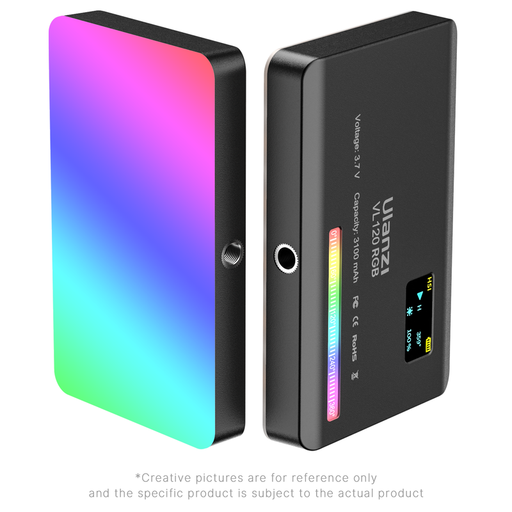 Image unavailable
Consider this compact light for a camera-based knitted-hat shoot; check its diffusion and dimming options before relying on it to control stitch shadows.
The product listing states CRI ≥95, a 2500–9000 K colour-temperature range and an integrated 3100 mAh battery.
For portable use, check the battery runtime and the mounting accessories supplied with the exact bundle.
One panel can serve as the key light, but a diffuser and a simple fill surface give you more control over stitch shadows. Orbitvu’s product-photography guidance identifies a key light, fill or reflector, and diffuser as the elements used to manage shadows and glare; try a white card opposite the light if the shadow side loses detail.
Look for documented colour-rendering figures for the exact panel and use a consistent colour-temperature and camera white-balance setting. Godox lists CRI/TLCI 98+ and 2,800K–6,500K adjustment for the P260C Pro; amaran lists CRI 95+, TLCI 97+ and 3,200K–6,500K for the P60x. Those specifications do not remove the need to control mixed room light.
You need a compatible portable power source if you plan to photograph hats away from mains power. amaran says the P60x can use two NP-F-style batteries and that its stated NP-F970 batteries are not included. The Godox P260C Pro also offers USB-C power, but its manual sets lower maximum brightness with lower-power supplies.
Check the seller, supplied instructions, manufacturer details and appropriate safety marking for where you will use the panel. The UK Office for Product Safety and Standards gives these checks in its consumer guidance and also advises shoppers to look for relevant recalls. Do not treat a picture of a marking on its own as a substitute for checking the product information.