What matters when choosing a light?
Decide whether you need neutral product lighting or coloured scenes first; then check how the light will fit, mount and draw power in your room.
Diffused bi-colour panel
Choose it when: You mainly want adjustable white light for straightforward product demonstrations.
Trade-off: It does not provide RGB background colours; check whether diffusion is built in or a modifier is supplied.
RGB panel
Choose it when: You need coloured accents or settings you can repeat across several takes.
Trade-off: The extra colour controls may go unused in a neutral demonstration; RGB features do not replace the need to check white-light controls and diffusion.
| Concern |
What to check |
Who this matters to |
| Product colour |
Check the exact model’s stated CRI or TLCI, adjustable white colour-temperature range and dimming controls. |
If I am showing a product whose colour matters, I want to set the light and camera white balance for that scene rather than rely on an effects preset. Faithful product colour would come first for around 36% of consumers. |
| Soft light in a small space |
Check for built-in diffusion or a supplied softbox, then allow room for a stable stand and the filming surface. |
When glare or hard shadows distract from a small product, I need a way to soften the light without crowding my desk. For around 29% of consumers, that manageable setup would be the main concern. |
| Quick setup and storage |
Check the light’s dimensions, weight, power options and mounting contents. |
If the room serves other purposes, I need to put the light away and set it up again without leaving a permanent filming area. Around 21% of consumers would prioritise that flexibility. |
| Power and kit contents |
Check the supply arrangement and whether the adapter, stand and any required batteries are included. |
With limited socket and floor space, I need a power and cable arrangement I can use safely, as well as the parts needed to position the light. That would be the primary concern for around 14% of consumers. |
Brands to consider
These model examples illustrate different controls and kit arrangements; check the exact listing before applying a specification to a particular bundle.
Godox
The P260C Pro is a bi-colour panel to consider when adjustable white light and diffusion matter more than RGB effects.
- Godox specifies 2,800–6,500 K adjustment, 45 W input, panel and app control, and CRI/TLCI averages of at least 98 for the P260C Pro.
- Its softer-light description is Godox’s own claim. Check the exact bundle’s mounting and power contents, and whether the panel will fit beside your filming surface.
NEEWER
The RGB168 is relevant when a demonstration needs adjustable white light as well as coloured accents and optional battery operation.
- NEEWER specifies 2,500–8,500 K adjustment, RGB control, built-in diffusion, app control and CRI/TLCI of 97+ for the RGB168.
- Its two-NP-F battery option does not include the batteries. Compare its published lux figures only with figures measured under matching conditions.
amaran
The P60c is an RGBWW option for demonstrations that alternate between neutral and coloured setups and could use a supplied modifier.
- amaran specifies 2,500–7,500 K adjustment, green–magenta control, CRI 95+ and TLCI 96+; its P60c package lists a softbox and grid.
- NP-F batteries are separately sold. Confirm the exact seller’s bundle and power arrangement for your location.
Joybuy products for this setup
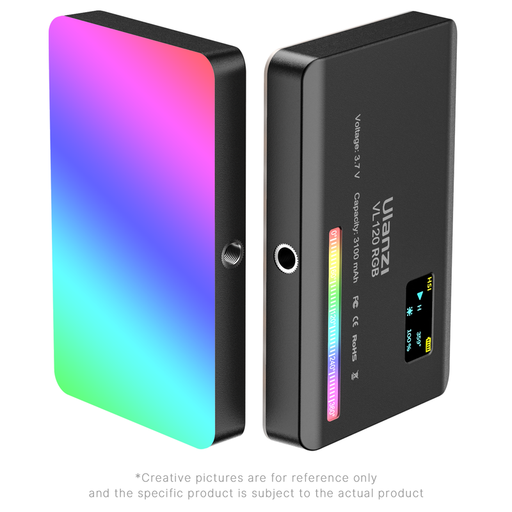
This compact RGB video light is relevant if you want coloured accents and integrated battery power for a product demonstration. Check its light-output controls and how you would position it before treating it as your main light.
 No image available
ULANZI VL120 RGB compact video light
Consider this light if your demonstration uses coloured accents or you need to reposition a compact, battery-powered light.
The product name states an integrated 3,100 mAh battery, 360° colour control, 20 lighting effects, CRI ≥95 and a 2,500–9,000 K range.
If precise output control or soft light matters, check the dimming controls, diffusion and mounting contents on the exact listing. Plan a position that leaves the light ventilated and cables clear.
View on Joybuy
Common questions
Which specifications matter most for showing a product on camera?
Start with dimming, adjustable white colour temperature and a stated CRI or TLCI figure for the exact light. Godox, NEEWER and amaran publish model-specific figures for the panels discussed here, but those manufacturer specifications do not replace setting camera white balance for your room and product.
Do I need RGB lighting for a product demonstration?
Not if you only need adjustable white light for a neutral demonstration. Consider RGB controls when coloured backdrops or accents form part of the shot; still check the light’s white-light controls and diffusion before choosing it as a main light.
Will a softbox, stand and batteries come with the light?
Contents vary by model and bundle, so check the exact product listing. amaran lists a softbox and grid with the P60c, while NEEWER states that NP-F batteries are not included with the RGB168; do not assume that an accessory shown in a photograph is supplied.
How can I use a panel light safely in a student room?
Use power equipment suited to the available supply, inspect plugs and cables, and avoid damaged leads and overloaded sockets. The Health and Safety Executive advises checking supply suitability and equipment condition; Merseyside Fire & Rescue Service gives the socket and damaged-wire warnings. Position the stand securely and keep cables out of walkways.


