Catalogue wallet sellers
If you photograph several leather wallets for listings, consistent colour, white balance and adjustable light output help you present their finishes coherently.


Choose an LED panel with adjustable output and published colour-rendering specifications, then position it so the wallet receives light without broadly lighting the dark backdrop. A diffused panel can reveal grain and stitching, but glossy leather or a nearby backdrop may call for more careful angling and flags. A compatible lens polariser can help with remaining reflections from non-metallic surfaces, but it cannot replace light placement.
If you photograph several leather wallets for listings, consistent colour, white balance and adjustable light output help you present their finishes coherently.
A desk or compact tabletop calls for a panel you can position around the wallet while keeping its grain, seams and edges visible.
On finished or glossy leather, a bright reflection can obscure grain or embossing. Panel angle matters; a compatible lens polariser is another option if unwanted glare remains.
For a wallet against a dark backdrop, assess colour and white balance alongside where the light falls. Then consider how the panel will fit and draw power in your shooting space.
| Concern | What to check | Who this matters to |
|---|---|---|
| Leather colour and finish | Check the exact panel’s published CRI or TLCI, colour-temperature range and output adjustment. Set the camera’s white balance deliberately. | If I need listing photos to distinguish leather colours and finishes, brightness alone will not settle the choice. Roughly 36% of consumers put colour and finish depiction first. |
| Backdrop and glare control | Check dimming and mounting options so you can angle the panel away from the backdrop; consider whether flags or a grid will fit the setup. | With glossy leather or a backdrop close behind the wallet, I want visible detail without a distracting highlight or a lit-up background. Around 29% of consumers make light and reflection control their primary concern. |
| Compact tabletop workflow | Check the panel’s dimensions, controls and mounting arrangement against the available desk space. | When I photograph wallets on a small desk, I need to reposition the light without rebuilding the setup each time. Approximately 21% of consumers prioritise a compact workflow. |
| Power and multi-light control | Check the exact kit’s mains or battery options and whether its controls suit any other lights you intend to use. | If I move between shooting locations or add another light, I need a power and control arrangement that works in both setups. Roughly 14% of consumers put that flexibility first. |
Output figures do not tell you how the wallet’s colour will appear on camera. The panel’s colour-rendering specification, colour-temperature setting, placement and camera white balance also matter.
Compare specifications for the exact model, then make a camera test with your wallet and intended backdrop before settling on a lighting position.
Diffusion can soften shadows, but a broad panel can also light the backdrop. The result depends on the panel’s angle, distance and output.
Try the panel off-axis at a lower output, and check whether its mount lets you position it or add spill control where needed.
Flags or a suitable grid add equipment to position and time to set up.
Battery capability does not mean the batteries come with the panel. For example, the Godox LEDP260C manual specifies two separately purchased NP-F970 batteries for battery operation.
Check the exact listing for its battery type and quantity, charger, mains adapter, plug and mounting hardware before ordering.
The Tiffen Company describes reduced glare from non-metallic surfaces with a polarising filter, but the wallet’s finish and lighting angle still affect the image.
Adjust the panel first. If glare remains, check that a polariser fits your lens and judge its effect through the camera.
Photography and video panels to consider when you want published colour-rendering and output specifications for a controlled tabletop setup.
Compact bi-colour panels to compare if soft light and direct or app-based control suit your product-photography space.
Desk-oriented lighting to consider when an adjustable mount and straightforward output control matter more than a studio-style modifier setup.
Slim bi-colour panels to examine if your setup may need different power arrangements.
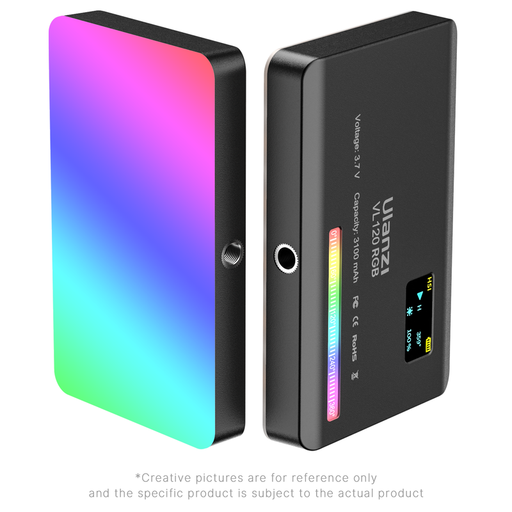
This compact camera light is a product to consider if adjustable colour temperature and battery-powered positioning matter for your wallet photos. Check its output, dimming and mounting arrangement for the dark-backdrop setup you plan to use.
 No image available
Consider this compact camera light if battery-powered positioning is useful for your wallet setup.
Its listed specifications include CRI ≥95, a 2500–9000 K colour-temperature range and an integrated 3100 mAh battery. Check its output, dimming controls and mounting arrangement before relying on it to preserve a dark backdrop.
Start with published colour-rendering information and controllable output rather than brightness alone. Elgato describes CRI above 90 as good for camera use and above 94 as a stronger target, but a rating cannot guarantee the final colour: set white balance and test the wallet under your chosen light.
Move the panel or wallet until the strongest reflection no longer points towards the lens, while checking that grain and edges remain visible. If glare persists on a non-metallic finish, a lens-compatible polariser may help; assess the change through the camera rather than assuming every reflection should disappear.
Not necessarily: a fixed setup near a socket may not need battery operation. If you want to move the light away from mains power, check the exact model and kit; the Godox LEDP260C manual, for example, specifies two NP-F970 batteries purchased separately for battery use.
Check the panel’s product identification, seller details, instructions and applicable conformity information for where you will use it. The Office for Product Safety and Standards publishes guidance on the Electrical Equipment (Safety) Regulations 2016 for Great Britain; Northern Ireland has different arrangements, so check the guidance relevant to your location rather than assuming GB marking guidance applies there.