Small-desk stationery sellers
If you photograph pens, notebooks, stickers or small sets beside your desk, a compact light may be easier to position and put away. Leave room for a reflector or diffusion if the set casts distracting shadows.


For a small stationery set on a desk, start with a panel whose brightness and colour temperature you can control, and plan how you will soften its light. Larger arrangements or frequent shoots may call for more output and room for modifiers; neither a white backdrop nor a single panel will necessarily remove shadows. Check the panel's stated colour-rendering specification alongside your camera's white-balance settings rather than relying on the light alone for consistent colours.
If you photograph pens, notebooks, stickers or small sets beside your desk, a compact light may be easier to position and put away. Leave room for a reflector or diffusion if the set casts distracting shadows.
For repeat listings, consistent paper whites and stationery colours matter as much as the panel's published colour-rendering specification. Nikon's white-balance guidance supports setting the camera for the lighting you actually use.
Larger arrangements and repeated shoots make output, space for modifiers and repeatable light placement worth considering alongside the panel's size.
Decide how you will control shadows across the stationery and white backdrop, then consider colour consistency, the size of your set and the space available around it.
| Concern | What to check | Who this matters to |
|---|---|---|
| Soft light and shadows | Check the emitting area and whether diffusion is included. Allow room for a reflector, second light or light tent if you want less visible shadow. | Layered stationery can cast shadows that distract from the products, so I want light I can soften and direct. Around 40% of consumers put shadow control first. |
| Colour and white balance | Look for adjustable colour temperature and a stated colour-rendering specification; set camera white balance for the finished lighting arrangement. | When listing paper, inks or pastel sets repeatedly, I need the whites and colours to look consistent across photographs. Colour consistency is the primary need for around 30% of consumers. |
| Output for repeat shoots | Read illuminance together with its measurement distance and settings. Check the mounting arrangement and any included modifiers. | A larger set or a light placed farther away leaves me needing enough usable output to keep the setup repeatable. Around 20% of consumers prioritise that output and control. |
| Desk space and power | Check dimensions, mounting options and the exact USB-C or battery requirements, including what comes in the box. | If I shoot occasionally at a small desk, I need a light I can position and store without taking over the workspace. Compact placement and flexible power come first for around 10% of consumers. |
A panel can light the stationery while still leaving directional shadows beneath layered items. Canon Europe describes a light tent as a way to produce shadowless product images.
Decide whether you want some visible shaping or a near-shadowless catalogue image, then allow space for diffusion, a reflector or another light as needed.
SmallRig states 2,000 lux at 0.3 m for the P200, while amaran states 5,070 lux at 1 m and 5600 K for the P60x. Those figures cannot be compared directly because the stated distances differ.
Before comparing panels, check the measurement distance, colour-temperature setting and whether a modifier was fitted.
amaran describes an NP-F battery option for the P60x, but says the two batteries needed for that option are not included.
Check the exact box contents and power requirements if you plan to use a light away from a mains socket.
GOV.UK's electrical-equipment guidance covers Great Britain and points to separate arrangements for Northern Ireland. A listing intended for one destination should not be assumed to answer every UK delivery question.
Confirm your delivery destination, then check the exact model's plug, voltage and conformity information with the seller.
The P200 illustrates a compact panel for close, desk-based stationery photography.
The P260C Pro is a soft bi-colour panel to consider when photographing larger arrangements or working with diffusion.
The P60x provides a panel-and-modifier setup for repeat product photographs where there is room to position it.
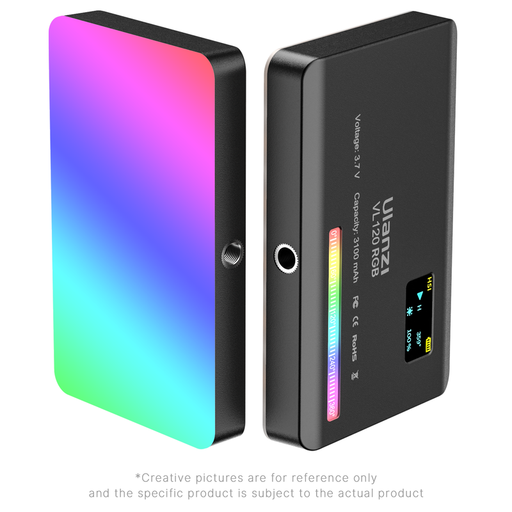
This compact light is relevant if desk space and portable power matter to your stationery setup. Check how you would mount and soften it before relying on it as your main light against a white backdrop.
 No image available
Its compact design and integrated battery may suit an occasional stationery shoot where the light needs to be put away afterwards. The product title states a 3100 mAh battery, a 2500–9000 K colour-temperature range and CRI ≥ 95. Before planning a fixed tabletop setup, check mounting compatibility, brightness control, usable output and whether a diffuser is included.
One panel can work for a small arrangement if some shaped shadow is acceptable. To reduce shadows further, try a reflector or diffusion; Canon Europe also describes a light tent as a route to shadowless product photographs.
Choose a consistent setting and set camera white balance for the lighting actually falling on the stationery and backdrop. Nikon's guidance shows why a white-card reading can help under mixed lighting; avoid adding unbalanced room lights to the setup.
No. A published colour-rendering index, or CRI, is one specification to consider for the exact model, not a guarantee for every paper, ink or camera setup. Keep the lighting and white balance consistent, then check photographs of the colours you need to represent.
Check the exact light's plug, voltage and conformity information for your delivery destination. GOV.UK's guidance on the Electrical Equipment (Safety) Regulations 2016 covers Great Britain and directs readers to separate guidance for Northern Ireland, so do not assume the arrangements are identical.