Choose a standalone commercial signage display if visitors mainly need to see event times, directions or prepared content. Choose an interactive display when annotation or connecting presenters’ devices is central to a workshop; in either case, check the room’s viewing conditions, connections, mounting plan and the exact model’s operating-hours rating before ordering.
Who is the display for?
Event-information organisers
Library teams displaying schedules, directions, speaker information or looping messages rather than inviting visitors to write on the screen. The British Library describes public-library events ranging from talks and story-times to digital workshops and community activities.
Workshop and collaboration hosts
Teams running sessions in which presenters need to connect a device and participants need to annotate or discuss material on-screen. Check that the chosen display supports the devices and working method planned for the session.
Shared-space display coordinators
Staff placing a screen in a lobby, meeting room or multi-use space, where lighting, viewing position, mounting and the daily schedule all affect the choice.
What matters when choosing?
Standalone commercial signage
Choose it for: Timetables, directions and prepared event content that staff update without writing on-screen during the event.
Trade-off: It does not replace an interactive annotation workflow.
Interactive display
Choose it for: Workshops or planning sessions where connecting a presenter’s device and annotating content are part of the activity.
Trade-off: The added interaction workflow may be unnecessary for a screen showing only prepared information.
| Concern |
What to check |
Who this matters to |
| Readable event information |
Assess lighting and viewing distance, then compare the exact model’s brightness and haze specifications. |
If visitors need to read schedules or directions from across a shared space, clarity takes priority over touch; around 40% of consumers put clear public information first. |
| Live workshop interaction |
Confirm the need for annotation and check device compatibility and the required connections. |
For a workshop, I need presenters to connect their materials and work through them with participants; roughly 30% of consumers place live collaboration first. |
| Practical installation |
Check dimensions, weight, mounting pattern, power and the exact model’s daily operating-hours rating. |
A screen in a multi-use room must fit the planned position and event schedule; around 30% of consumers make workable shared-space deployment their primary concern. |
Mistakes to avoid
-
Paying for touch when the screen will only show information
Device connection and annotation add a working method that a schedule or looping slide presentation may never use.
Decide whether anyone must write on-screen during the event. If not, compare standalone signage against the display task before considering interactive models.
-
Choosing size before checking the viewing conditions
A large screen can still be hard to read if reflections obscure it or programme text is too small at the intended viewing distance.
Check the proposed position and lighting, then compare brightness, haze treatment and the content layout for the exact model.
-
Treating a display specification as an installation plan
The screen also needs a suitable position, power, connections and mounting arrangement for its intended hours of use.
Measure the space and confirm the model’s dimensions, weight, VESA pattern, inputs and daily operating-hours rating before arranging mounting or installation.
-
Using Great Britain guidance for a Northern Ireland purchase
GOV.UK’s electrical-equipment guidance distinguishes Great Britain from Northern Ireland, where different provisions apply.
If the display will be supplied or used in Northern Ireland, ask the supplier or procurement team to confirm the applicable requirements for that product.
Brands to consider for event displays
Samsung
Samsung Business UK’s QMC professional signage line is relevant to a fixed event-information screen.
- Samsung identifies the 55-inch QMC LH55QMCEBGCXEN with an ultra-slim design and centred VESA holes.
- For a planned installation, confirm the mounting equipment and how staff will manage the displayed content for the selected model.
LG
LG’s commercial signage range offers specifications to assess for a fixed screen in a shared library space.
- LG lists UHD resolution, 500-nit typical brightness, 28% haze and multiple connections for the 55UH5N-E.
- Those model specifications do not establish readability at a particular wall or viewing distance; assess the proposed location and content layout.
ViewSonic
ViewSonic’s ViewBoard IFP65G1 is an interactive-display example for presenter-led workshops.
- ViewSonic states that the IFP65G1 offers USB-C plug-and-play connectivity with up to 65W charging.
- Check presenter-device compatibility and whether participants will use interaction features; they may add little to a passive information screen.
Joybuy product choices
These choices cover a portable screen for event presentations and a touchscreen for a compact interactive information point. Assess either against the venue and workflow rather than treating it as a substitute for fixed commercial signage.
 No image available
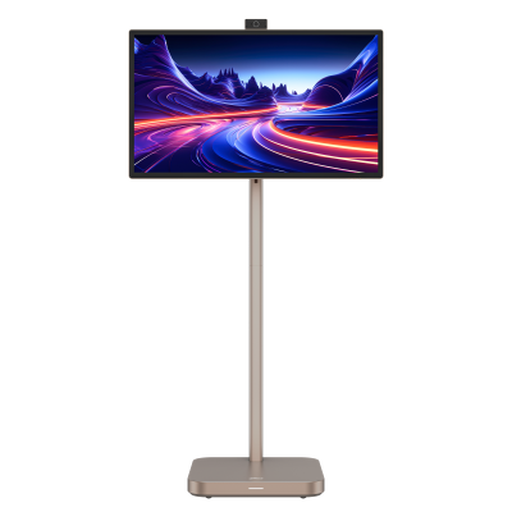
Dahua Explorer 31.5-inch 4K portable smart monitor
Consider it for a presenter-led session where moving the screen is useful. The named variant has Android 11, 8GB+128GB storage and a built-in battery rated for up to four hours; check runtime for the planned presentation and whether mains power will be available throughout.
Before using it for visitor-facing information, assess lighting and viewing distance. Confirm the supplied panel specification if viewing angles will affect placement.
View on Joybuy
 No image available
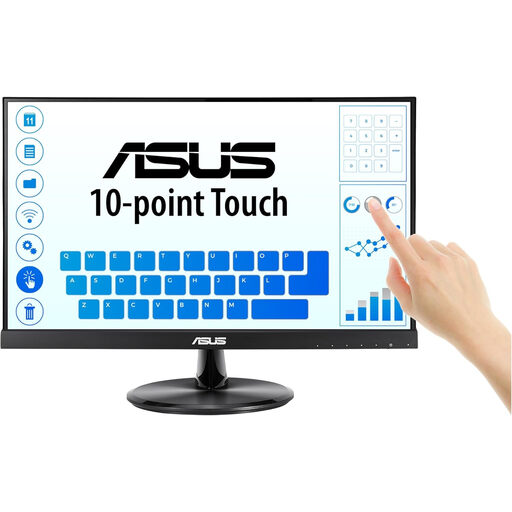
ASUS TOUCH VT229H FHD touchscreen monitor
Consider it for a compact interactive information point used with a compatible computer. Check touch compatibility with the intended device and software, as well as visibility and the operating-hours rating for the proposed location.
View on Joybuy
Common questions
Should a library event use signage or an interactive display?
Use commercial signage when the main task is showing programme information, directions or prepared content; choose an interactive display when annotation or presenter-device connection is part of the event. Confirm that the chosen model supports the planned content and working method.
Do brightness and glare matter indoors?
Yes, because indoor lighting and viewing position affect whether visitors can read the screen. LG lists 500-nit typical brightness and 28% haze for the 55UH5N-E, but those figures alone cannot establish readability at a particular location; check nearby windows, lighting and content size.
What conformity information should a library request?
Ask the supplier for conformity information applicable to the exact product and where it will be supplied. GOV.UK says CE marking continues to be recognised alongside UKCA marking for the Great Britain market; its electrical-equipment guidance also distinguishes Northern Ireland, so confirm the applicable requirements there separately.
What should we arrange for an old screen being replaced?
Agree a suitable recycling or collection route with your organisation’s waste contractor or the supplier before replacing it. GOV.UK’s electrical and electronic equipment guidance describes producer responsibilities for equipment and the waste it becomes, but it does not establish a take-back arrangement with every seller.


