Choose an iPad or Android tablet if you need to review comments and tracked changes in a live Word draft; check whether your Microsoft 365 account covers the functions you need. A Kindle Scribe makes more sense for reading and handwriting on an imported document, provided manual file transfers fit your workflow. For library use, balance viewing space against the weight of the complete setup and silence alerts before entering a quiet area.
Who is each route for?
Tracked-changes report reviewers
If colleagues expect you to inspect comments or accept and reject revisions in a Word draft, you need a Word review workflow, not just a way to write on a PDF. Microsoft Support documents mobile review functions for iPad and Android tablets; check the functions available with your account.
PDF annotators who prefer handwriting
If the report is a stable document you mainly want to read and mark by hand, an imported-document workflow may suit you. Amazon says Kindle Scribe can be used to write on supported imported documents, but cloud-drive files do not sync automatically.
Portable library-study users
If you carry your setup between study spaces, compare screen size with the weight you will actually hold, including a case. Silence alerts before using a silent-study area; the University of Nottingham Libraries asks users to turn off phone alerts in its silent-study spaces.
What matters when choosing?
Start with the file you must return: a Word draft with conventional revisions calls for a different workflow from a document marked up by hand. Then decide how much screen space and equipment you want to carry into the library.
| Concern | What to check | Who this matters to |
|---|
| Word revisions |
Open a representative .docx file in Word; check comments, tracked changes and the functions available with your Microsoft 365 account. |
If I must return a draft with colleagues’ revisions resolved, handwritten marks on a separate PDF will not do the same job. Around 50% of consumers put collaborative Word review first. |
| Pages and handwriting |
Compare the screen and case in hand; check whether a suitable pen is included and whether your report format accepts the marks you need. |
When I spend a long session reading dense pages and writing notes, I need enough room to work without making the device awkward to hold. Page viewing and annotation come first for around 30% of consumers. |
| Focused reading |
Check how the report is imported and returned with annotations; silence device alerts for quiet study. |
If I am reading a settled draft, I would rather concentrate on the document than manage a live editing session, but I still need to send my notes back. Roughly 20% of consumers primarily want that focused reading workflow. |
Buying pitfalls
-
Using handwritten PDF marks for a live Word review
Writing on an imported document is not the same as accepting, rejecting or adding conventional tracked revisions in a shared Word draft.
If the people receiving your report require a revised .docx file, try that file in Word on the intended iPad or Android tablet before committing to the workflow.
-
Planning around the tablet alone
A pen, keyboard or qualifying Microsoft 365 plan may matter to the way you intend to review the report. Apple sells its iPad Air pens and keyboards separately.
Check which accessories come with the exact variant and whether your account enables the Word functions you expect to use.
-
Assuming all Kindle Scribe PDF imports behave alike
Amazon distinguishes supported document imports from PDFs loaded by USB-C: direct handwriting on the latter is not supported. Cloud-drive files also do not sync automatically.
Try your report using the intended import method and confirm how you will return the annotated file.
-
Choosing screen size without handling the setup
More viewing area has a carrying trade-off. Apple lists its 11-inch iPad Air Wi-Fi model at 464 g and its 13-inch Wi-Fi model at 616 g, before you account for a case.
Hold the size you are considering with a case, especially if you expect to move between library spaces or read away from a desk.
Relevant brands for reference
Apple
The iPad Air is an iPad route for reviewing a Word draft, with 11-inch and 13-inch size choices.
- Apple lists Apple Pencil support and an 11-inch iPad Air Wi-Fi weight of 464 g.
- The 13-inch Wi-Fi model is listed at 616 g. Check the complete setup if you also need a Pencil or keyboard, which Apple sells separately.
Samsung
The Galaxy Tab S10 FE is an Android option to consider for a Word-based review workflow.
- Samsung lists a 10.9-inch display and microSD support of up to 2 TB for the Tab S10 FE.
- Display specifications do not establish how comfortable your particular report will be to review; check your document and Word account before relying on this route.
Amazon
Kindle Scribe is a document-reading and handwriting route, rather than a direct substitute for collaborative Word review.
- Amazon describes an 11-inch glare-free display, a supplied Premium Pen and writing on supported imported documents.
- Amazon says cloud-drive documents do not auto-sync, and PDFs loaded by USB-C cannot be written on directly.
Joybuy tablets for report review
These are conventional tablet options for reading a report and considering a Word review workflow. Microsoft documents mobile Word review functions at platform level; test your actual draft and account before relying on a particular device for tracked changes. If you chiefly want handwritten marks on an imported document, weigh that different workflow separately.
 No image available
TECLAST ArtPad Pro 2025 Edition, 12.7-inch
Consider this Android tablet if you want a larger screen and an included pen while reviewing a report; check the Word functions available with your account.
The title specifies a 12.7-inch 2K display, Android 15 and an included stylus pen. Handle the complete setup if carrying weight matters to you.
View on Joybuy
 No image available
Xiaomi Pad 7 Grey, 8GB RAM, 128GB, Focus Pen included
The included Focus Pen makes this an option to examine if handwritten notes are part of your report-review routine; confirm that your chosen document app supports the marks you need.
The product name specifies 8GB RAM and 128GB storage. Check your actual Word draft and account for tracked-changes work.
View on Joybuy
 No image available
Apple 11-inch iPad Air (2026, M4), Wi-Fi 128GB, Space Grey
Consider this iPad for a live Word draft when comments or tracked revisions matter; Microsoft documents Word review functions on iPad, subject to the functions available with your account.
This is the 11-inch Wi-Fi, 128GB variant. If you want to write or type substantial edits, check which Pencil or keyboard you need and whether it comes with this variant.
View on Joybuy
 No image available
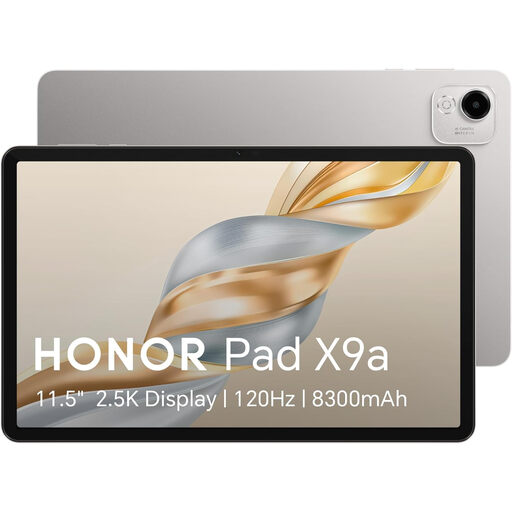
HONOR Pad X9a, 11.45-inch Wi-Fi, 128GB, Grey
This Android tablet is worth considering if you want an 11.45-inch screen for reading a report; test the required Word review functions with your document and account.
The product name specifies Wi-Fi connectivity and 128GB storage. If handwriting is important, confirm a compatible pen and the annotation behaviour before buying.
View on Joybuy
 No image available
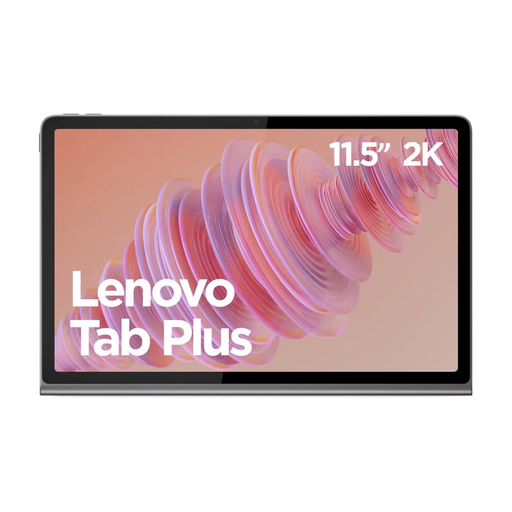
Lenovo Tab Plus, 128GB, Grey
Consider this Android tablet for reading a draft at a library desk, then check your actual file and Microsoft 365 account if the task includes Word revisions.
The product name specifies 128GB storage. Confirm any pen, charger or other accessories needed for your working setup.
View on Joybuy
Frequently asked questions
Can I review Word Track Changes on a tablet?
Yes, Word review functions are documented for iPad and Android tablets, but test the exact draft and your account before depending on them. Microsoft Support describes changes and comments on iPad and identifies mobile review functions; some advanced functions require a qualifying Microsoft 365 subscription.
Is Kindle Scribe suitable for reviewing a draft report?
Kindle Scribe suits reading and handwriting on a supported imported document when you can manage the transfer back to other reviewers. It is a different workflow from resolving tracked revisions in Word: Amazon says cloud-drive files do not sync automatically and direct handwriting is not supported on PDFs loaded by USB-C.
Should I choose an 11-inch or 13-inch tablet for reports?
Choose around 11 inches if carrying and hand-held use matter most; consider 13 inches if extra page space matters enough to accept more weight. For a concrete comparison within one range, Apple lists the 11-inch iPad Air Wi-Fi model at 464 g and the 13-inch Wi-Fi model at 616 g.
How should I use a tablet in a silent library area?
Silence alerts before entering and use headphones if you need audio. The University of Nottingham Libraries asks users to turn off phone alerts in silent-study spaces, while the University of Portsmouth Library requires devices to be in silent mode.


