
24/7 Customer Support

Free returns

Same-day & Next-day Delivery

Quality Guaranteed

Unlock Your Welcome Offers: FREE Delivery | Up to 80% OFF | Free 30-day JoyPlus trial
Download the APP
In the world of competitive gaming, victory and defeat are often separated by milliseconds. Your reaction time, aim and consistency are paramount, and the hardware you use can be a critical factor. A lightweight gaming mouse is no longer a niche preference; for many players, it's an essential tool for achieving faster flicks, more precise tracking and reduced fatigue during marathon sessions.
This guide is designed to help you navigate the technical specifications of modern gaming mice. We will break down the features that truly matter, helping you identify a mouse that complements your playstyle and gives you a tangible advantage, without the marketing hype.
Choosing the right mouse involves looking beyond the surface. Here are a few key technical aspects to analyse when making your selection.
The term superlight mouse has become a benchmark in the industry, with many competitive models now weighing well under 70 grams. This is often achieved through innovative hollow-shell designs and the use of advanced materials like magnesium alloy, which provides structural rigidity without the extra weight of traditional plastics. A lighter mouse reduces inertia, making it physically easier to start and stop movements, which can translate to quicker and more accurate aiming. Equally important is the shape. An ergonomic gaming mouse is designed to fit comfortably in your hand, reducing strain and promoting a consistent grip over long periods.
You will frequently see terms like 4K gaming mouse or 8K polling rate mouse. The polling rate, measured in Hertz (Hz), is the frequency at which the mouse reports its position to your computer. The standard for a long time has been 1000Hz (1000 times per second). An 8K polling rate mouse reports its position 8000 times per second. For a competitive player, this higher frequency can result in visibly smoother cursor movement and lower click latency, providing a more responsive and one-to-one feel between your hand and the on-screen action.
The debate over wired versus wireless is largely a thing of the past for high-end peripherals. Modern 2.4GHz technology in a wireless gaming mouse offers latency that is indistinguishable from its wired counterparts, providing freedom of movement without any performance compromise. When choosing a wireless model, consider battery life and charging options to ensure your mouse is always ready for action. Many models also offer tri-mode connectivity (wired, 2.4GHz and Bluetooth) for maximum versatility.
Based on current specifications and user-focused features, here are some noteworthy options available on the market.
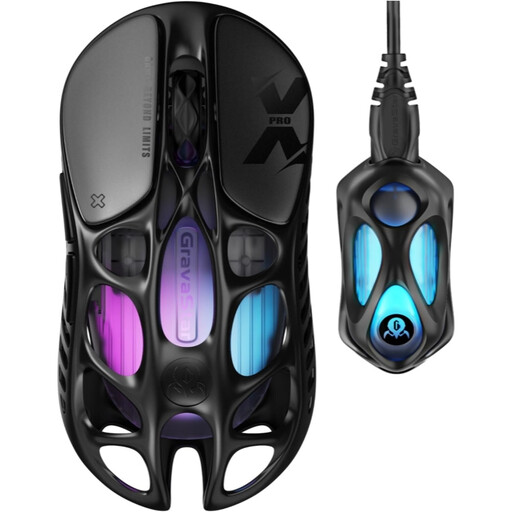
Why It Stands Out: The Mercury X Pro is engineered for elite-level performance, combining an astonishingly low weight with top-tier internal components. Its magnesium alloy skeleton provides durability while keeping the weight at just 49 grams, making it one of the lighter options available for a pro gaming mouse.
Pros:
Who is it for?: Competitive esports players and enthusiasts who demand the lowest possible weight and the highest polling rate for maximum responsiveness in fast-paced FPS and battle royale titles.
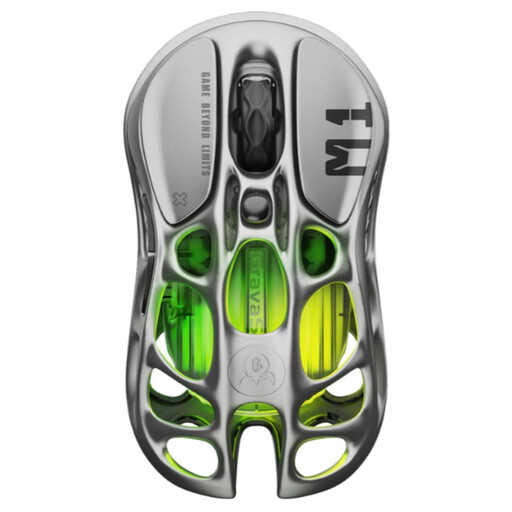
Why It Stands Out: The M1 Pro offers a compelling balance of performance and striking aesthetics. While slightly heavier than the X Pro, its 88-gram magnesium alloy frame is still firmly in the lightweight category. It features a high-performance sensor and customisable RGB mouse lighting, making it a versatile choice for both serious gaming and a stylish setup.
Pros:
Who is it for?: Gamers who want a high-performance lightweight gaming mouse with a unique design and customisable RGB lighting, without needing the absolute lightest model on the market.

Why It Stands Out: The Rexsun V2 is positioned as a practical and affordable option. While not a dedicated pro gaming mouse, its silent click feature and comfortable ergonomic shape make it an excellent choice for a work-from-home setup or as a quiet secondary mouse for late-night productivity and light gaming.
Pros:
Who is it for?: Users seeking a reliable and quiet mouse for office work, study or casual use. It can serve as a great affordable companion to a primary gaming peripheral.
For gamers who love to personalise every aspect of their setup, from keycaps to mouse grips, the journey doesn't stop with the mouse itself. If you're looking into unique components and aesthetic touches for your projects, you might find some interesting options in our collection of designer buttons.
For many players, yes. A lighter mouse has less physical inertia, which means it requires less force to start and stop moving. This can lead to faster aiming, easier micro-adjustments and less strain on the wrist and arm during long gaming sessions. However, preference still plays a role, and some users may prefer the stability of a slightly heavier mouse.
While 1000Hz remains a solid standard for a responsive experience, the competitive scene is shifting towards higher polling rates. A 4K gaming mouse (4000Hz) or an 8K polling rate mouse (8000Hz) offers smoother tracking and lower latency, which can provide a noticeable advantage in high-speed, precision-based games. For anyone serious about competitive performance, aiming for 4000Hz or higher is a forward-thinking choice.
No, the RGB lighting on a mouse is purely for aesthetics and does not impact the performance of the sensor or the switches. The only practical consideration is that on a wireless gaming mouse, running the lighting will consume more power and reduce the overall battery life between charges. Most models allow you to dim or turn off the lighting to conserve power.