
24/7 Customer Support

Free returns

Same-day & Next-day Delivery

Quality Guaranteed

Unlock Your Welcome Offers: FREE Delivery | Up to 80% OFF | Free 30-day JoyPlus trial
Download the APP
Navigating the world of PC gaming peripherals can feel like a minefield of technical jargon and ambitious marketing claims. When searching for a lightweight wireless gaming mouse, it's easy to get drawn in by impressive numbers and sleek designs, only to end up with a device that hinders your performance. As your Joybuy Product Recommendation Officer, my role is to help you sidestep the common purchasing traps and focus on the features that genuinely matter for your gaming experience in the UK.
Before you add anything to your basket, let's look at the three most common pitfalls that gamers encounter:
To avoid these traps, focus on a few core parameters that define a quality gaming mouse. Understanding these will empower you to make a choice based on performance, not just marketing.
The sensor is the heart of your mouse. Instead of fixating on the maximum DPI, look for information about the sensor model, such as the well-regarded PAW3395 sensor. A quality sensor ensures flawless 1:1 tracking, meaning it won't "spin out" or lose tracking during fast, sweeping movements common in a gaming mouse for FPS titles.
Equally important is the polling rate, measured in Hertz (Hz). This is how many times per second the mouse reports its position to your computer. The standard for a modern esports mouse is 1000Hz, which translates to a 1ms response time. Anything less can introduce noticeable input lag. A high-quality sensor paired with a high polling rate is the foundation of a responsive, low latency gaming experience.
A lightweight wireless gaming mouse typically falls within the 50g to 80g range. While lighter can reduce fatigue, the shape and how it fits your hand are far more crucial for comfort and control. An ergonomic gaming mouse is designed to support your specific grip style—be it palm, claw or fingertip. A mouse that fits your hand perfectly will do more for your aim and long-session comfort than one that simply shaves off a few extra grams at the cost of a poor shape or flimsy build.
For serious gaming, a stable 2.4GHz wireless connection via a USB dongle is essential. It provides the speed and reliability needed for competitive play. Bluetooth is a useful secondary option for productivity on a laptop, but it is not suitable for gaming due to its higher latency.
Look for models that offer a healthy battery life (over 40 hours is a good starting point) to avoid constant interruptions. Features like a magnetic charging dock or quick-charge capabilities via USB-C can significantly improve the user experience, ensuring your mouse is always ready for action.
Rather than a single "one-size-fits-all" option, the right mouse depends on your playstyle and priorities. Here are a few recommendations matched to different types of gamers.
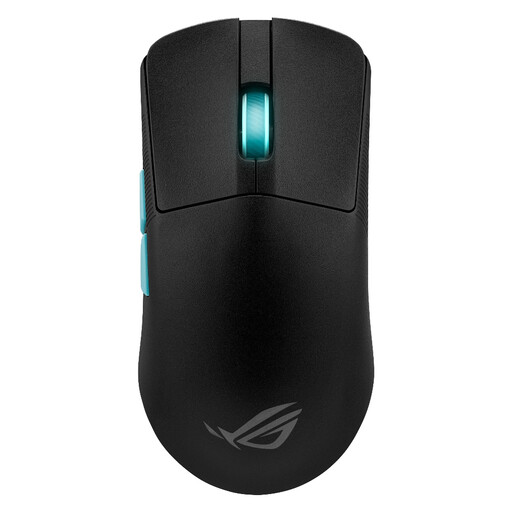
Why This Fits Their Persona: This player demands precision and speed above all else. The Harpe Ace is exceptionally light at 54 grams and was co-developed with aim training software Aim Lab. Its focus is purely on performance, with a top-tier optical sensor and a simple, ambidextrous shape suited for fast-paced FPS games.
It achieves its low weight through intelligent internal engineering rather than flimsy materials, avoiding the durability trap. Its collaboration with Aim Lab focuses on tangible performance improvements, not just a high DPI number.
Ultra-light 54g design for minimal fatigue. ROG AimPoint optical sensor for flawless tracking. Integrated Aim Lab software to help optimise your settings.
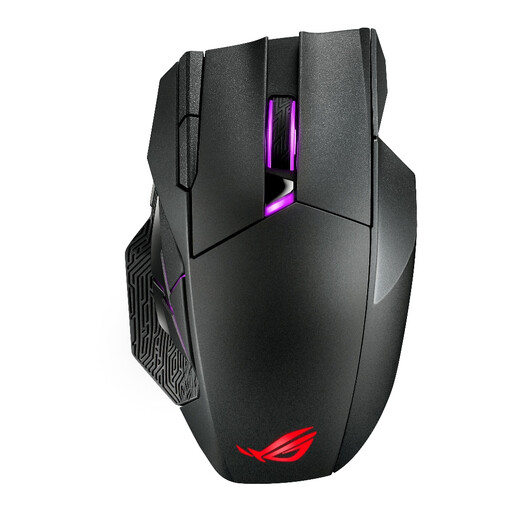
Why This Fits Their Persona: This player needs an arsenal of commands for MMOs or productivity. The Spatha X is a true MMO mouse, offering 12 programmable buttons, including a six-button thumb grid. Its large, comfortable and ergonomic shape is designed for marathon gaming sessions.
It wisely ignores the "ultra-lightweight" trend to focus on what MMO players need: buttons and comfort. Its value comes from tangible features like hot-swappable switches and extensive customisation, not misleading specs.
12 fully programmable buttons for ultimate control. Hot-swappable main switches allow you to customise click feel. Includes a magnetic charging dock for convenience.
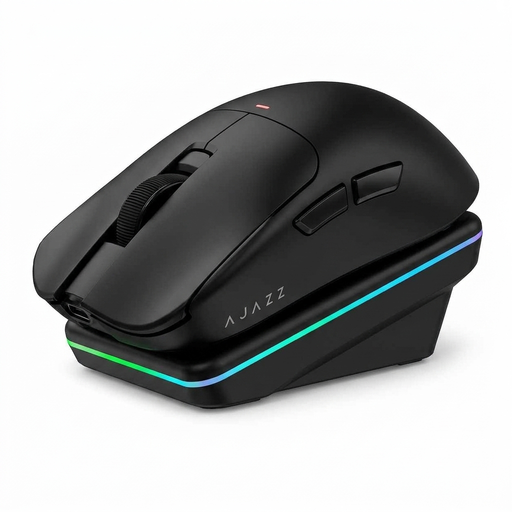
Why This Fits Their Persona: This gamer wants a great balance of modern features without the premium price tag. The AJ200 offers a 63g lightweight design, reliable tri-mode connectivity and a solid PAW3311 sensor. The inclusion of a magnetic charging dock is a standout feature at this price point.
It delivers a reliable tri-mode connection that works as advertised, avoiding the connectivity compromise. It provides a high-performance sensor without relying on an inflated DPI number to justify its value, focusing instead on practical features.
Excellent value package with a lightweight design and capable sensor. Includes a magnetic charging dock for hassle-free power. Reliable tri-mode connectivity for versatile use.
We have compiled a complete, real-time list of products that fully satisfy these strict selection criteria and UK safety regulations.
This varies significantly between models. A key factor is the RGB mouse lighting; with it on, battery life can decrease substantially. You can generally expect between 40 to over 100 hours of use on a single charge. For a realistic comparison, look for battery life figures quoted with the lighting turned off. Features like a charging dock or fast charging via USB-C can make daily battery management much less of a concern.
No, this is one of the biggest misconceptions in the market. While a high DPI capability indicates a modern, precise sensor (like a PAW3395 sensor), you will almost certainly never use the maximum setting. Most gamers find settings between 800 and 1600 DPI to be the sweet spot for accuracy and control. A sensor that tracks flawlessly at these lower sensitivities is far more valuable than one that simply boasts a large number.
A 2.4GHz wireless connection uses a dedicated USB dongle to create a high-speed, low latency link between the mouse and your PC. This is the essential mode for any kind of responsive gaming. Bluetooth connects directly to your computer's or laptop's built-in receiver. While more convenient for travel and less power-hungry, it has higher latency, making it unsuitable for fast-paced games. A mouse with tri-mode connectivity offers the best of both worlds: 2.4GHz for gaming at your desk and Bluetooth for on-the-go productivity.