
24/7 Customer Support

Free returns

Same-day & Next-day Delivery

Quality Guaranteed

Unlock Your Welcome Offers: FREE Delivery | Up to 80% OFF | Free 30-day JoyPlus trial
Download the APP
In the world of competitive gaming, a split-second can be the difference between victory and defeat. It’s no surprise that the market is flooded with promises of "zero-lag" and "feather-light" mice. But many gamers in the UK find their expensive new peripheral becomes a source of frustration, not a competitive edge. Before you invest, it’s crucial to understand the common pitfalls that marketing materials often gloss over.
As the Joybuy Product Recommendation Officer, my role is to help you see past the hype. Let's look at the real factors that determine performance and avoid the three most common traps when buying a lightweight wireless gaming mouse.
To ensure your new mouse is an asset, not a liability, focus on these critical technical details.
The polling rate, measured in Hertz (Hz), is how many times per second your mouse reports its position to your computer. While a standard gaming mouse operates at 1000Hz, newer models offer a true 8K wireless gaming mouse experience at 8000Hz. This means the cursor's movement on screen is updated eight times more frequently, resulting in exceptionally smooth tracking. However, be aware that an 8K polling rate requires more CPU processing power. For it to be a true advantage, the mouse must have a high-quality MCU and stable wireless connection to deliver that data without interruption.
The switches beneath the main buttons determine the feel and longevity of your clicks.
The Microcontroller Unit (MCU) is the brain of the mouse. A modern, power-efficient MCU, such as the Nordic nRF54L15, is crucial for two reasons. Firstly, it ensures the wireless signal is stable and powerful, even in environments with a lot of 2.4GHz interference. Secondly, it manages power consumption intelligently, allowing for a long battery life gaming mouse without needing an impractically large and heavy battery.
Instead of a one-size-fits-all approach, we've matched products to specific gamer profiles.
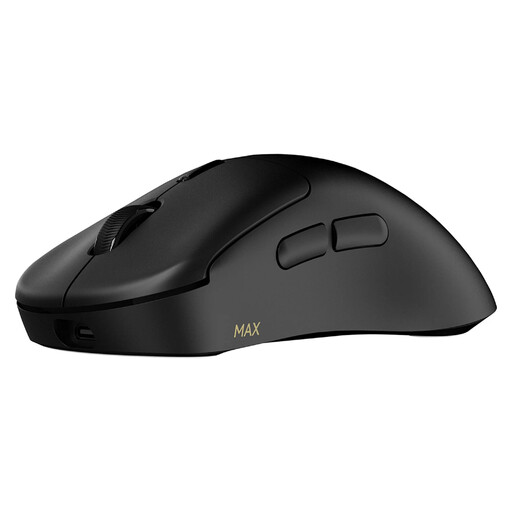
Why This Fits Their Persona: For competitive players, reliability is non-negotiable. This mouse is built for high-stakes environments where a single mis-click can cost the match. The focus is on long-term, consistent performance.
The 120-million lifespan optical switches directly counter the durability gamble, eliminating the risk of double-clicking that can plague mechanical switches over time.
True 8K wireless polling rate for exceptionally smooth tracking. The efficient Nordic MCU provides up to 750 hours of battery life at 1000Hz, avoiding the battery life illusion.
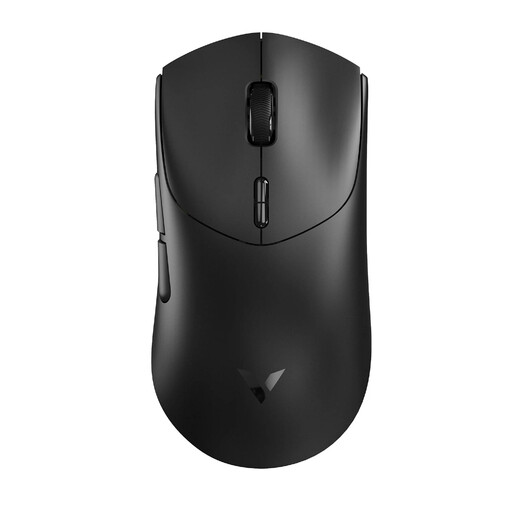
Why This Fits Their Persona: This gamer values the classic, crisp feedback of a mechanical switch. For them, the specific feel and sound of the click are an integral part of the gaming experience, and they prefer it over other technologies.
While using mechanical switches, it features a high 100-million click lifespan, mitigating the durability concerns often associated with standard mechanical switches in other mice.
Delivers the same 53g lightweight design, 8K wireless performance and long battery life as its optical counterpart, but with the distinct tactile feedback of mechanical switches.
Why This Fits Their Persona: Finding a high-performance, **programmable gaming mouse for Mac** can be a challenge. This user needs a device that works seamlessly with macOS for both gaming and productivity, without compromising on features.
It avoids the trap of poor cross-platform support by offering a dedicated driver software, A HUB, for both Windows and Mac OS, ensuring full access to customisation features.
Features 10 programmable buttons and onboard memory, allowing users to save their macros and settings directly to the mouse and use them across different devices and operating systems without reconfiguration.
We have compiled a complete, real-time list of products that fully satisfy these strict selection criteria and UK safety regulations.
An 8K (8000Hz) polling rate can provide a noticeable improvement in tracking smoothness, especially on high-refresh-rate monitors (144Hz and above). However, it demands more processing power from your computer's CPU. If you have a modern gaming PC, you should be able to take full advantage of it. On older systems, you may experience a slight performance drop, in which case you can easily switch to a lower polling rate like 4000Hz or 1000Hz via the mouse software.
The lifespan of a lightweight mouse depends entirely on its build quality, not just its weight. A well-designed 53g gaming mouse made from high-quality polymers with strong internal structuring can be just as durable as a heavier one. The most critical factor for longevity is often the switch type. Models with optical switches, rated for lifespans like 120 million clicks, offer a significant durability advantage over traditional mechanical switches.
Yes, but it is essential to check for manufacturer support. Many gaming peripherals are designed primarily for Windows. A good programmable gaming mouse for Mac will have dedicated software, like the "A HUB" driver mentioned for the Rapoo models, that allows you to customise buttons, macros and DPI settings directly within macOS. Always verify Mac compatibility on the product page before purchasing.