What to check before choosing a route
Start with services that can be ordered at the exact address, then compare their performance, full terms and installation requirements; consider a USO assessment only if the address may meet Ofcom’s conditions.
| Concern |
What to check |
Who this matters to |
| Availability at the address |
Check the exact address, then confirm with the provider that the service can be ordered and installed there. |
I want to know that a connection will actually serve my home before I buy a hub or dish. About 26% of consumers prioritise address availability. |
| Usable performance |
Compare address-specific speed information with your needs, and distinguish broadband performance from in-home Wi-Fi. |
If calls or shared household use matter, I need a realistic picture of the connection at my property, not just a headline maximum. Around 21% of consumers put usable performance first. |
| Full service terms |
Check the named plan, data allowance, service charges and any equipment or installation charges in the offer for your address. |
I want to understand the service commitment as well as the equipment cost before choosing a package. About 21% of consumers prioritise the overall terms and cost. |
| Installation requirements |
Check the proposed position, obstructions, cabling and any permissions relevant to the property. The UK government’s antenna guide applies to England. |
If mounting equipment or running cable could be difficult at my property, I need to know what the installation involves before ordering. Around 16% of consumers put installation first. |
| USO eligibility |
Ask the designated provider about eligibility and any build contribution. Ofcom’s guidance, updated 19 June 2026, includes a £59.60-per-month affordability condition for access to an existing decent service. |
If my current service may not meet the criteria, I need an assessment for my address rather than assuming that a USO request is available. About 16% of consumers prioritise checking USO eligibility. |
Mobile-broadband equipment on Joybuy
These Joybuy product choices relate to mobile broadband equipment, including 5G SIM routers and a 4G USB adapter. Confirm service availability and compatibility at your address before choosing equipment.
 Image unavailable
TP-Link Archer NX500 5G AX3000 Router
A SIM-based option to consider when a provider confirms suitable mobile service at the address.
The product description specifies 5G/4G access, dual-band Wi-Fi 6 and a 2.5 Gbps WAN/LAN port.
It uses a nano SIM; check that the service and SIM are compatible before purchase.
View on Joybuy
 Image unavailable
D-Link F530 5G NR AX3000 Wi-Fi 6 Mobile Hotspot
A portable mobile-broadband option to consider if the provider’s service is available where you plan to use it.
The product description lists a 5260 mAh battery and a stated battery use of up to 7 hours.
Allow for the stated battery duration when planning use away from power.
View on Joybuy
 Image unavailable
TP-Link Archer NX200 5G AX1800 Router
A SIM-router option for a home where a compatible mobile service is available.
The product description specifies 5G/4G access, dual-band Wi-Fi 6 and a Gigabit WAN/LAN port.
It requires an activated SIM; confirm service compatibility and address coverage before buying.
View on Joybuy
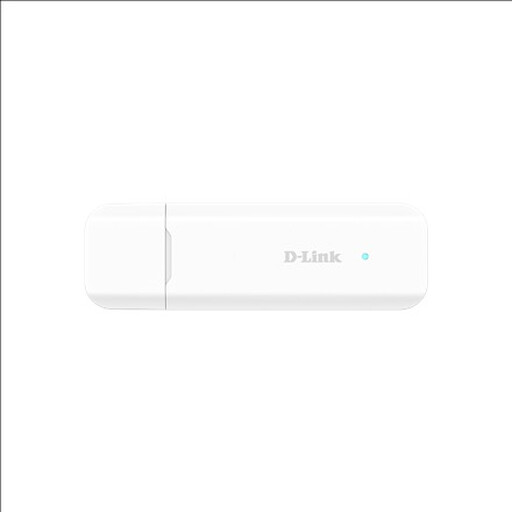 Image unavailable
D-Link DWM-222W/R 4G LTE AX300 Wi-Fi 6 USB Adapter
A 4G option to consider when a compatible USB-connected host is available; it is not described as a standalone home router.
The product description specifies 4G LTE Cat 4, a Nano SIM slot and Wi-Fi sharing for up to eight devices.
Check the USB host requirement and mobile-service compatibility before purchase.
View on Joybuy
Frequently asked questions
Does a postcode or coverage-checker result prove what speed I will get indoors?
No. Ofcom describes checker results as predictions and notes that local conditions can affect whether a particular property receives the predicted service. Confirm availability with the provider and distinguish the broadband connection from in-home Wi-Fi performance.
Does buying a 5G router provide broadband by itself?
No. A separate SIM router needs a compatible, activated mobile service, and coverage must suit the address. TP-Link’s UK instructions for the Archer NX200 specify an activated SIM; you can also compare a provider package that includes its own hub.
What should I check before choosing fixed wireless or satellite?
For Airband’s point-to-point fixed wireless, ask about the line-of-sight site survey and receiver position. For Starlink, check for a clear sky view because its setup guidance says obstructions can interrupt service. Check other operators’ requirements separately.
Are satellite and mobile home-broadband plans always unlimited?
No; data terms depend on the provider and plan. Starlink says its Residential plans include unlimited data and that availability varies by address. Check the exact offer and current terms before ordering.
Who assesses a broadband USO request, and can construction cost money?
Ofcom directs applicants to BT outside the Hull area or KCOM in Hull. Ofcom’s guidance, updated 19 June 2026, says the provider has 30 days to confirm eligibility and estimated build cost; if the applicant’s share exceeds £3,400, the applicant must pay the excess to proceed. The guidance also includes a £59.60-per-month affordability condition for access to an existing decent service.


