What matters when choosing?
Start with the services and controls the household will use every day, then check console connections and sound-system plans against the exact model rather than a broad feature label.
| Concern | What to check | Who this matters to |
|---|
| Streaming and broadcast use |
Confirm the required UK apps and broadcast reception on the exact model; check whether its interface suits everyone sharing the TV. |
If we switch between live programmes and streaming, I want both easy to reach without changing devices. Around 33% of consumers put everyday viewing access first. |
| Gaming connections |
Check the console or PC’s required resolution, refresh rate, VRR and ALLM against the features of each intended HDMI port. |
When my console is used regularly, I do not want to choose a gaming label that cannot deliver the mode I need. Gaming connectivity comes first for around 25% of consumers. |
| Dialogue and sound |
Check whether the TV and intended soundbar or AVR have compatible connections and support the audio formats you plan to use. |
If several of us watch together and dialogue is hard to follow, I need to plan the audio setup alongside the screen. Around 25% of consumers make sound integration their primary concern. |
| Accessible operation |
Confirm the needed menu guidance, captions or audio description on the exact model and in the services used at home. |
When I depend on spoken guidance or readable menus, a feature that works only in some content is not enough for daily use. Accessible operation is the main priority for around 17% of consumers. |
An external streaming device is an option if the TV’s built-in interface does not meet a household’s service or navigation needs, though it adds another device and HDMI connection. A soundbar is a separate decision: HDMI Licensing Administrator explains that eARC can carry audio from TV sources to a compatible sound system through one HDMI cable.
Joybuy TV choices
These smart TVs are choices to examine for mixed streaming, shared viewing and console use. Match each model’s services, HDMI ports and any planned sound system to your household before deciding.
 No image available
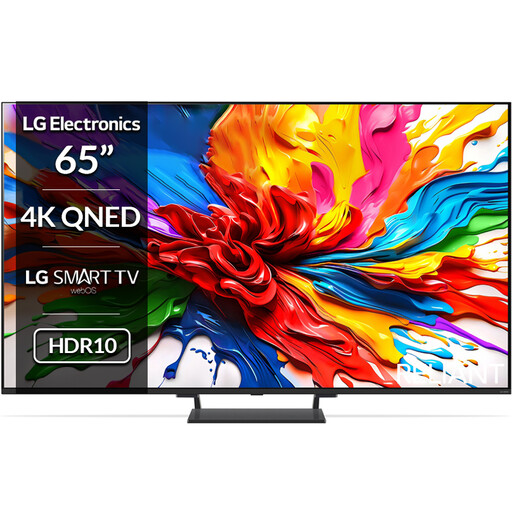
LG 65QNED93A6A 65-inch QNED Evo MiniLED 4K Smart TV
Consider this model if a 65-inch smart TV is the right starting point for the shared room. Its product name specifies QNED Evo MiniLED and 4K; check the required apps, gaming modes and soundbar connection for this exact model.
View on Joybuy
 No image available
TCL 75Q6C 75-inch QD-Mini LED 4K HDR Google TV
Consider this 75-inch model if the household wants a larger shared screen and plans to check gaming support. Its product name lists a native 144Hz refresh rate; confirm the intended input modes, HDMI ports and required services on the 75Q6C.
View on Joybuy
 No image available
TCL 55P8K-UK QLED 4K HDR Pro Smart TV
Consider the 55P8K-UK when comparing a smart TV with a named built-in sound system. Its product name lists ONKYO 2.1 audio and a 288Hz Game Accelerator; check what that gaming mode means for the resolution and source you intend to use, as well as the exact HDMI connections.
View on Joybuy
 No image available
Hisense 55U7QTUK Pro 55-inch U7Q Pro Mini LED 4K TV
Consider this VIDAA smart TV if its interface suits the household’s streaming routine and a console will also be connected. The product name identifies a 165Hz Game Mode Ultra and built-in subwoofer; confirm supported console modes and ports rather than treating the mode name as a connection specification.
View on Joybuy
 No image available
TCL 65V6C 65-inch Direct LED 4K HDR Google TV
Consider this 65-inch model for shared streaming and gaming where its stated mode meets the source’s needs. The product name specifies a 120Hz Game Accelerator in FHD, not 4K at 120Hz; check the exact HDMI modes before connecting a console.
View on Joybuy
Common questions
Does HDMI 2.1 mean a TV supports every gaming feature?
No. HDMI Licensing Administrator says manufacturers choose which HDMI 2.1 features to include. Check 4K at 120Hz, VRR, ALLM and eARC separately for the exact TV model and the ports you intend to use.
What should I check before pairing a new TV with a soundbar?
Check the exact TV’s audio-output port, the soundbar’s compatible input, the formats you want and the cable requirements. HDMI Licensing Administrator describes what eARC can carry, but an ARC label alone does not establish compatibility for every pairing.
Will captions and audio description work on every smart-TV programme?
Not necessarily: support can depend on the TV, app, broadcast and programme. Samsung says audio description on its TVs is available only when the current broadcast supports it, so confirm the services your household actually watches.
Should I consider an external streaming device instead of built-in TV apps?
An external streaming device is worth considering when the TV’s own service selection or navigation does not meet your needs. It adds a device and HDMI connection, and it does not change the TV’s panel, broadcast tuner or console ports.


