Choose the TV around the console you use and the seats it needs to serve, rather than the highest advertised refresh rate. If you play compatible games on a PS5 or Xbox Series X and want 4K at 120Hz, check that the intended HDMI input supports that signal, plus variable refresh rate (VRR) and automatic low-latency mode (ALLM) where you need them. For older consoles or mainly 60Hz play, a general TV with suitable inputs may meet your needs; measure the room before deciding on screen size.
Who is choosing this TV?
PS5 or Xbox Series X players seeking 120Hz gaming
If you play compatible high-frame-rate games, check the exact TV input for 4K/120Hz, VRR and ALLM rather than relying on a gaming label. PlayStation and Xbox Support describe 4K/120Hz output for their respective consoles, subject to a compatible display setup.
Households sharing a living-room screen
For multiplayer, films and everyday TV, the screen needs to work from the seats people actually use. Which? advises measuring the sofa-to-screen distance before choosing a size; also consider the regular side seats.
Older-console and 60Hz-focused players
If 4K/120Hz is not a priority for the consoles and games you use, focus on the required input formats, a low-latency picture mode and room fit. A higher refresh-rate figure alone does not establish a benefit for this setup.
What matters when choosing?
Gaming-focused TV
Consider it when: you want to use compatible 4K/120Hz games and VRR on a PS5 or Xbox Series X.
Keep in mind: a 144Hz-plus headline does not establish an extra console benefit; check the modes available through the intended HDMI input.
General TV with suitable inputs
Consider it when: older consoles, 60Hz play and shared TV viewing take priority over 4K/120Hz gaming.
Keep in mind: ALLM does not imply VRR or 4K/120Hz support. Sony’s K-43S3 specifications, for example, list ALLM but not VRR.
Gaming monitor
Consider it when: the screen can sit close to its users and the household is content with a more individual viewing arrangement.
Keep in mind: assess the sofa distance and simultaneous viewing positions before using a monitor instead of a living-room TV.
| Concern | What to check | Who this matters to |
|---|
| Console and TV compatibility |
Check the intended HDMI port for the console’s resolution and refresh rate, and confirm VRR and ALLM if wanted. For 4K/120Hz, check the required cable too. |
I want to use compatible 120Hz games without discovering that the chosen input cannot accept the signal. Around 33% of consumers put console-to-TV compatibility first. |
| Shared-room screen fit |
Measure from the main sofa to the proposed screen position, then consider the regular side seats before choosing a diagonal size. |
When several of us watch or play from different seats, I need a screen that fits our actual layout. For around 27% of consumers, room fit is the primary concern. |
| Responsive gaming modes |
Confirm Game Mode or ALLM and whether VRR works on the intended input. Check whether advertised refresh rates above 120Hz apply to consoles. |
I play games where low-latency settings and compatible VRR matter more to me than a headline refresh-rate figure. Around 20% of consumers make responsive gaming modes their first priority. |
| Features for older or 60Hz play |
Identify the consoles you will connect and the input formats they need; consider whether you expect to add a 4K/120Hz console later. |
If my games and consoles mainly use 60Hz, I want the necessary connections without making unused high-refresh features my deciding factor. That is the primary need for around 20% of consumers. |
Buying pitfalls
-
Assuming every HDMI port has the same features
Gaming and audio features can be assigned to particular inputs. Sony’s K-55XR5 specifications, for example, identify VRR on HDMI 3 and 4.
Map your console, soundbar or AV receiver and other devices against the port descriptions for the exact TV model.
-
Choosing a console TV by its 144Hz-plus claim
Samsung says the 4K 144Hz, 165Hz and 240Hz modes it advertises require supported PC games and compatible PC graphics hardware. Those figures do not, by themselves, establish a benefit for PS5 or Xbox play.
For a console-led setup, check 4K/120Hz input support, VRR and ALLM first.
-
Choosing screen size from a product image
A TV’s diagonal does not tell you how it will feel from your sofa or the seats used for multiplayer. Which? recommends measuring the sofa-to-screen distance when choosing a size.
Measure the proposed position and consider how the screen looks from the household’s regular viewing seats.
-
Taking a marketplace listing as a safety check
Electrical Safety First advises buying TVs from reputable retailers rather than assuming a third-party online listing establishes that necessary safety checks have been met.
Choose a reputable retailer, retain proof of purchase and check the supplied plug and cable for damage before use.
Brands to consider
LG
LG’s UK C6 OLED range is relevant if you are comparing living-room TVs advertised with high-refresh gaming features.
- LG lists up to 4K/165Hz with G-SYNC compatibility and FreeSync Premium for its 65-inch OLED evo AI C6.
- For console use, confirm 4K/120Hz, VRR and port support for the exact size; the advertised 165Hz figure alone is not a reason to choose it.
Samsung
Samsung’s gaming-TV ranges provide OLED, QLED and Neo QLED models to compare by their exact specifications.
- Samsung describes HDMI 2.1 connections, adaptive-sync technologies and gaming modes across models in its promoted range.
- Samsung says its advertised 4K 144Hz, 165Hz and 240Hz modes require supported PC games and compatible PC graphics hardware; check console features on the particular TV.
Sony BRAVIA
Sony’s model specifications are useful when planning where consoles and an eARC sound system will connect.
- Sony lists 4K120, eARC, VRR and ALLM features for the K-55XR5, with VRR assigned to HDMI 3 and 4.
- Features differ between models: Sony’s K-43S3 specification lists ALLM but not VRR. Check the exact model and intended ports.
TCL
TCL’s QD-Mini LED and QLED ranges are relevant to shoppers comparing gaming features in living-room TV sizes.
- TCL lists HDMI 2.1, ALLM and 120Hz and 144Hz VRR support for its UK Q9BK model.
- A 144Hz or game-accelerator claim does not replace checking 4K/120Hz operation for the exact console, screen size and input.
Joybuy TVs for living-room console play
These TCL TVs offer screen sizes to compare with your living-room layout. Their model names describe gaming-oriented features, but confirm console signal support on the intended HDMI port before choosing for 4K/120Hz play.
 Image unavailable
TCL 50Q6C-UK 50-inch QD-Mini LED 4K HDR TV
Consider this 50-inch screen if that size suits your measured seating distance and shared viewing positions.
The product name specifies QD-Mini LED, 4K HDR and a 144Hz native refresh-rate claim. Check the exact HDMI-port specification for your console’s intended 4K/120Hz and VRR modes.
View on Joybuy
 Image unavailable
TCL 98Q6C-UK 98-inch QD-Mini LED 4K HDR TV
Consider the 98-inch size only after checking that the proposed position and regular seating distances accommodate it.
The product name specifies QD-Mini LED, 4K HDR and a 144Hz native refresh-rate claim. Confirm 4K/120Hz and VRR support for your console on the input you plan to use.
View on Joybuy
 Image unavailable
TCL 55P8K-UK 55-inch QLED 4K HDR PRO TV
Use the 55-inch diagonal to assess this option against the main sofa distance and the seats used for shared play.
The product name specifies QLED, 4K HDR PRO, Miracast and Google Cast. Its Game Accelerator claim does not establish 4K/120Hz console input support; check the exact HDMI ports for that mode and VRR.
View on Joybuy
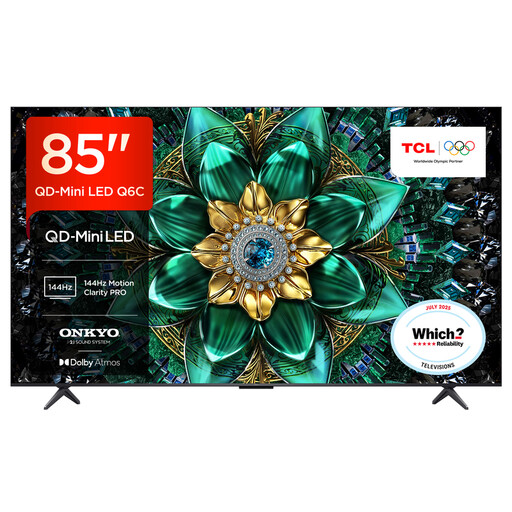 Image unavailable
TCL 85Q6C-UK 85-inch QD-Mini LED 4K HDR TV
The 85-inch size is worth considering where the measured room and regular viewing positions can accommodate it.
The product name specifies QD-Mini LED, 4K HDR and a 144Hz native refresh-rate claim. Check which HDMI input supports the console modes you intend to use, particularly 4K/120Hz and VRR.
View on Joybuy
 Image unavailable
TCL 75Q6C 75-inch QD-Mini LED 4K HDR TV
Compare the 75-inch diagonal with your measured seating distance and the positions used for shared viewing.
The product name specifies QD-Mini LED, 4K HDR and a 144Hz native refresh-rate claim. Check the specification for this exact size to establish its HDMI-port allocation and whether your intended input supports 4K/120Hz, VRR and ALLM together.
View on Joybuy
Frequently asked questions
Do I need an HDMI 2.1 TV for PS5 or Xbox Series X?
Not for every game or console setup, but compatible HDMI 2.1 capability matters if you specifically want 4K gaming at 120Hz. PlayStation states that PS5 supports 4K/120Hz output, while Xbox Support’s Series X setup guidance calls for a TV supporting HDMI 2.1 for that mode. Check the intended TV input as well as the model name.
Does a 144Hz or 165Hz TV give a console an advantage over a 120Hz TV?
Not on the strength of that figure alone. For compatible PS5 or Xbox Series X games, establish whether the TV accepts 4K/120Hz and supports the VRR and low-latency modes you want. Samsung says its advertised 4K 144Hz, 165Hz and 240Hz modes require supported PC games and compatible PC graphics hardware.
How do I choose a TV size for a shared living room?
Measure from the main seating position to the proposed screen location, then consider the other seats used for watching and multiplayer. Which? recommends measuring sofa-to-TV distance before choosing a size; use published distance guidance as a starting point rather than a substitute for checking your room layout.
What electrical-safety checks matter when buying a TV?
Buy from a reputable retailer and check the supplied plug and cable for damage before use. Electrical Safety First cautions against assuming that a third-party online seller’s listing means a TV has passed the necessary safety checks. If conformity markings are part of your checks in Great Britain, GOV.UK states that CE marking continues to be recognised alongside or instead of UKCA marking where the relevant product rules apply.


