Households keeping their TV
If the screen still suits the room, check whether its built-in apps—or an HDMI add-on—offer the catch-up and streaming services everyone uses.


Keep a satisfactory living-room TV if its own apps meet the household’s needs, or if an HDMI streaming device can add the missing services. Consider a new smart TV when the screen itself also needs replacing; if streams buffer at the TV, check the connection before expecting different viewing hardware to fix the problem. Whichever route you choose, confirm live, catch-up and accessibility features on the exact device and apps you plan to use.
If the screen still suits the room, check whether its built-in apps—or an HDMI add-on—offer the catch-up and streaming services everyone uses.
If people move between broadcaster channels and on-demand programmes, compare an integrated Freely guide on compatible equipment with using separate apps.
If playback falters at the TV, assess the connection there and whether a wired-capable device is practical before replacing the display.
Choose it when: Its exact model runs the required apps and the connection works at the screen.
Trade-off: A smart-TV label does not guarantee every app or viewing feature on that model.
Choose it when: The display still suits the room, but its apps or interface do not.
Trade-off: An add-on brings its own setup and interface and needs a suitable connection to the TV.
Choose it when: You also want a different screen and have checked the new model’s services and inputs.
Trade-off: Replacing a satisfactory screen just to add apps may be unnecessary if an HDMI device meets that need.
Start with what the household watches, then check the display and connection before deciding which hardware route fits.
| Priority | What to check | Your needs |
|---|---|---|
| Apps and features | Check each required app on the exact UK TV or device model. Check live viewing, catch-up and subtitles separately: ITV and Channel 4 describe platform-specific differences. | I want everyone’s programmes on the shared screen, including the particular ways we watch them—not just an app icon. |
| TV connection and picture | For an external player, check an available HDMI input, suitable power and any required cable. Match any desired 4K or HDR output to a capable TV as well as a capable player. | The screen still works for us; I only want an add-on if it connects properly and delivers a picture the TV can show. |
| Internet at the TV | Check the connection where the screen is used. If wiring is practical, confirm Ethernet on the exact box or TV; Google specifies an Ethernet port on its TV Streamer. Freely recommends at least 10 Mbps for its own service. | If streams buffer in the living room, I need to understand the connection there before changing the television. |
| Shared viewing | Compare built-in apps, a separate player and a Freely-enabled TV or device if an integrated internet-delivered broadcaster guide matters. Freely says its on-demand player apps require individual sign-ins. | We switch between live channels and catch-up, so the route between them matters as much as the list of apps. |
| Setup requirements | Check the selected product’s included accessories and power requirements. Google lists the TV Streamer’s HDMI cable as separately sold; Roku warns that some TV USB ports do not supply enough power for its players. | I want to know what needs connecting and which accounts need signing in before the household starts using it. |
ITV distinguishes ITVX live-TV availability from general device support, while Channel 4 describes platform-specific subtitle support.
Check each essential live, catch-up and accessibility feature on the exact UK device and app you intend to use.
The display must also be capable of showing the picture format you want.
Check the TV’s resolution and HDR capabilities alongside the player and HDMI connection.
A weak connection where the TV is used can remain a problem after changing the streaming device or screen.
Check connectivity at the TV first, then consider a wired connection where the equipment and room layout allow it.
Google specifies a separately sold HDMI cable for its TV Streamer, and Roku notes that some TV USB ports may not power its players adequately.
Check the exact package contents, cable requirements and power arrangement against your TV before setting up.
These brands illustrate different device routes; service and feature support still needs checking on the exact model.
Streaming sticks for adding apps to an existing HDMI TV.
Fire TV sticks provide another add-on route for an existing television.
The Google TV Streamer is a box to consider when a wired connection is useful.
Apple TV 4K is a box route for households considering Apple’s device ecosystem.
The Aero 4K box brings Freely to an existing HDMI TV.
A smart-TV route when the household is replacing the screen as well as choosing apps.
These options focus on adding viewing routes to an existing TV: two Roku streaming sticks and a wireless HDMI display adapter. The adapter uses another device as its content source rather than providing its own streaming-app platform.
 No image available
For a household keeping its TV, this streaming stick offers an add-on route rather than a new screen. Check the exact model for the UK apps you use, and confirm the TV has a suitable HDMI input and power arrangement. Its 4K designation does not change what an HD-only TV can display.
 No image available
This is another streaming-stick option for keeping the existing screen. Its title identifies the 4KPlus variant; check the TV’s HDMI and power arrangements, as well as support on this exact model for the broadcaster apps and features your household needs.
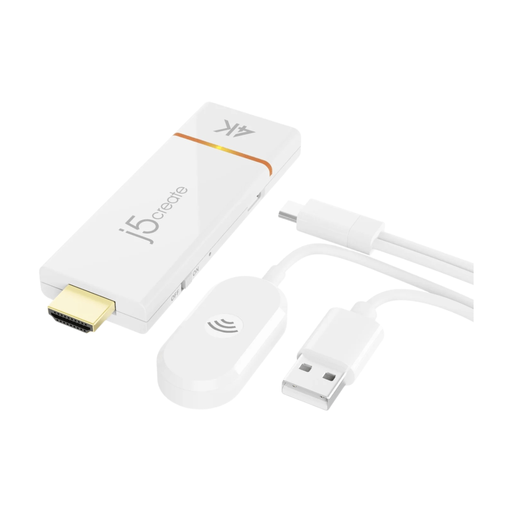 No image available
Consider this wireless HDMI display adapter if the aim is to show content from another compatible device on the shared TV. It is not a substitute for a standalone streaming player with its own apps; check compatibility with the source device and the TV’s HDMI connection.
No. ITV publishes separate guidance for ITVX live TV on connected devices and notes that only some Freeview models support that feature. Check both the exact device and the type of viewing your household wants.
It needs a suitable TV HDMI input, power and an internet connection, followed by the selected player’s setup steps. Roku cautions that some TV USB ports may not supply enough power; check the requirements of the particular product.
Yes, on a Freely-enabled TV or streaming device with a suitable internet connection. Freely recommends at least 10 Mbps for its service and says you must sign in to individual on-demand player apps.
Check the connection where the TV is used before replacing the screen or streaming player. If the equipment and room layout allow it, a wired Ethernet connection is another route; Freely also notes that streaming counts towards any broadband data allowance.