What matters when choosing?
Decide whether the current screen is worth keeping before choosing an app platform; treat shared sound and individual listening as separate decisions. The concerns below describe the primary need that may drive each consumer’s choice for a shared living room.
| Concern | What to check | Who this matters to |
|---|
| Streaming apps |
Check each required service’s current UK device list against the exact TV or player model and software. |
If our TV still looks good but cannot run a service we use together, I would rather change the app platform than the screen; around 33% of consumers would put app access first. |
| Screen and picture |
Check the display’s resolution and HDR capability, plus the player, service and HDMI requirements for the format you want. |
When the screen itself no longer suits our room, adding a player will not change what it can display; roughly 27% of consumers would prioritise the picture and display. |
| Shared and private audio |
For a soundbar, check the TV’s ARC/eARC port and the soundbar input. For headphones, check Bluetooth audio and simultaneous-output support on the exact TV. |
We need sound that works for several viewers, or a separate listening level without silencing the room; around 27% of consumers would make audio their primary concern. |
| Connections and setup |
Count free HDMI inputs and check power, internet access and any device-specific setup requirements. |
I need a new device to connect and operate where the TV already sits, not just offer the right apps; approximately 13% of consumers would put connections and setup first. |
A streaming player changes the app platform, not the TV panel. Roku says its Streaming Stick 4K works with an HDMI-equipped TV, while its 4K and HDR output requires a compatible display. If a replacement TV is the better route, check its exact model against each streaming provider’s support information rather than relying on the smart-TV platform name alone.
Relevant brands to consider
These brands illustrate different equipment routes, not interchangeable solutions: compare the exact product and required services before deciding.
Roku
An added-player route for keeping an HDMI-equipped TV.
- Roku says its Streaming Stick 4K connects to an HDMI-equipped TV.
- 4K or HDR viewing still needs a compatible screen, and Roku advises using its wall adapter if TV USB power is insufficient.
Apple
An Apple TV 4K box is another way to add a streaming platform to an existing display.
- Apple lists a Wi-Fi + Ethernet configuration for households seeking a wired network connection.
- Apple specifies a compatible 4K/HDR TV for those picture formats and states that an HDMI cable is sold separately.
Amazon Fire TV
A connected-device platform to assess when a household wants to keep its current TV.
- ITV Support includes Amazon Fire devices among its listed ITVX platforms.
- Check the exact Fire TV device and every other required app; a platform listing is not a promise of support for every model.
Samsung
A smart-TV route when the display as well as streaming access needs changing.
- Samsung describes Tizen TVs with streaming apps including Netflix and YouTube.
- Confirm the required services for the exact TV; an operating-system update commitment does not guarantee continuing support for every third-party app.
LG
A webOS smart-TV route for households replacing the screen.
- LG describes webOS as a TV platform for streaming apps and home-screen profiles.
- LG says app and content availability varies by country, product and region, so check the exact UK model.
Joybuy TVs and soundbars for this setup
These TVs are relevant if the household is replacing its screen and app platform; the soundbars address audio shared through the room. If the existing screen is satisfactory, check its app support and connections before deciding whether either change is needed.
 No image available
TCL 65V6C 65-inch 4K HDR Google TV
Consider this model when replacing both the living-room screen and its smart-TV platform. The product title specifies a 65-inch Direct LED display with 4K HDR and Google TV.
Check that the screen fits the room and that the exact TV supports every service the household uses.
View on Joybuy
 No image available
TCL 55V6C 55-inch 4K HDR Google TV
Consider this model when a 55-inch replacement screen suits the available space and the household also wants a smart-TV platform. Its title specifies Direct LED, 4K HDR and Google TV.
Check the viewing position and required apps against this exact model before choosing a screen size.
View on Joybuy
 No image available
TCL 43V6C 43-inch 4K HDR Google TV
Consider this model if the room calls for a 43-inch replacement TV rather than a larger screen. The title identifies a Direct LED 4K HDR display and Google TV.
Measure the available space and confirm support for the household’s streaming services on the exact TV.
View on Joybuy
 No image available
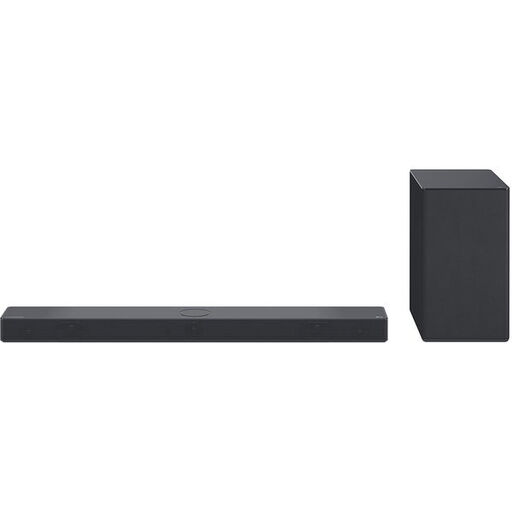
LG USC9S 3.1.3-channel soundbar with wireless subwoofer
This is a room-audio option for people watching together, rather than a substitute for individual headphones. The product title specifies a 3.1.3-channel soundbar and wireless subwoofer.
If you intend to use an eARC connection or the described TV mounting arrangement, check the ports and fit for your exact TV.
View on Joybuy
 No image available
Bose Smart Ultra Soundbar, Arctic White
Consider this soundbar when the household wants to change shared-room audio without replacing a satisfactory TV screen. Confirm that the TV has the connection you intend to use.
If headphone listening is also important, check the particular headphones against Bose SimpleSync compatibility rather than assuming any Bluetooth pair will work.
View on Joybuy
Common questions
Do I need a new TV to get current streaming apps?
No, not if the existing screen still suits you and has a free HDMI input for a compatible streaming player. Check every required service against the player’s supported-device information: Netflix says some TVs and streaming devices made before 2015 may no longer be supported, and ITV Support lists platform-specific conditions for ITVX.
What should I check before buying a 4K streaming device?
Check the display, HDMI connection, internet access and the service offering the content. Google’s guidance for its streaming devices specifies a 4K-capable display, HDCP 2.2 and an internet connection of at least 20 Mbps for 4K content; those requirements do not make an HD screen display 4K.
Can headphones and TV speakers play at the same time?
They can on some compatible TV setups, but Bluetooth support alone does not establish simultaneous output. Sony UK documents a dual-audio procedure for compatible TVs and says Bluetooth audio requires the relevant TV support; check the exact model and headphones before planning shared and private listening together.
What connection do I need for a soundbar?
Match the soundbar’s intended input to an available output on the TV. If you plan to use HDMI ARC or eARC, locate the TV’s designated port and confirm compatibility on both devices; the HDMI Licensing Administrator describes eARC as a way to carry audio from TV sources to a soundbar through one HDMI cable.


