Same-room basketball hosts
If several people will play in the kitchen diner, start with the number of simultaneous players and the game’s supported controller arrangement. That determines how many usable inputs you need.


Choose a controller that works with the device running your basketball game before weighing up other features. For same-room matches, check the game’s local-player and controller requirements, count the inputs you already have, and plan where extra controllers will charge without leaving cables across the kitchen diner.
If several people will play in the kitchen diner, start with the number of simultaneous players and the game’s supported controller arrangement. That determines how many usable inputs you need.
If you already play on a Switch, PS5 or Xbox, look for a controller compatible with that console and check whether your basketball game accepts it for another local player.
If a computer or mobile device also runs your games, check compatibility on each device separately. A controller’s supported-device list does not establish that every game accepts its input.
Start with the host device and game, then work out player capacity and how the controllers will fit into a shared room.
| Concern | Buying checks | Who this matters to |
|---|---|---|
| Device and game compatibility | Check the exact console or operating system and whether the basketball game accepts the controller. | If my usual device cannot use the controller in this game, its other features will not help me join the match. Around 36% of consumers put compatibility first. |
| Enough player inputs | Count controllers already owned, then check the game’s local-player limit and permitted controller layouts. | When friends play at once, I need an input for each player that the game actually recognises. Player capacity is the primary concern for around 29% of consumers. |
| Charging and storage | Check how extra controllers are powered or charged and where cables and controllers can be kept between matches. | In a room also used for meals, I want to put the setup away and avoid cables across walking routes. Around 21% of consumers prioritise this shared-space need. |
| Use on other devices | Check each device’s controller support, connection requirements and the features available in its games. | If I switch between a console and another gaming device, I want to know where the same controller will work. That flexibility comes first for around 14% of consumers. |
A console’s controller connection limit does not tell you how many people can play a particular basketball game locally. Nintendo Store says a Joy-Con pair can be shared for two-player action in supported games, not every game.
Check the exact game’s local mode and controller layout before buying inputs for additional players.
Nintendo Joy-Con, Xbox Wireless Controllers and PlayStation DualSense controllers have different stated device compatibility. A shared kitchen-diner screen does not make their host devices interchangeable.
Identify the console or computer running the game, then check controller and game compatibility for that setup.
Extra controllers need a suitable way to recharge or a supply of their required batteries. Active charging or play cables also need a route clear of chairs and walkways.
Check what comes with each controller and where you will power and store it between sessions.
PlayStation says DualSense feature availability varies by device and game. Compatibility with a PC or mobile device does not mean every PS5 feature will work there.
Confirm basic controller input for the basketball game before treating additional features as a reason to buy.
Joy-Con are relevant when a Nintendo Switch-family console runs the basketball game.
The Xbox Wireless Controller is a route for Xbox console and Windows PC play.
DualSense is relevant to PS5 households adding controllers for same-room games and to compatible games on other supported devices.
These controllers cover different host-device choices: a Switch controller pair, a PS5 DualSense and an Xbox Wireless Controller. Choose for the device running your game, then confirm its local-player arrangement.
 No image available
Consider this twin-controller set for a Nintendo Switch setup. Before planning a two-player basketball match around the pair, check that the game accepts the intended controller arrangement.
 No image available
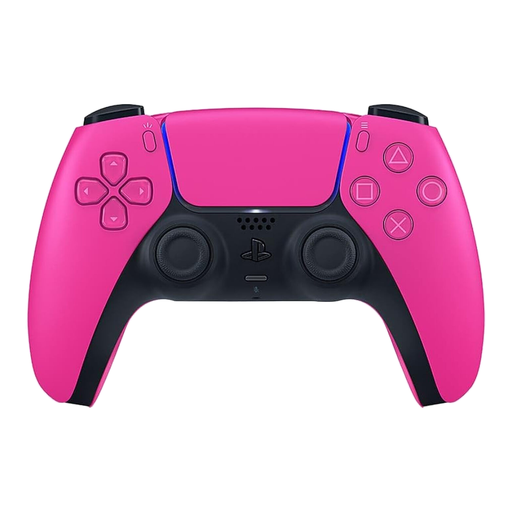
A wireless DualSense choice for a PS5 household adding a player input. Check the basketball game’s local-player limit; for play on another device, confirm game compatibility and the features available there.
 No image available
A wireless controller choice for an Xbox console or a compatible Windows PC game. Confirm that the basketball game supports the planned number of local players on the device you use.
Plan for the number of people playing at once, then check the game’s own local-player limit and accepted controller layouts. Nintendo Store says a Joy-Con pair can serve two players in supported games; PlayStation UK Support says PS5 can use up to four controllers simultaneously, but neither point establishes a particular basketball game’s player limit.
Do not assume it will. Xbox lists the Xbox Wireless Controller for Xbox consoles, Windows PCs, iOS and Android, while PlayStation lists DualSense for PS5 and compatible PC, Mac and mobile use. Check the exact device and game before relying on cross-device compatibility.
Work out how each controller will be powered or charged and where it will be stored. Check the contents of the product you choose, and keep any cables used during play clear of walkways in the kitchen diner.
Feature availability depends on the device and game, according to PlayStation. Confirm that the basketball game accepts DualSense input first, then check support for any additional feature you want on that particular setup.