Choose an extra controller for the console or PC running your local co-op game, and check the game’s player and controller support before buying several. For cable-free seating, plan how every pad will be powered and paired; features such as advanced feedback may depend on the game, host and connection.
Who needs an extra controller?
Console households adding another pad
If you already play on PS5, Xbox, Switch or Switch 2, start with a controller intended for that host. PlayStation says PS5 can use up to four controllers at once; Nintendo says up to eight wireless controllers can be paired with Switch, although controller type and enabled features can affect that number. The game’s own player limit still matters.
Windows PC lounge players
If your local co-op game runs from a Windows PC, check the controller’s PC connection method as well as its wireless option. Microsoft specifies Windows PC support for the Xbox Wireless Controller; 8BitDo specifies 2.4 GHz wireless and wired Windows use for its Ultimate 2C Wireless.
Groups preparing for a cable-free session
Several wireless pads let players sit without cables running between seats, provided each controller is paired and powered. Check whether your chosen models use rechargeable batteries or replaceable AAs, and keep a suitable data-capable cable available for connection troubleshooting.
What matters when choosing?
Confirm the host and the game’s local-player support before choosing connection methods, power arrangements or optional controls. A controller that pairs with one device should not be assumed to work with every console.
| Concern |
What to check |
Who this matters to |
| Host and game compatibility |
Check the exact console or PC, the controller’s supported hosts and the game’s local-player limit. |
If I am adding pads for one console, they need to work with both that host and the game before other features matter. Around 36% of consumers put this compatibility question first. |
| Cable-free seating |
Check the wireless method for your host and whether the controller uses rechargeable or replaceable batteries. |
When friends sit around the lounge, I want to avoid cables across the seating area while keeping every pad powered. For around 29% of consumers, cable-free group seating is the primary concern. |
| Windows PC flexibility |
Check Windows support and the available Bluetooth, 2.4 GHz receiver or wired modes for the exact model. |
If the game runs on a TV-connected Windows PC, I need a connection that works with that setup rather than relying on a console-focused feature. Windows PC flexibility comes first for around 21% of consumers. |
| Session readiness |
Check how pads are charged or supplied with batteries, and how players can identify their controllers. |
Before a group starts, I want each player to find a working pad without sorting out power or ownership mid-session. Around 14% of consumers make that readiness their primary concern. |
Mistakes to avoid
-
Buying several pads before checking the game
A console’s controller capacity does not establish how many people a particular game lets play locally. PlayStation puts simultaneous PS5 use at up to four controllers; Nintendo says Switch can pair up to eight wireless controllers, subject to controller type and enabled features.
Check the game’s local multiplayer listing and controller support, then buy the number of host-compatible pads you need.
-
Expecting every feature on every device
PlayStation says DualSense adaptive triggers require a supporting game. Its haptic feedback may require USB on PC and is not supported on Mac or mobile devices.
If a particular feature matters, check the controller, game, host and connection method together rather than relying on Bluetooth pairing alone.
-
Leaving power and connection checks until guests arrive
Wireless play still depends on charged batteries or usable replacements. Microsoft recommends checking batteries when an Xbox controller will not connect.
Prepare each pad before the session, and keep a confirmed data-capable USB cable available for pairing or troubleshooting where the controller supports it.
Brands to consider for your setup
PlayStation
The DualSense route is designed around PS5 play.
- PlayStation describes adaptive triggers and haptic feedback for supported uses.
- On other devices, feature support varies by game and connection; PC haptics may require USB, and Mac and mobile devices do not support them.
Xbox
The Xbox Wireless Controller is a route for Xbox consoles and Windows PC play.
- Microsoft specifies Xbox Wireless and Bluetooth connectivity, with support for Xbox consoles, Windows PC, iOS and Android.
- The standard wireless controller uses replaceable batteries, so plan for AAs or a compatible rechargeable option.
Nintendo
Nintendo’s controllers serve Switch and Switch 2 households seeking platform-specific controls.
- Nintendo lists mappable GL/GR buttons, an audio jack and a supplied USB charging cable for the Switch 2 Pro Controller.
- Switch pairing capacity can vary with controller type and enabled features, and does not determine a game’s local-player limit.
8BitDo
8BitDo offers distinct controller variants for different hosts, rather than one interchangeable connection route.
- 8BitDo specifies Windows 2.4 GHz wireless and wired use for the Ultimate 2C Wireless, alongside Bluetooth use on Android.
- The separate Ultimate 2C Bluetooth is the Switch and Switch 2-focused variant; check the exact model before choosing a host.
Joybuy controller choices
These choices include controllers labelled for PS5, Xbox, PS4 or PC use. Match each model to your actual host and local co-op game, particularly where a controller lists several devices.
 No image available
Sony DualSense Wireless Controller HYPERPOP Remix Green (PS5, PC, Mac and Mobile)
Consider this DualSense variant when the co-op game runs on PS5. If you also intend to use it on another listed device, check game and connection support for features such as adaptive triggers and haptic feedback.
View on Joybuy
 No image available
Xbox Wireless Controller – Robot White
This is a choice to consider for Xbox console or Windows PC co-op. Microsoft specifies Xbox Wireless and Bluetooth connectivity for the controller; plan for replaceable batteries or a compatible rechargeable solution.
View on Joybuy
 No image available
Turtle Beach PDP Victrix Pro BFG Wireless Controller for Xbox Series X|S, Xbox One and Windows 10/11 PC – Black
Consider this model if its stated Xbox or Windows PC route matches your lounge setup. Confirm support for your exact host and game before relying on it for a group session.
View on Joybuy
 No image available
Microsoft Xbox One S Elite Wireless Controller Series 2 (Xbox One/Xbox Series X/S/PC)
This Elite Series 2 variant is worth checking if you want its stated Xbox or PC route. Confirm compatibility with your exact Xbox generation or PC setup and the game’s local-player support before buying.
View on Joybuy
 No image available
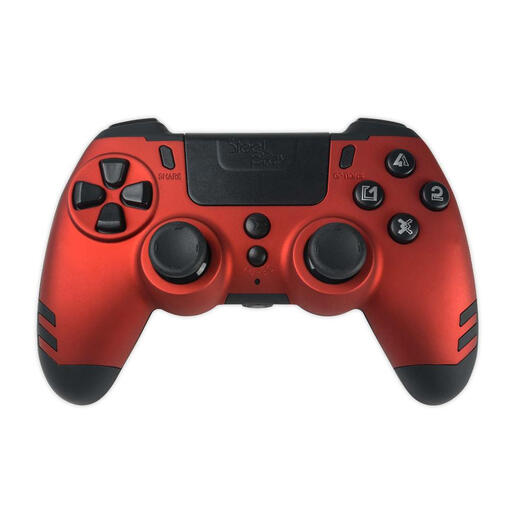
Lexip SteelPlay Slim Pack Wireless Controller – Ruby Red (PS4, PC)
Consider this PS4- and PC-labelled model only after checking support for your intended host and local game. If motion controls matter, confirm that the feature applies to this exact variant.
View on Joybuy
Common questions
How many controllers can we use for local co-op?
The game’s local-player support determines how many people can join, within the host’s controller limits. PlayStation says PS5 can use up to four controllers simultaneously; Nintendo says Switch can pair up to eight wireless controllers, with the number varying by controller type and enabled features. Check the game’s listing before buying extra pads.
Will a DualSense give me every PS5 feature on a PC?
Not necessarily. PlayStation says adaptive triggers need game support, while haptic feedback may require USB on PC. Check the particular game and connection method if those features influence your choice.
What should I check if an Xbox Wireless Controller will not connect?
Start with its batteries: Microsoft advises checking their charge or replacing them when the controller will not connect or turn on. A suitable data-capable USB-C cable can then help you check whether the difficulty is with the wireless connection.
What should I do with an old controller or its batteries?
Use an appropriate recycling collection point rather than putting electrical products or batteries marked with the crossed-out wheelie-bin symbol in household rubbish. That is the guidance given by GOV.UK for those marked items.


