Choose a controller that works with the device hosting the arena game, then check how many local players and controllers that game supports. DualSense is a PS5 route, Xbox Wireless Controller covers Xbox and Windows PC, and 8BitDo’s similarly named Ultimate 2C models have different platform support. For a shared flat, connection and power arrangements matter more than extra controls the game may never use.
Who needs which controller?
Shared-flat console hosts
If your arena games run on PS5 or Xbox, start with controllers documented for that console. PlayStation presents an additional DualSense as a way to add players; Xbox lists its Wireless Controller for Xbox consoles. Neither establishes how many people your particular game lets play locally.
Windows PC local-multiplayer groups
When the PC hosts the match, check both Windows compatibility and the connection each controller uses. Xbox lists Windows PC support, while 8BitDo specifies 2.4 GHz or wired connection on Windows for its Ultimate 2C Wireless.
Switch game-night players
For a Nintendo Switch or Switch 2 setup, choose a controller documented for that device rather than relying on a familiar-looking model name. 8BitDo lists its Ultimate 2C Bluetooth for Switch and Switch 2, separately from the Windows/Android Ultimate 2C Wireless.
What to check before buying
Identify the host device and game before choosing a controller type or quantity. Once those match, work out how the group will connect and power every controller during a session.
| Concern |
What to check |
Who this matters to |
| Device and game compatibility |
Match the exact controller model and connection mode to the host device; check the game’s local controller support. |
If the controller cannot join the game on my device, its other features will not help. Around 36% of consumers put compatibility first. |
| Enough controllers for the group |
Check the game’s local-player limit and how many controllers the host can use at once. |
I want everyone playing in the same match to have a working controller, without buying extras the game cannot use. Having enough usable controllers comes first for around 29% of consumers. |
| Connection and power |
Check the host-specific wireless or wired method and plan for cables, ports, batteries or charging. |
Cables across the room or an unpowered pad could interrupt our session. For around 21% of consumers, an easy-to-manage connection and power routine is the main concern. |
| Controls and configuration |
Consider D-pad layout, button mapping and whether a desired feature works in the planned connection mode. |
Once our controllers work together, I care most about the controls we will actually use in repeated matches. Around 14% of consumers give control feel and configuration their first priority. |
Mistakes that can disrupt game night
-
Assuming similar model names mean the same compatibility
8BitDo documents the Ultimate 2C Wireless for Windows and Android, but the separate Ultimate 2C Bluetooth for Switch and Switch 2. The shared model family name is not enough to identify the right controller.
Check the complete model name against the device that will host the game.
-
Buying one controller for every flatmate
The number of people available to play may differ from the number a game accepts in its local mode.
Check the game’s local-player limit and supported controllers, then count the people who will play simultaneously.
-
Treating stated battery life as a guaranteed session length
8BitDo describes the Ultimate 2C Wireless runtime figures as results from ideal laboratory conditions. Actual use need not match those conditions.
Prepare the controller’s power source before play and check whether your host supports a suitable wired fallback.
-
Choosing a feature without checking when it works
DualSense haptics and adaptive triggers depend on game support. 8BitDo’s stated 1,000 Hz polling rate for the Ultimate 2C Wireless applies to its 2.4 GHz and wired modes, not its Bluetooth mode.
Check the game and intended connection before making either feature a deciding factor.
Controller brands to consider
Sony PlayStation
A first-party route when the shared-flat game runs on PS5. PlayStation presents an additional DualSense as an option for adding players.
- DualSense offers haptic feedback and adaptive triggers in games that support them, according to PlayStation.
- Check the particular game’s local-player and feature support; the controller’s features do not establish either.
Xbox
A first-party controller route for Xbox-console or Windows-PC hosts; Xbox also lists Android and iOS among its supported devices.
- Microsoft lists Xbox Wireless, Bluetooth, a hybrid D-pad and button mapping for the Xbox Wireless Controller.
- Xbox Support’s setup guide starts with installing batteries. Check the exact retail bundle’s power contents before a group session.
8BitDo
A third-party route with distinct Ultimate 2C variants: Wireless for Windows/Android and Bluetooth for Switch/Switch 2.
- 8BitDo documents 2.4 GHz and wired Windows connections for the Ultimate 2C Wireless, and Bluetooth or wired connection for the Switch-focused Ultimate 2C Bluetooth.
- Connection modes and platform support differ by variant. Match the full name and host device before relying on a feature listed for either model.
Joybuy controllers for different setups
These controllers cover Xbox or Windows, PS5 and Switch-oriented setups, alongside a tri-mode model. Choose by your host device and game first; a connection option named for one setup does not establish that it works on every other device.
 No image available
Xbox Wireless Controller – Robot White
Consider this for an Xbox-console or Windows-PC host once you have checked the game’s local controller support.
Microsoft lists Xbox Wireless, Bluetooth, a hybrid D-pad and button mapping for this controller model. Its setup guide calls for batteries; check whether the retail box includes them.
View on Joybuy
 No image available
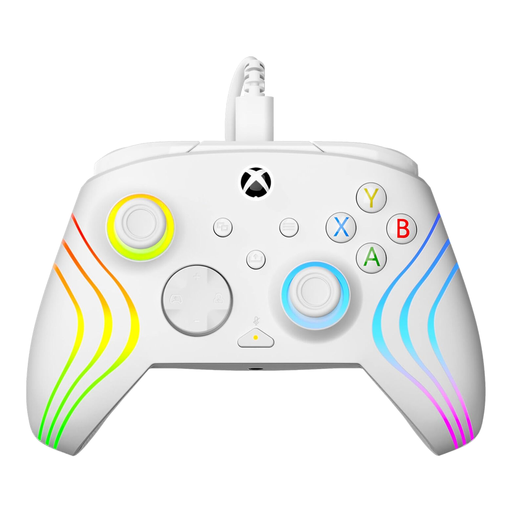
Turtle Beach PDP Afterglow Wave Wired Controller for Xbox/Xbox Series – White
This wired Xbox/Xbox Series variant is worth considering when your host supports it and players can sit within cable reach.
Check the available connection and seating arrangement for every player before choosing wired controllers for the group.
View on Joybuy
 No image available
Machenike G3 V2 Tri-mode Controller – White
This tri-mode controller may suit a group comparing connection options, provided the exact host-and-mode combination works for its game setup.
Check which of its connection modes applies to your device rather than assuming every mode works on every named platform.
View on Joybuy
 No image available
Turtle Beach Rematch Wireless Controller for Nintendo Switch – Invincible Mario
This wireless Nintendo Switch controller is a route for a Switch-hosted game night, subject to the game’s controller and local-player support.
If you plan to use it with Switch 2, check whether your intended use requires a C Button; this controller is listed without one.
View on Joybuy
 No image available
Sony DualSense Wireless Controller (PS5) V3 – Starlight Blue
For a PS5-hosted match, an additional DualSense is an option once you know how many local players the game supports.
PlayStation describes haptic feedback and adaptive triggers, but their effects depend on support in the particular game.
View on Joybuy
Common questions
How many controllers should I get for local arena battles?
Get enough compatible controllers for the people who will play at once, up to the game’s local-player limit and the host’s supported controller count. Check both limits before buying extras.
Is Bluetooth always the right connection for a shared flat?
No: the controller must support Bluetooth with the device hosting the game. For example, 8BitDo specifies Bluetooth on Android for the Ultimate 2C Wireless, but 2.4 GHz or wired connection on Windows; its separate Switch-focused Ultimate 2C Bluetooth supports Bluetooth and wired connection.
Do I need rechargeable batteries or a charging dock?
Check the exact controller’s power arrangement and box contents before buying an accessory. Xbox Support’s Wireless Controller setup guide calls for installing batteries, while 8BitDo describes built-in rechargeable batteries for the cited Ultimate 2C models; neither point tells you what an individual retail bundle includes.
Will extra controller features improve every arena game?
No: whether a feature matters depends on the game and connection mode. DualSense haptics and adaptive triggers require game support, and 8BitDo’s stated 1,000 Hz polling rate for the Ultimate 2C Wireless applies to 2.4 GHz and wired use rather than Bluetooth.


