For simulated lorry driving, choose a three-pedal setup if you want a dedicated clutch, but decide first whether you need a complete control system, a wheel-and-pedal bundle or pedals for an existing PC rig. A truck-focused system offers dedicated controls, while standalone pedals leave more of your current setup in place; in either case, check the exact pedal configuration, platform and mounting requirements. Headphones do not determine pedal compatibility, so check their audio connection separately.
Who each setup suits
PC truck-simulator players
If Euro Truck Simulator 2 or American Truck Simulator is your main game, a truck-focused system is worth considering when you want a clutch and dedicated controls. Check Windows support and the space needed to secure the system before choosing one.
First-time wheel-and-pedal buyers
If you currently drive with a keyboard, mouse or gamepad, a complete bundle lets you select the wheel and pedals together. Match its specific PC or console version to your setup rather than relying on a product-family name.
Existing PC rig upgraders
If you already have a wheel, standalone pedals may let you change pedal positioning or brake configuration without replacing it. Confirm the connection method, clutch contents and mounting requirements for the exact set.
What matters when choosing
Start with the equipment you already own and the platform you use. Then check whether the pedals provide the controls and stable position you want for lorry driving.
Truck-focused control system
Consider it when: You play truck simulators on a supported Windows PC and want a wheel, shifter and truck-oriented controls together.
Check before choosing: An integrated system needs suitable desk or cockpit space; confirm that the exact pedal unit includes a clutch if you need one.
Wheel-and-pedal bundle
Consider it when: You need a first complete setup that you may also use for other driving games.
Check before choosing: General racing controls are not the same as a truck-specific layout, and PC, PlayStation and Xbox versions must be matched to the intended platform.
Standalone PC pedals
Consider it when: You already own a wheel and want to change the pedals without replacing the whole rig.
Check before choosing: Direct USB use, a clutch and the parts needed for mounting depend on the exact pedal configuration.
| Concern |
What to check |
Who this matters to |
| Clutch and truck controls |
Confirm that throttle, brake and clutch are included if you want manual-style inputs; check that the required controls can be mapped in your game. |
If I want to operate a clutch and reach truck controls without relying on keyboard shortcuts, those inputs shape my choice. Around 40% of consumers would put truck-style controls first. |
| Hardware compatibility |
Match the exact PC or console version and check whether the pedals connect directly by USB, through a wheel base or with an adapter. |
When I am keeping my existing wheel, I need new pedals that can connect to my setup. Roughly 30% of consumers would make compatibility their primary concern. |
| Pedal position and stability |
Check available adjustment and whether the pedals can be braced or mounted securely where you sit. |
For long sessions at a desk, I need pedals positioned comfortably that will stay put when I brake. About 30% of consumers would prioritise pedal placement and stability. |
Buying pitfalls
-
Assuming every pedal set has a clutch
A two-pedal set provides throttle and brake but no dedicated clutch input. Fanatec CSL Pedals, for example, have separate upgrade routes rather than an automatically included third pedal.
Check the exact box contents for throttle, brake and clutch before choosing a configuration.
A separate clutch kit or a different pedal configuration may be needed.
-
Confusing PC USB support with console support
Direct USB operation can be useful with an existing PC rig, but it does not establish compatibility with a console or every wheel base.
Identify your platform and wheel-base model, then check the exact pedals' connection requirements.
Some connection routes require an adapter or another compatible component.
-
Overlooking how the pedals will stay in place
A high-resistance brake needs a stable pedal position. MOZA and Fanatec describe bracing or mounting options for relevant pedal setups.
Check your floor, chair movement and available wall or cockpit support before choosing the brake arrangement.
Your setup may need a brace or mounting hardware to keep the pedals stable.
-
Choosing a bundle by its family name alone
Thrustmaster's T248 PlayStation/PC and Xbox/PC versions are distinct products. The shared family name does not make them interchangeable across consoles.
Match the full variant name and stated platform support to the device you will use.
Relevant brands to consider
HORI
A truck-focused integrated-system route for supported Windows PC setups.
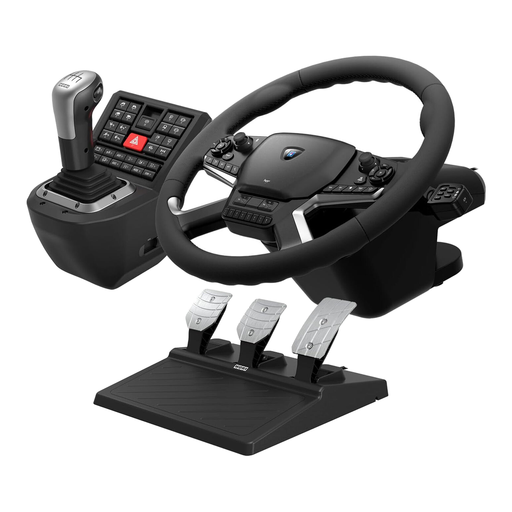
- The Force Feedback Truck Control System brings a wheel, shifter and adjustable pedal unit together.
- If you only want replacement pedals, check whether buying an integrated system meets that need. Confirm the pedal count and clutch on the exact listing.
Thrustmaster
Wheel-and-pedal bundles with platform-specific versions, alongside accessories for some heavy-vehicle setups.
- The T248R is described by Thrustmaster as an all-in-one wheel with a three-pedal set; its SimTask Steering Kit is a separate steering accessory for compatible wheels.
- Check the precise bundle and platform: the T248 PlayStation/PC and Xbox/PC versions are distinct, and a steering accessory does not add a pedal.
MOZA Racing
A standalone PC-pedal route for an existing rig.
- MOZA describes direct PC USB use and pedal-position adjustment for its SRP2 range.
- Check whether the chosen set includes a clutch and how it will be secured in your setup.
Fanatec
A modular pedal route for PC rig builders.
- Fanatec lists separate clutch and load-cell upgrade options for CSL Pedals.
- Standalone USB operation requires the specified adapter or Load Cell Kit; check which components are included in the configuration you select.
Logitech G
Complete wheel-and-pedal systems with versions for different platforms.
- Logitech G describes adjustable floor pedals with its G29 and G920 systems.
- Select the platform-specific system and check any adapter or game-configuration requirements before combining generations of equipment.
Joybuy product choices
These choices cover a wheel-and-pedal bundle for an Xbox or PC setup and an integrated truck-control system for Windows PC. Check the clutch configuration and your simulator's control requirements for the exact product before ordering.
 No image available
Thrustmaster T-248X Racing Wheel and Pedals (Xbox and PC)
Consider this wheel-and-pedal bundle if you are assembling a first Xbox or PC driving setup rather than replacing pedals alone.
Check the exact pedal count, clutch contents and simulator compatibility for this variant before buying.
View on Joybuy
 No image available
HORI Force Feedback Truck Control System (Windows 11/10)
Consider this integrated system if you want truck-oriented controls for a Windows 11 or 10 PC rather than pedals alone.
The Joybuy listing describes a wheel, detachable shifter and adjustable pedal unit. Confirm whether the exact pedal unit includes a clutch, and check the space available to secure the controls.
View on Joybuy
Common questions
Do I need a clutch pedal to drive a simulated lorry?
Choose a three-pedal set if you want a dedicated clutch input for manual-style controls. A two-pedal set still provides throttle and brake; check whether a clutch is included or requires a separate kit before buying.
Can standalone pedals work with a wheel from another brand?
On PC, they can when the exact pedal set supports a connection independent of the wheel. MOZA describes direct PC USB use for SRP2 pedals, while Fanatec specifies an adapter or Load Cell Kit for standalone USB use with CSL Pedals. Check console compatibility separately.
Should I check pedal controls after a game update?
Yes, particularly if you use customised bindings. SCS Software has noted that controller-configuration changes can affect heavily modified layouts in Euro Truck Simulator 2 and American Truck Simulator; check your pedal assignments and calibration if a control behaves differently after an update.


