Desk-based truck-sim beginners
You want a wheel and pedals for lorry simulation, but need to attach the wheel to a desk and put it away afterwards. Thrustmaster describes a clamp attachment for its T128.


Choose a wheel that matches your PC or console before comparing steering features: similar-looking PlayStation and Xbox versions can have different compatibility. A clamp-mounted wheel with pedals suits a desk setup you need to put away, while a PC direct-drive bundle is worth considering if you want its feedback and have a stable place to mount it. Check headphone and microphone connections against your PC or console separately from the wheel.
You want a wheel and pedals for lorry simulation, but need to attach the wheel to a desk and put it away afterwards. Thrustmaster describes a clamp attachment for its T128.
You need the wheel variant that matches your PC, PlayStation or Xbox. Thrustmaster and Logitech G list different console compatibility for versions that can look similar.
You play regularly on PC and are considering a direct-drive wheelbase and further controls. MOZA Racing lists its R5 bundle as a PC-focused option with a table clamp; check that your mounting space suits it.
Start with platform and game compatibility, then decide how much desk space and mounting stability you can provide. Extra feedback and truck-style controls matter only if you want them enough to accommodate the additional setup.
Choose it when: You need a wheel you can clamp to a desk and store between sessions; Thrustmaster lists desk attachment and 270°–900° rotation for the T128.
Trade-off: The standard T128 set has two pedals, so it does not include a clutch pedal.
Choose it when: You want a wheel-and-pedals setup with a route to physical gear selection; Logitech G makes a Driving Force Shifter for its G29 and G920.
Trade-off: The shifter is separate, and the G29 and G920 have different console compatibility.
Choose it when: You play on PC, want a direct-drive wheelbase and can give the setup a stable mounting position; MOZA Racing lists these features for its R5 bundle.
Trade-off: Confirm game support, mounting fit and any accessories you want rather than assuming a PC-focused bundle suits a console or every desk.
| Concern | What to check | Who this matters to |
|---|---|---|
| Platform and game fit | Match the exact PC or console variant to your device, then check support or controller settings for the game you intend to play. | If my wheel does not work with my console or truck simulator, its other features will not help me. Around 40% of consumers put platform and game fit first. |
| Desk setup | Check the clamp against your desk and look at the included pedals and available steering rotation. | I need to clear the desk after playing, so a manageable wheel-and-pedals setup matters more to me than extra controls. Desk setup comes first for around 30% of consumers. |
| Feedback and controls | Check the wheelbase type, mounting needs and whether your preferred shifter or truck-oriented controls are included or compatible add-ons. | If I play often, I may prefer more steering feedback or physical gear controls despite the extra space and setup involved. Around 30% of consumers prioritise feedback and expansion. |
Logitech G identifies the G29 as a PlayStation/PC model and the G920 as an Xbox/PC model. Thrustmaster also offers separate T128 console versions.
Check the exact platform stated for the variant you are buying, not just its model family or appearance.
The standard Thrustmaster T128 set has two pedals, while Logitech G sells its Driving Force Shifter separately. A wheel-and-pedals bundle does not necessarily cover your preferred way of changing gear.
Decide whether you need a clutch, physical shifter or additional buttons, then check the bundle contents and compatible accessories.
Adding controls later can also take up more desk or mounting space.
MOZA Racing lists the R5 as a PC direct-drive bundle with a table clamp. A clamp being supplied does not establish that every desk will be stable enough for your intended setup.
Check the available space, mounting surface and current game support before choosing this route.
Wheel compatibility and headset audio are separate decisions. A wheel's platform listing does not establish a headphone or microphone connection through that wheel.
Check your headphones' connection type and microphone support against the PC or console you will use.
Its range includes platform-specific T128 wheels and a separate Farming/Trucking accessory range.
The G29 and G920 are wheel-and-pedals routes for different console families and PC.
Its R5 bundle offers a PC-focused direct-drive route with a wheel, pedals and table clamp.
These choices include a Windows-labelled truck-control system and two platform-specific T128 desk-wheel variants. Select by your gaming platform, then check the intended game and the controls you need; arrange headphone audio through your PC or console.
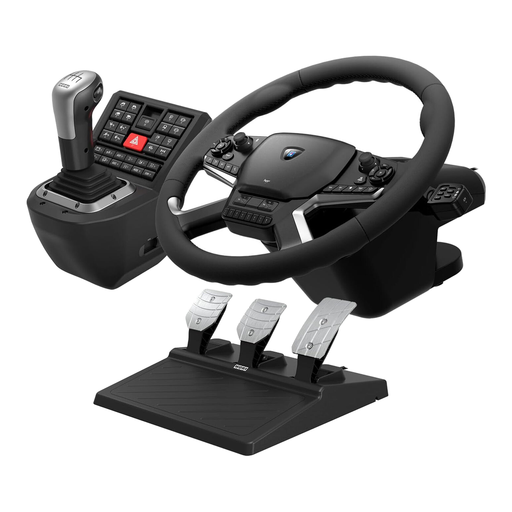 No image available
For a Windows 11/10 lorry-simulation setup, check support for your exact PC and game before choosing this system.
If a shifter or particular mounting arrangement matters to you, confirm the bundle contents and desk fit. Check headphone and microphone connections on your PC separately.
 No image available
For a desk-based PlayStation or PC setup, this T128 variant has a clamp attachment and a standard two-pedal set, without a clutch pedal.
Thrustmaster lists 270°–900° rotation for the T128. Check your truck game, desk fit and separate headphone connection before buying.
 No image available
For an Xbox or PC desk setup, this T128 variant has a clamp attachment and a standard two-pedal set, without a clutch pedal.
Thrustmaster lists 270°–900° rotation for the T128. Check support for your truck game, along with desk fit and separate headphone connection.
Choose a PC-compatible wheel, then check its current game-support information and configure the controls in Euro Truck Simulator 2. Steam carries the game and has published information about changes to its controller configuration; a console label alone is not a substitute for stated PC compatibility.
Buy the version that explicitly lists the console you use. Thrustmaster sells separate T128 console variants, while Logitech G identifies the G29 with PlayStation and PC and the G920 with Xbox and PC.
Yes, if the wheel's attachment suits your desk and the mounted setup is stable. Thrustmaster lists a desk attachment for the T128, and MOZA Racing says its R5 bundle includes a table clamp; check clearance and stability for the particular setup you choose.
No; you can begin with a suitable wheel and pedals and consider a physical shifter if gear selection matters to you. Logitech G describes its Driving Force Shifter as a separate accessory designed for the G923, G29 and G920.
Choose the wheel for platform, game, mounting and controls, then check headphone audio separately. Confirm that your wired, USB or wireless headphones and any microphone work with the PC or console you intend to use rather than assuming the wheel provides the connection.